SuperPlug AI Review
A Real Creative Studio Behind Your Chatbot, With More Hype Than It Needs

Everyone’s got a favorite AI already. Some people live inside Grok, some swear by ChatGPT, and a growing crowd uses Claude. What none of them do on their own is hand you a finished promo film with a voiceover, an original jingle and a matching landing page That's the space SuperPlug AI is trying to own.
SuperPlug AI was created by Pankaj Malav and Deepanker Rajora, the team behind a recent string of JVZoo launches including ClipsField AI, VideoClawBot, Appsfield AI, HookedAI, MagicDesigners and Cinema Studio AI. Their idea is simple: plug SuperPlug into the AI you already use and watch it create videos, images, voiceovers, music and websites within the same chat. Launch Launch opens Wednesday October 7, 2026 @ 11:00 AM EST Launch pricing ends Monday October 12, 2026 @ 11:59 PM EST
The sales copy promises to put your AI “on steroids.” In this SuperPlug AI review I want to separate what the software actually does from what the marketing wants you to believe and walk through exactly what you pay for at every step.
SuperPlug AI Pricing & Complete Upsell Funnel
SuperPlug AI has 2 different ways in for buyers so it is worth understanding both before looking at features.
Option 1: The Front End, Then Each Upsell One by One
The route implies that you purchase the main product, and then you decide on each upgrade. You can take any upsell, skip any upsell, skip all of them.
Front End: SuperPlug AI Commercial – $37
This is the main product. You also get a SuperPlug account, dashboard, the connection link for Claude, ChatGPT and Grok, SuperPlug Chat built-in, Brand Kits, project and asset library and starter workflow library. $37.00 with coupon EARLY10 for 10% off, or about $33.30. The name says "Commercial", but there is not yet a published license page explaining what commercial use of the generated media covers, so check before delivering work to paying clients.
OTO 1: SuperPlug AI Unlimited Pro – $67
The vendor has not yet revealed what this upgrade entails. Inside the dashboard, eight workflows are labeled with a locked “Pro” badge, so unlocking those is the most likely role. Be wary of the term "Unlimited". SuperPlug works on credits, and has a permanent "Buy credits" button, so this cannot mean unlimited generation.
OTO 2: SuperPlug AI Series – $47
On the launch material, this upgrade appears under the heading "Series Includes:" with nothing under it. The same vendors were selling a Cinema Studio Series upgrade for the same price a month ago, so it’s probably related to multi-part story or episode content. Let it be unsaid until the contents are spelled out.
OTO 3: CinemaStudio CinemaBox – $67
They didn't even call this upgrade SuperPlug. CinemaBox is a new offering from the vendors’ CinemaStudio AI launch and is presented here at the same $67 price point with no description. If you bought CinemaStudio AI and its upgrades, check if you’re being charged twice.
OTO 4 : Loop StudioAI - $67
Another carry-over product, also $67, also without a description. Same applies to the CinemaStudio AI funnel, so previous buyers should compare before buying.
The front end plus all four upgrades at full price comes to $285.
Option 2: The Special Offer
The second path bypasses the front end and the separate upgrades. You buy 1 package the vendor says has everything.
SuperPlug AI Bundle - $317 One Time Payment
The Bundle is "One Price, Everything Included": all upgrades, all features & exclusive bonuses for one payment. The CINEMA50 coupon reduces it to $267, saving you $50.
The Bundle page also says “85% off.” That doesn’t add up to basic math. The Bundle is \(32 more than the front end + all four upgrades at full price. It’s about \)18 off with the coupon. The Bundle might be worth it if its exclusive bonuses are good, but "85% off" doesn't describe the deal.
Mega Bundle (Bundle Buyers Only) – Lite $147 or Pro $247
This extra offer is only available at checkout to Bundle purchasers. There are two levels, Lite for $147 and Pro for $247. The vendor has not revealed what either tier adds. The Bundle says it has everything. Get a clear list of what you get before spending another $147 to $247.
What is the right way to go?
So if you just want to try SuperPlug, the $37 front end is the way to go. You get the dashboard, Brand Kits, starter workflows and the chatbot connection. Upgrade only if the vendor explains what it unlocks.
The Lowdown on SuperPlug AI
SuperPlug AI is a credit-based AI media studio with two paths in, remove the “steroids” language.
The first way is to use your current chatbot. SuperPlug gives you a connection link that you add as a custom connector to Claude, 🦙 or Grok. Then you can use SuperPlug’s tools from your chatbot in a normal chat. Say what you want, your AI plans it, and SuperPlug’s own engines make the video, images, voiceover and music.
The second is SuperPlug Chat, an in-app assistant the app calls "No setup" and suggests for those who don't pay for an AI plan.
That second option says something. Something important. Your chatbot does not do the creative work, the creative work is done by SuperPlug’s engines and paid for with SuperPlug credits. Your chatbot is a handy steering wheel, not the engine. That's not a bad thing but it is a different product than the one the headline sells.
What is SuperPlug.AI?
The process consists of four steps:
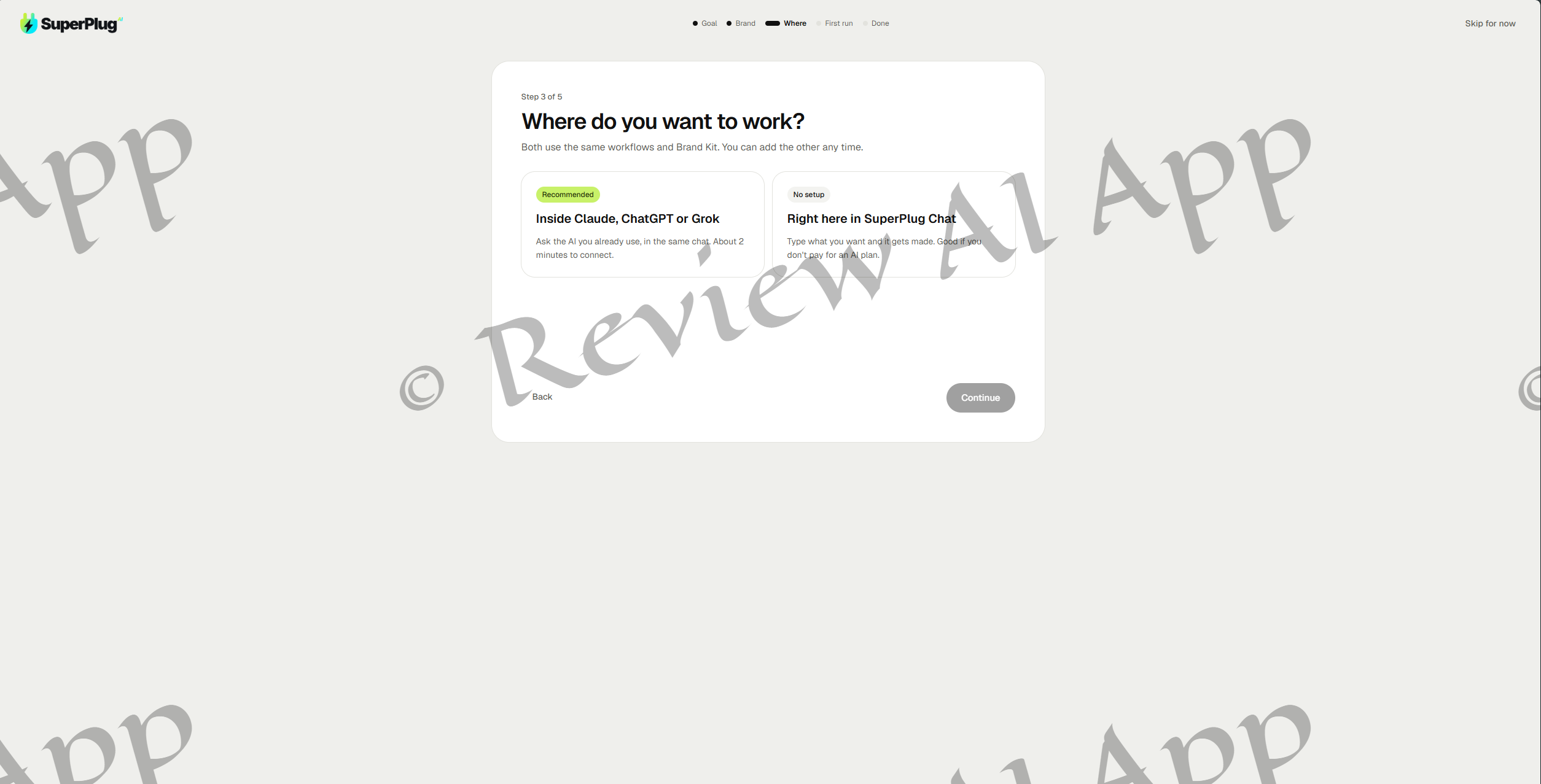
Connect: Login, copy your SuperPlug link, add to your AI and test it by asking it to say hello.
Pick: Select your goal or pick from a pre-made workflow, then add brand info & references.
Direct and refine. Talk to influence the work, review the output and ask for changes.
Work: Download assets approved for use in content, campaigns, websites or clients.
New accounts go through a short onboarding: pick a first goal, paste your website so SuperPlug can import your logo, colors and tone, and choose whether to work inside your chatbot or in SuperPlug Chat. SuperPlug suggests a first project, e.g. a six-slide carousel, with the estimated cost in credit and time.
Link to Amazon AI tools such as Claude and others like Grok
The Connect your AI page says setup takes about two minutes. For Claude that sticks: Settings -> Connectors -> Add custom connector called SuperPlug -> paste your link -> sign into SuperPlug and approve. It uses a proper sign in so there's no API keys to copy.
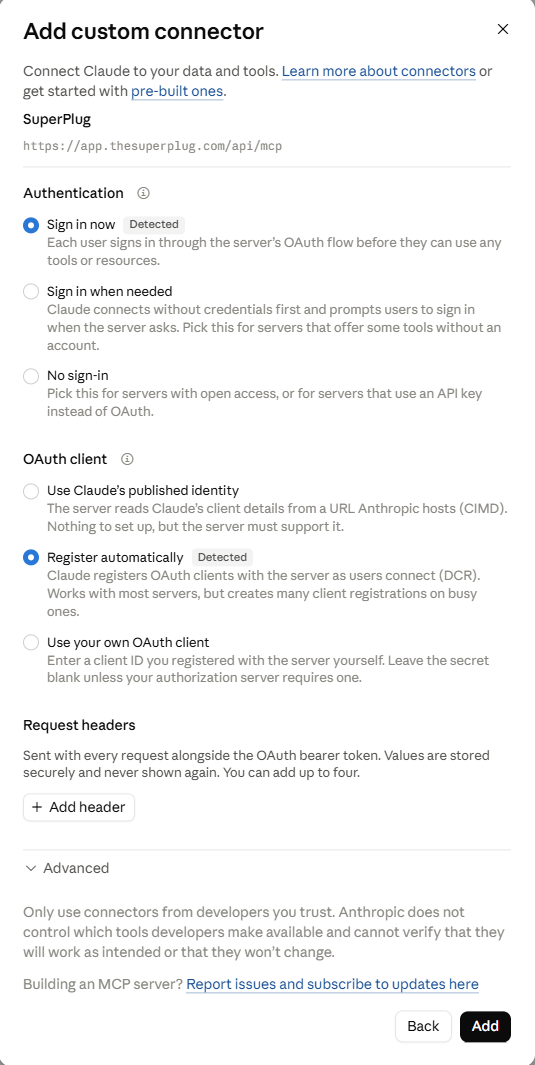
SuperPlug says it works on both the paid and free plans for Claude, but the free plan only allows one custom connector, so SuperPlug would use up that one slot.
SuperPlug's own help list for ChatGPT says "I can't see Developer mode in ChatGPT" which tells you connecting there is switching on a developer setting. That's a bigger ask for non-technical buyers than the two minute promise suggests. Grok has its own setup tab, but the workflow library shows it’s clearly a secondary option.
SuperPlug AI Dashboard
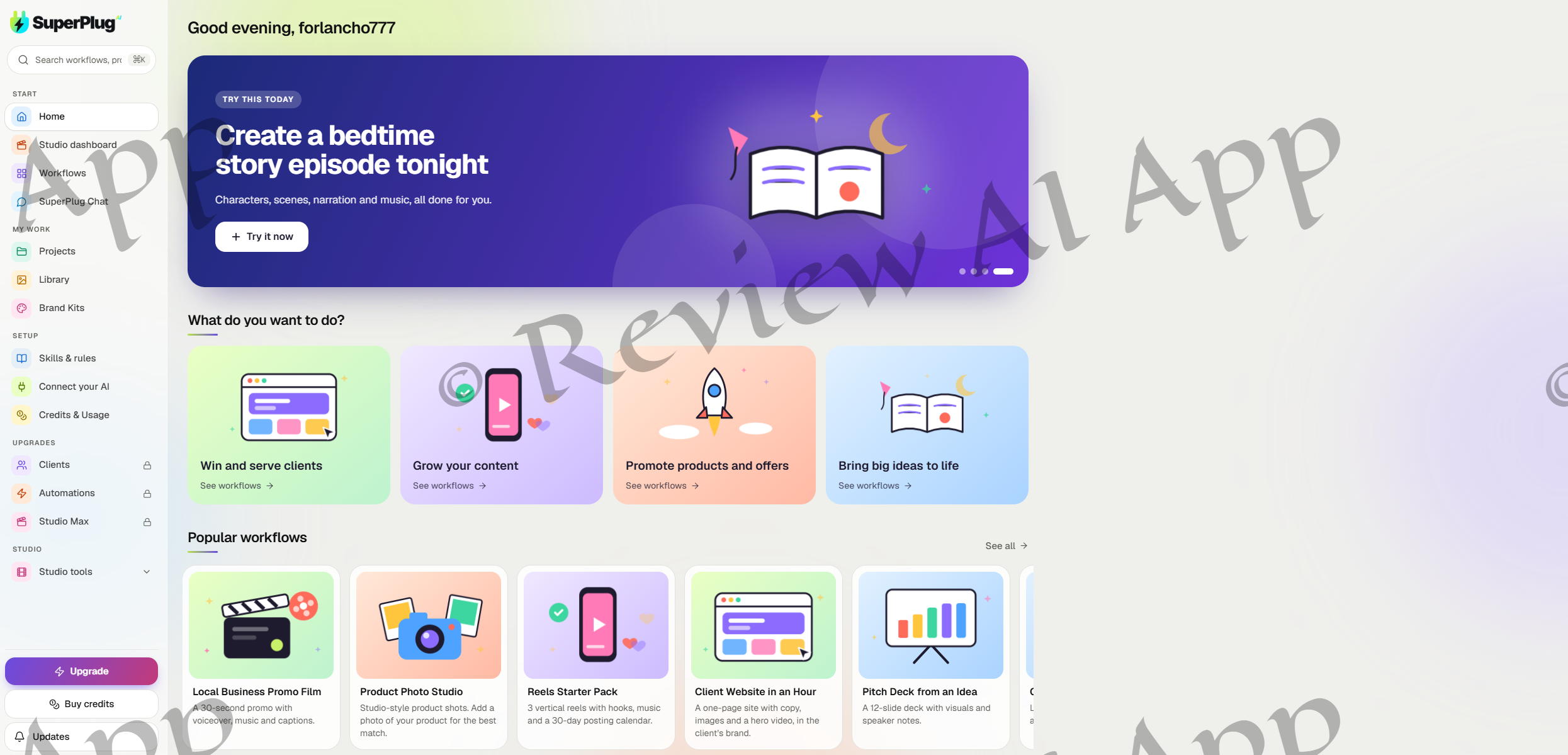
The member area is slick and well organized:
Home, Studio dashboard, Workflows and SuperPlug Chat
My Work Projects, Library and Brand Kits
Setup Skills and rules Connect your AI Credits and Usage
Upgrades: Clients, Automations and Studio Max, all locked.
Studio: Menu of studio tools
At the bottom: Buy Credits and Updates Upgrade
Many of these areas were called “planned” in the launch material and they are now live, a good sign. The three locked upgrades, however, do not match any of the four upsell names and nothing explains which purchase unlocks which area.
Library of Workflows
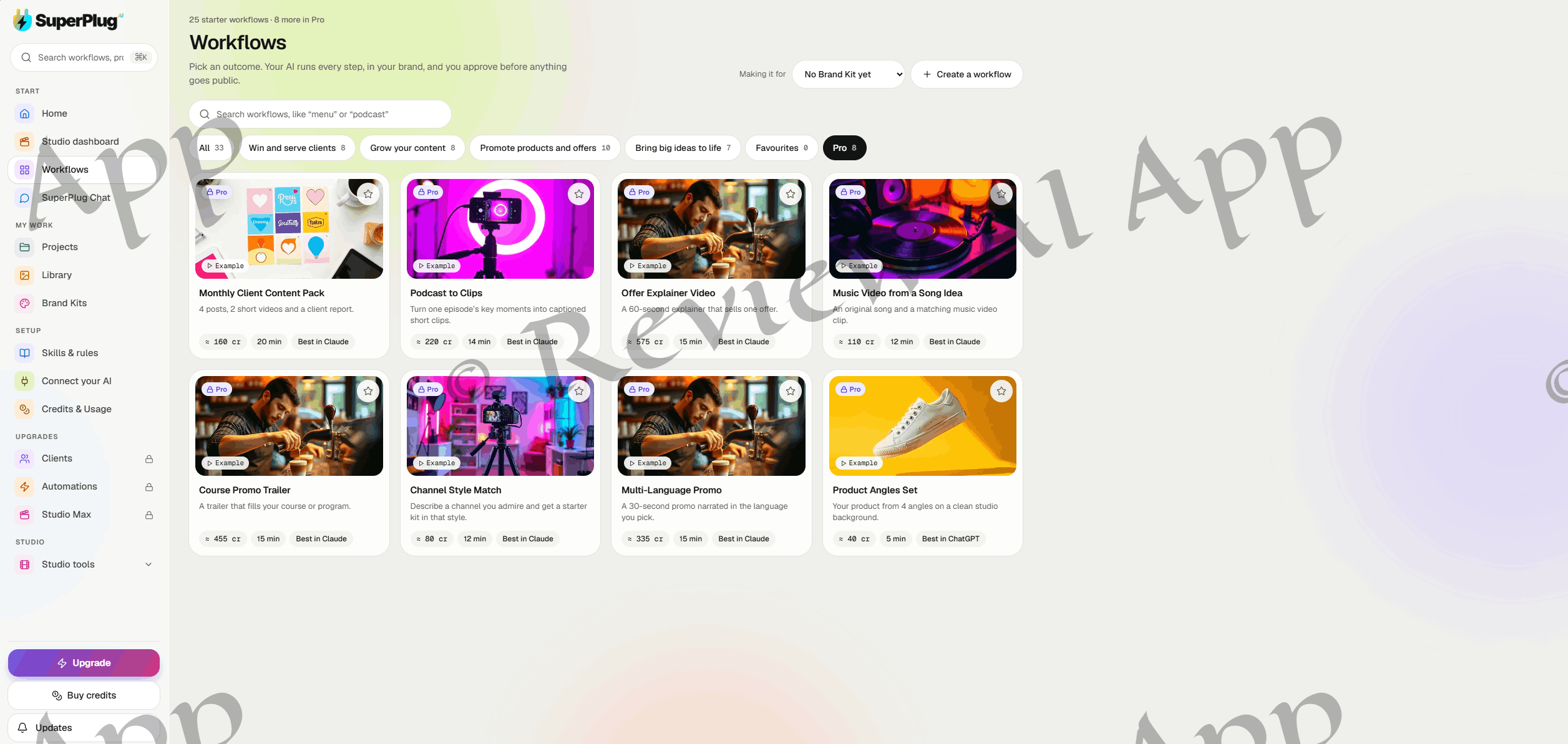
SuperPlug’s beating heart is workflows. The library has “25 starter workflows” and “8 more in Pro,” for a total of 33, in four categories. Each card shows estimated credit cost, estimated time, and whether it runs best in Claude or ChatGPT.
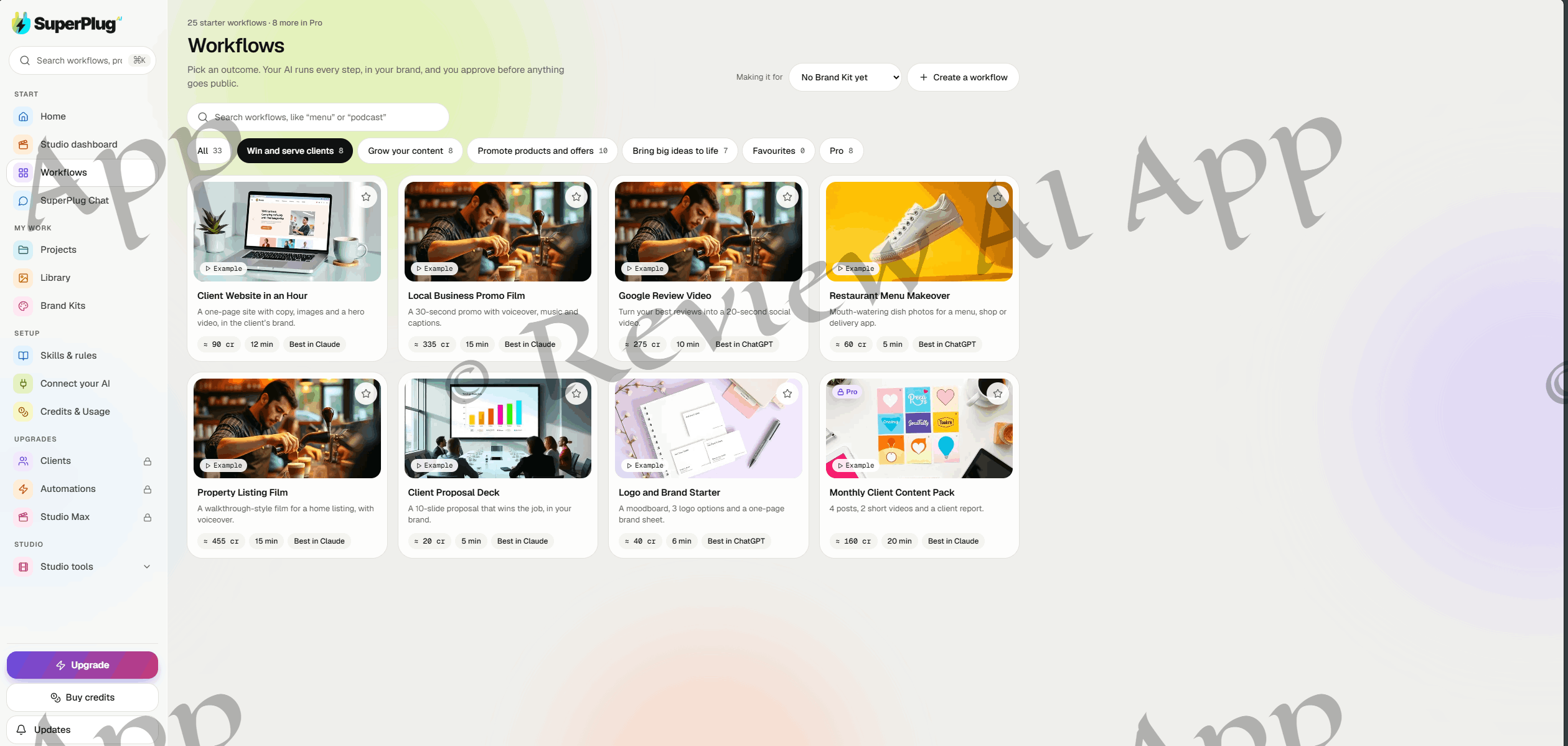
(8) Win and serve clients: websites, local promo films, Google review videos, menu photos, property listing films, proposal decks and logo starters
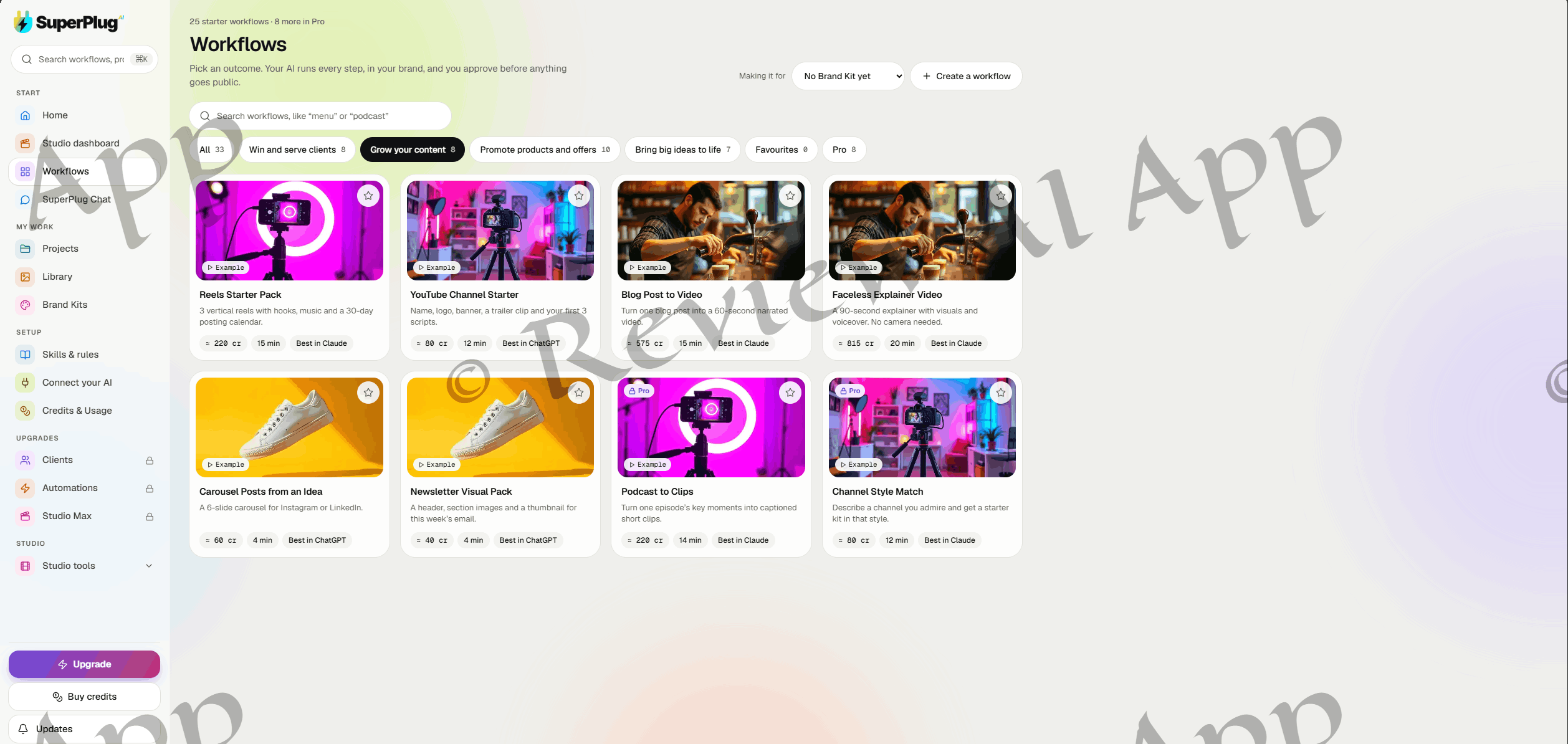
Grow your content (8): reels packs, youtube channel starters, blog to video, faceless explainers, carousels and newsletter visuals
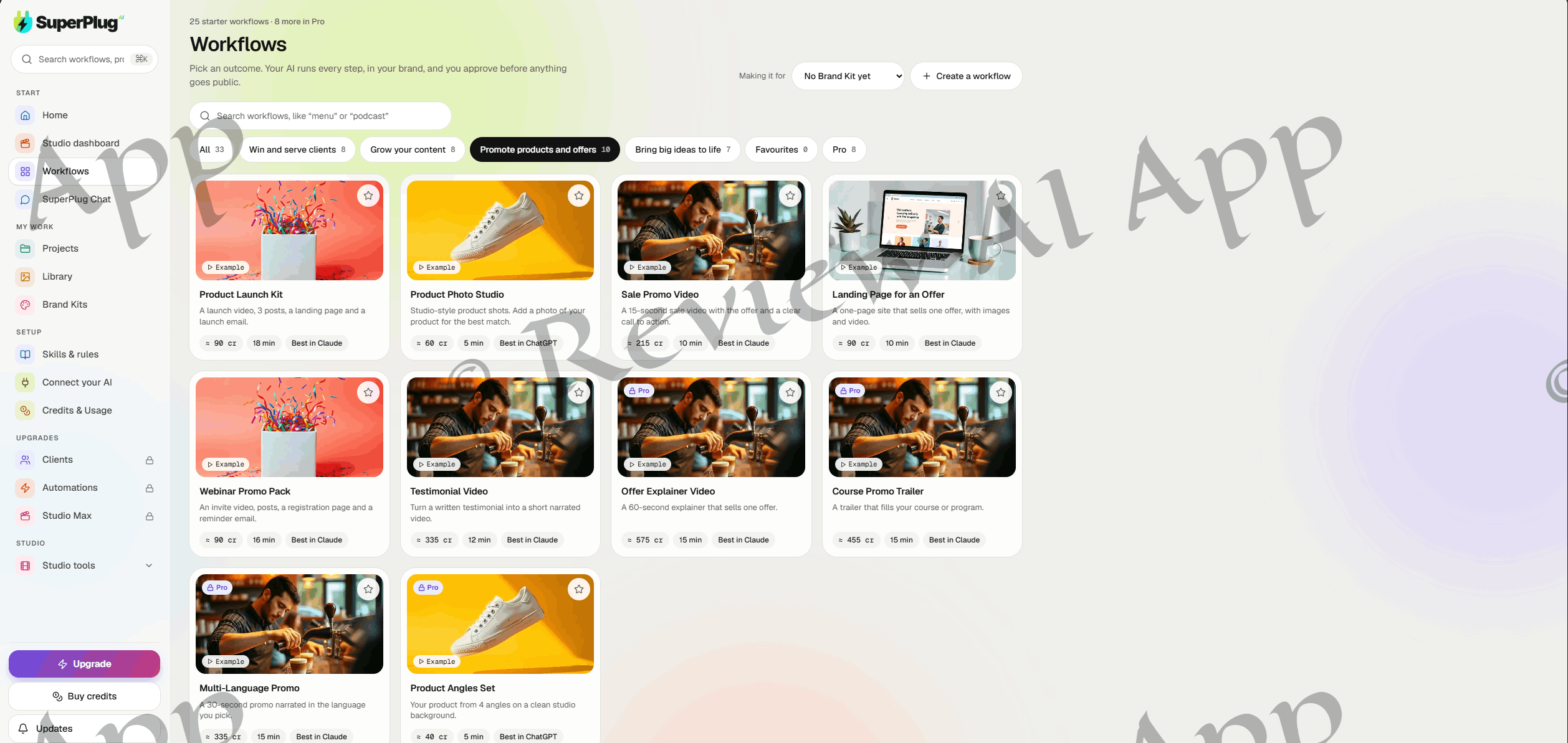
Promotion of offers and products (10): sales promos, landing pages, webinar packages and testimonial videos, launch kits, product photos
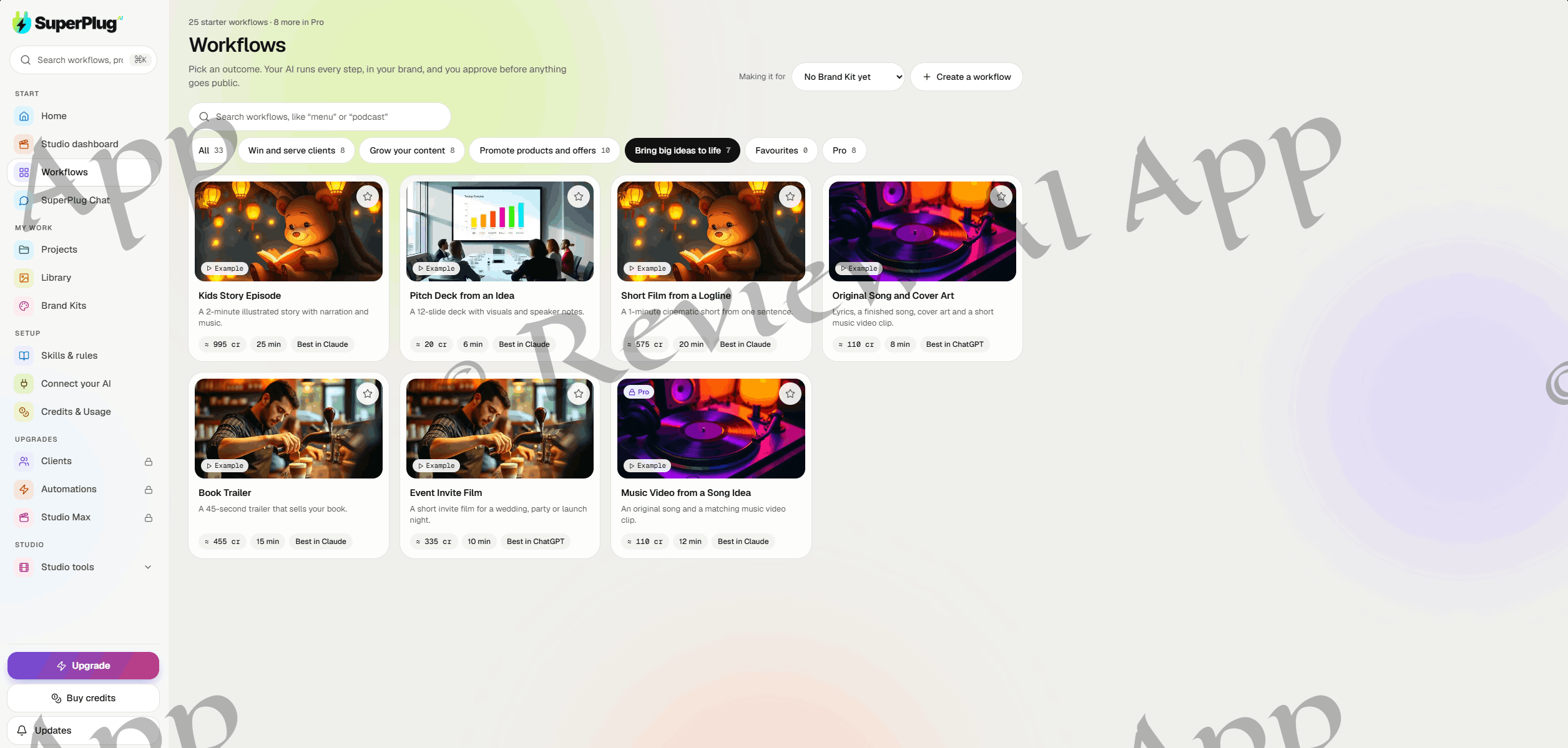
Bring big ideas to life (7) kids story episodes pitch decks short films original songs book trailers event invites
The estimates show the bias of the credit system. Image and document jobs are cheap, at around 20 credits for a proposal deck and around 60 for six product shots. Credits are for video: around 215 for a 15 second sale video, 335 for a 30 second promo, 575 for a 60 second film, 815 for a 90 second explainer and 995 for a two minute kids story. You can also build your own by clicking the “Create a workflow” button.
This is what marketing doesn’t tell you. Take a look at the output of each workflow and the steps it runs, and the 33 cards are from about 10 underlying recipes. A Local Business Promo Film, a Book Trailer, a Testimonial Video; all follow the same five steps: script, characters and scenes, voiceover, video clips, then music and final edit. Only the length is changed. Carousel Posts, Restaurant Menu Makeover and Product Photo Studio all produce the same six photos. Product Launch Kit and Webinar Promo Pack are essentially the same thing.
Pro workflows follow the same pattern: The Podcast to Clips service includes the same three reels, music, and posting calendar as the free Reels Starter Pack. Channel Style Match is a mirror of YouTube Channel Starter. Course Promo Trailer is a mirror of Book Trailer . The different wording still helps beginners to pick a starting point, but “33 workflows” is overstating the variety, and the paywalled Pro set is mostly re-labeled starter recipes.
Two other things jump out. Both deck workflows promise 10 or 12 slides “with visuals” but both produce only two slide visuals. For the website and launch kit workflows the hero or launch video is only around 90 credits total, which is significantly less than the 215 credits of a standalone 15 second video. This means those bundled videos are much simpler than the film workflows.
SuperPlug Chat & Brand Kits
SuperPlug Chat asks what it needs, shows a plan and only starts when you say yes. Starter prompts include six studio photos of a best-selling product, a 30-second promo for a weekend sale, a one-page website for a new offer, and ten reel ideas for a bakery. You can upload files and a note under the input box says “Nothing is made until you approve the plan.
That step of approval is a smart safeguard for a product that is credit-based, but it’s not universal. Some workflows, such as the expensive Kids Story Episode and Short Film from Logline, run through without a checkpoint for approval.
Brand Kits keep your logo, colors, business details and references. The fastest way to set up SuperPlug is to paste a website address and let it import everything. If you’re working with multiple clients, the “Making it for” dropdown on the Workflows page allows you to choose which brand a job is for — very helpful.
My practical test
[PLACEHOLDER: Add your own hands-on test, in your own wording. Things I consider: What credits your plan has, do they refill? What workflow did you run, how long? What was the actual credit cost vs estimate? What was the quality of the output, was the result usable as-is?
Who Is SuperPlug AI For
SuperPlug is a great fit for freelancers and small agencies that service local clients, small business owners that want on-brand social content, content creators that need reels and explainers, and authors or course creators that want trailers. It’s also aimed at heavy Claude or ChatBot users who prefer to work through conversation.
It’s less good for anyone expecting Hollywood-grade film, anyone needing large volumes of video on a tight budget, and anyone mostly using Grok.
Where the hype outweighs the product
SuperPlug AI is a real, working product which puts it ahead of many launches already. But in any honest SuperPlug AI review, you have to point out where the marketing goes beyond the product.
“Put your AI on steroids.” Your chatbot doesn’t improve. It makes requests to SuperPlug and SuperPlug’s engines do the making. SuperPlug Chat, pitched to those without an AI plan, demonstrates the chatbot connection is a portal, not the source of the power.
“One brief, four finished assets.” The headline demo turns a brief for a coffee shop into a promo film, jingle, poster and website. Those are different workflows with different credit costs inside the app, and the launch material admits a website build "can require host AI capabilities or separate hosting tools.
Cinematic films. The film workflows are one fixed five-step recipe that only varies in length, and the vendor doesn't name the video model behind them. “Cinematic” is a marketing adjective until you see the actual output.
"ChatGPT, Claude or Grok". 23 workflows are best in Claude and 10 best in ChatGPT of 33 workflows. Grok did not score best and ChatGPT needs Developer mode.
A funnel, recycled Two of the four upgrades are CinemaStudio products, and the bundle coupon is literally CINEMA50. SuperPlug exposes film-building tools to your chatbot such as story beats, shots, characters and production jobs, mirroring CinemaStudio’s structure, suggesting that SuperPlug’s film engine is built on the same foundation as the vendors’ September launch.
Risks and Watch-out Items
Credits are what really count. Each video job costs hundreds of credits, and there’s always a Buy credits button visible, so the one-off price is only half the story.
External dependencies. SuperPlug is based on the Base44 app platform and runs third-party AI models. It relies on the connector rules of Anthropic, Open Assistant and xAI. Any change to any of them can affect features or costs.
Initial speed. It’s the same team behind Appsfield AI, which launched in late July, CinemaStudio AI in early September and SuperPlug in early October. That’s a lot of products to support all at once.
Policies are missing. As I write this, the link to the refund policy leads to an error page, and there are no published commercial license terms.
SuperPlug AI: Pros and Cons
Advantages:
A real, working, polished dashboard
Links to Claude via a proper sign-in connector in minutes
SuperPlug Chat does not require any paid AI plans.
Credit and time estimates are shown prior to each workflow
Import Brand Kit from website address
Custom workflow builder for recurring jobs
Cons:
"33 workflows" is more like ten recipes with different names
Pro workflows are mostly free ones renamed
Video workflows heavy
Grok support is a secondary feature, ChatGPT needs Developer mode
No published contents for upsells, 2 are inherited from CinemaStudio AI
The Bundle's claim of "85% off" is not true
LAST JUDGMENT
SuperPlug AI is a neat idea wrapped in a slick app. It’s a real convenience to ask Claude or 🧙♂️ to produce a local business promo, a product photo set or a one page landing page, and get it produced in your brand without leaving the chat. SuperPlug Chat also means you’re not locked out without paying an AI plan.
The packaging is the problem. It’s not that your chatbot is bad, it’s just that it is oversold with the “supercharged AI” angle, the workflow count is padded, the Pro workflows are mainly copies, and the funnel is based on CinemaStudio products and a “85% off” claim that simple math disproves.
The advice I take away from this SuperPlug AI review is simple. If it sounds like a good fit for your work, start with the $37 front end, find out the amount of credits it includes, run a real project or two and judge the output yourself. Wait for the upgrades, the Bundle and the Mega Bundle until the vendor can clearly explain what each one adds, especially if you already have CinemaStudio AI.