Director AI Review
Can an AI Creative Director Really Plan and Make Your Videos?
Most AI video tools share the same Achilles heel. They can make a video, they just can't tell you what video to make. You still decide the angle, write the hook & choose between avatar or faceless format.
Director AI is built for that problem. Instead of a blank prompt box, it gives you a “AI Creative Director” which takes a plain English goal, proposes a creative plan and sends it to a set of built-in production studios.
This product is made by Steve Tari who is a regular JVZoo vendor. Some of his previous launches are AIgencify, CognexAI, EazyDocsAI, CourSeller, Agency iCeleraite, RevRescue AI and MegaSuite (built with Deepanker Rajora). Director AI, coming out in October 2026, bills itself as the “World’s FIRST Gen-3 AI Creative Director.”
In this Director AI review, I’ll go through the entire pricing and upsell funnel, then explain how the app works, what the dashboard looks like inside, where the sales page overpromises, and who should buy it.
Director AI Review Summary
Product: AI Director
Seller: Steve Tari
Launch: October 3rd 2026 (11am EST) – October 10th 2026 (11:59pm EST)
Platform: JVZoo
Front-end price: $37 one time (early bird price, increase every few hours during launch)
Bundle Deal: Single payment $397 ($297 with coupon DIRECTOR100)
Type: Cloud based AI video maker app, no installations
Main formats: AI avatar videos Faceless videos Idea to video Talking photos 2 host podcasts Video translation
License: Commercial license included.
Warranty: Full refund within 30 days
Director, AI Pricing & Upsell Pathways
Director AI is sold the usual JVZoo way, low priced front end followed by upgrades. There are two ways to purchase.
Option 1: Buy The Front End Then Choose Each Upsell Individually
You receive the $37 main offer. After checkout each upgrade is shown one at a time and you can accept or skip each. The front end doesn’t need anything to use the app.
Front-End: Director AI ($37)
The front end is the actual application. It includes the AI Director chat, the Director’s Brief and approval step, Director Autopilot and all the major production studios: Avatar videos, Faceless videos, Idea videos, Talking Photo, Podcast videos and the Video Translator (30+ languages). You also get the voice library, templates, the scene editor, auto captions, platform-sized exports and a commercial license. The front end features four bonus tools: an AI image and art generator, an AI thumbnail maker, an AI copywriter and an AI logo and brand kit maker. Price starts at $37, increasing every few hours during launch week.
OTO 1: Director AI Professional ($97)
This is the “full studio” upgrade most serious users will want. It has 100+ premium avatars, Custom Avatar (turn any face into your own AI presenter), moving avatars with natural gestures, AI voice cloning, AI music library, podcasts and videos created from scratch in other languages. It also unlocks the full drag-and-drop editor, longer videos, priority rendering, processing multiple videos at the same time, multiple Director chats, briefing the Director in your own language, premium AI models and higher-quality exports.
OTO 2: Done For You Director AI ($57)
This upgrade gives you over 100 ready-to-go campaign templates, with 10 new templates added each month. You’ll get templates for affiliate offers, local businesses, motivation pages, product promos, and podcasts. Each one is 'pre-directed' - one click upload, with your details swapped in and edited. It saves time for people that make similar videos for multiple clients.
OTO 3: Director, AI Automation ($67)
Automation gives you bulk video creation, auto-scheduling and bulk posting for YouTube, Facebook, Instagram and Pinterest. It can turn one goal into a content calendar and repurpose one video across platforms. If you post daily on a few channels definitely worth it. If you post a few videos a week not worth it.
OTO 4: AI Business Director ($197)
Business includes agency and reseller pack. You get an agency dashboard, a reseller panel to sell Director AI as your own service, a custom access manager for client and team accounts, the freedom to charge your clients whatever you want, and the ability to connect your own API keys. Commercial and reseller rights included. That's only worth it if you already have clients or a clear plan to sell video services or app access.
MegaBundle ($127/month)
The MegaBundle gives you VIP priority rendering, early access to features, priority support, and access to a members-only community, plus every month you'll get new voices, avatars, templates, AI models, languages, royalty-free music, and trending hook packs! It’s the sole recurring offer and not part of the Bundle Deal.
If you buy the front end and all four one-time upgrades this way, it comes to a total of $455, before the optional monthly MegaBundle.
Option 2: Get the Bundle Deal
The second path bypasses the step-by-step funnel. The Bundle Deal is $397 one off or $297 with the coupon code DIRECTOR100 while the coupon is active. It comes with the front end, plus all four one time upgrades: Professional, Done For You, Automation and Business. You can also select the Bundle as a “FastPass” upgrade at checkout so you don’t have to go through all the upsell pages.
Plus, those who buy the bundle also receive bundle-exclusive bonuses: AI Graphics Designer, Stock Media Library, AI Voice-Over Studio, Bio-Link Builder, Custom GPTs Builder, AI Webinar Builder, VIP Community Access and Priority Support.
Which Way Makes More Sense?
The $37 front end is enough to test out the Director concept and the 30 day refund gives you time to decide. If you know you want Professional, and another upgrade, the Bundle is cheaper than the two upgrades separately. If an agency is interested in OTO 4, they should go straight to the Bundle as Business alone is $197.
What Is Director AI?
Director AI is a cloud video app with a planning layer built on top. You tell it what your goal is, like “advertise this Shopify product on TikTok,” and the AI Director figures out the format, angle, hook, script, presenter, voice, scenes, captions, pacing and call to action and sends everything to a built-in studio.
Two features are supposed to distinguish it:
Live Trend Intelligence: the vendor says the app analyzes current trends, hooks, conversations and creative patterns before it creates anything, so your video is based on what’s drawing attention now, not months ago.
Director Autopilot: a set-it-and-forget-it mode for the Director to research, decide and create with the minimum amount of input from you.
If you want control, you can look at the Director's Brief, change it, and then approve it. You can also use each studio manually as a normal AI video tool.
How Does Director AI Work
The app takes you through 4 steps.
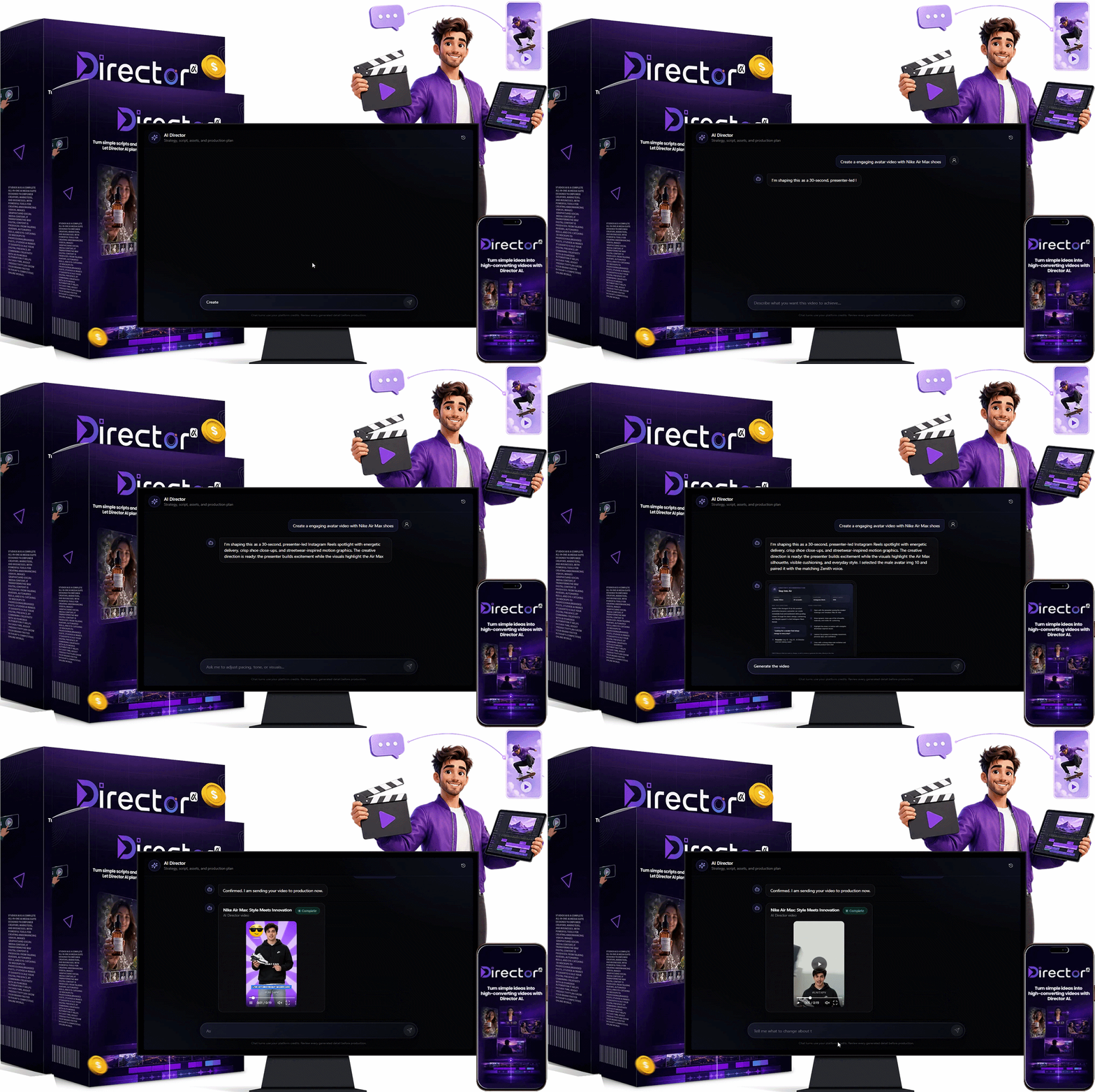
Step 1: Inform the Director of your purpose
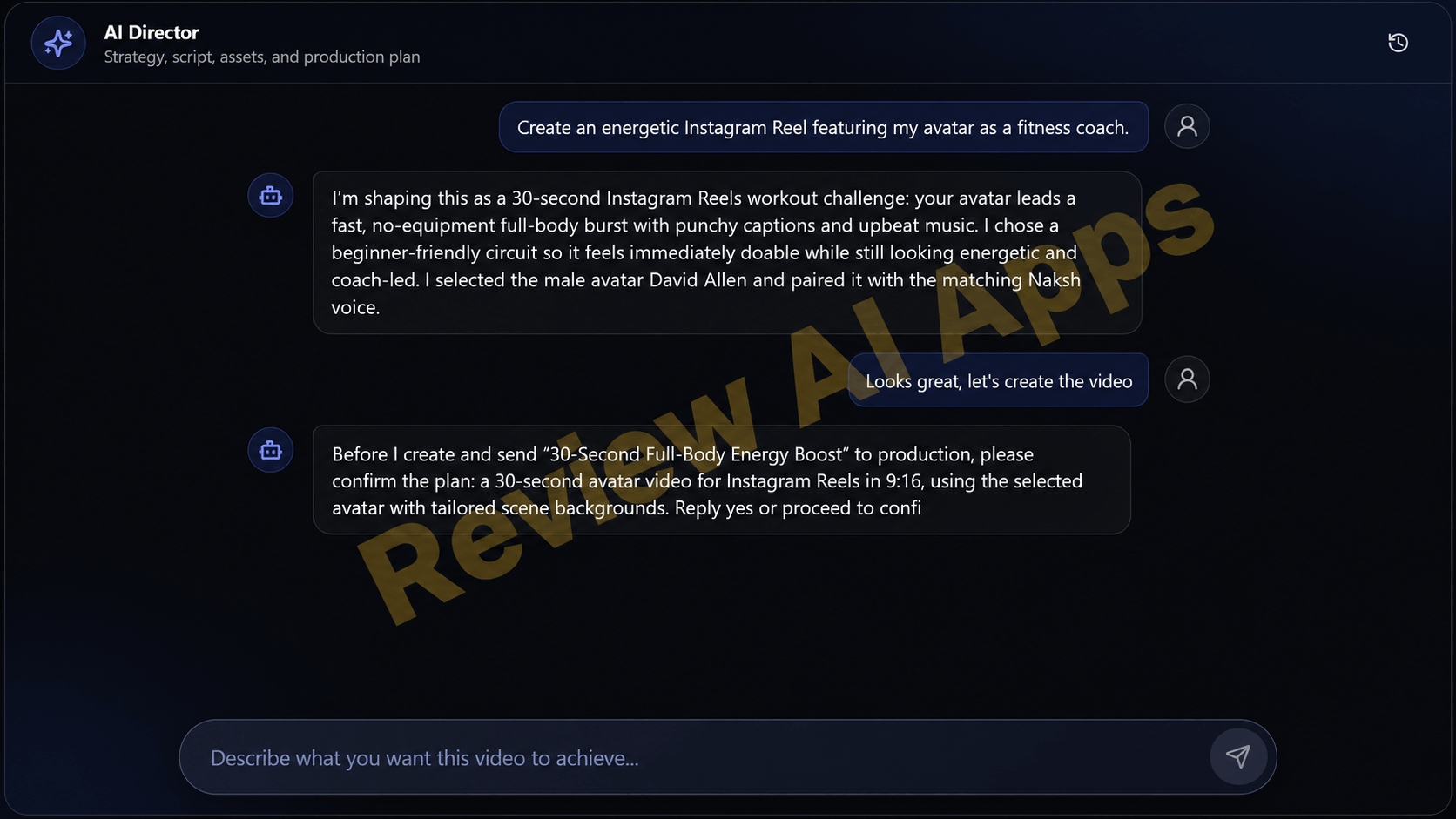
The AI Director is a chat screen. The input box just says “Describe what you want this video to achieve.”
In the walkthrough, the prompt was “Create an energetic Instagram Reel featuring my avatar as a fitness coach.”
Step 2: Director suggests plan
First, the Director answered in simple words. It proposed a 30-second workout challenge for Instagram Reels that involved a no-equipment workout suitable for beginners, punchy captions and upbeat music.
It opted for a male fitness avatar and a matching voice. It would then ask for confirmation before anything was sent into production.
Step 3: Review the Recommendation of the Director
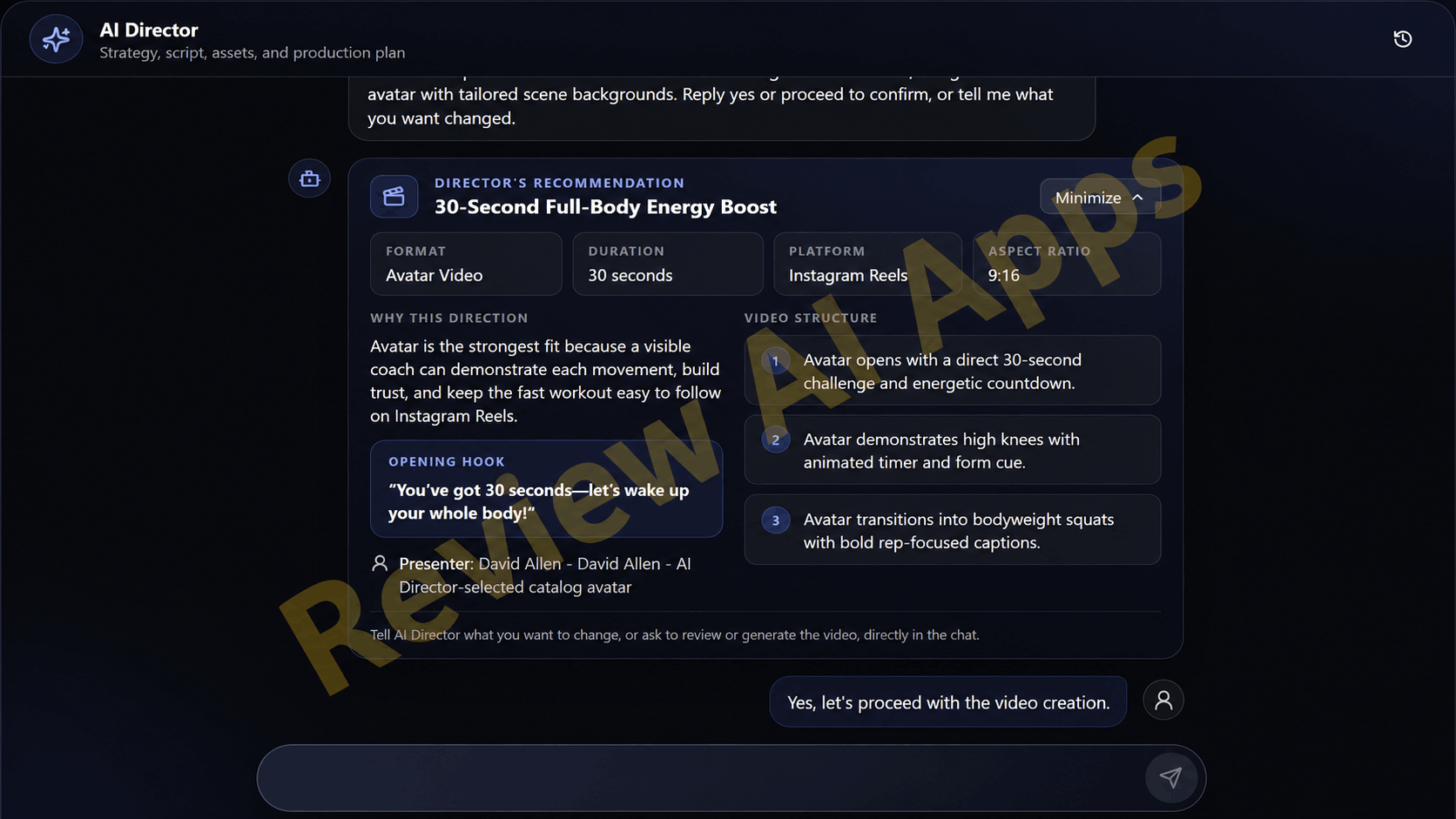
This is the best part of the product. The “Director’s Recommendation” card displays the format (Avatar Video), length (30 seconds), platform (Instagram Reels) and aspect ratio (9:16). It also contains a rationale for the approach (“Why this direction”), the opening hook (“You’ve got 30 seconds, let’s wake up your whole body!”), the presenter and a three-step structure. The question is whether we can request changes in the chat or approve it.
Step 4: Back the Director’s Cut
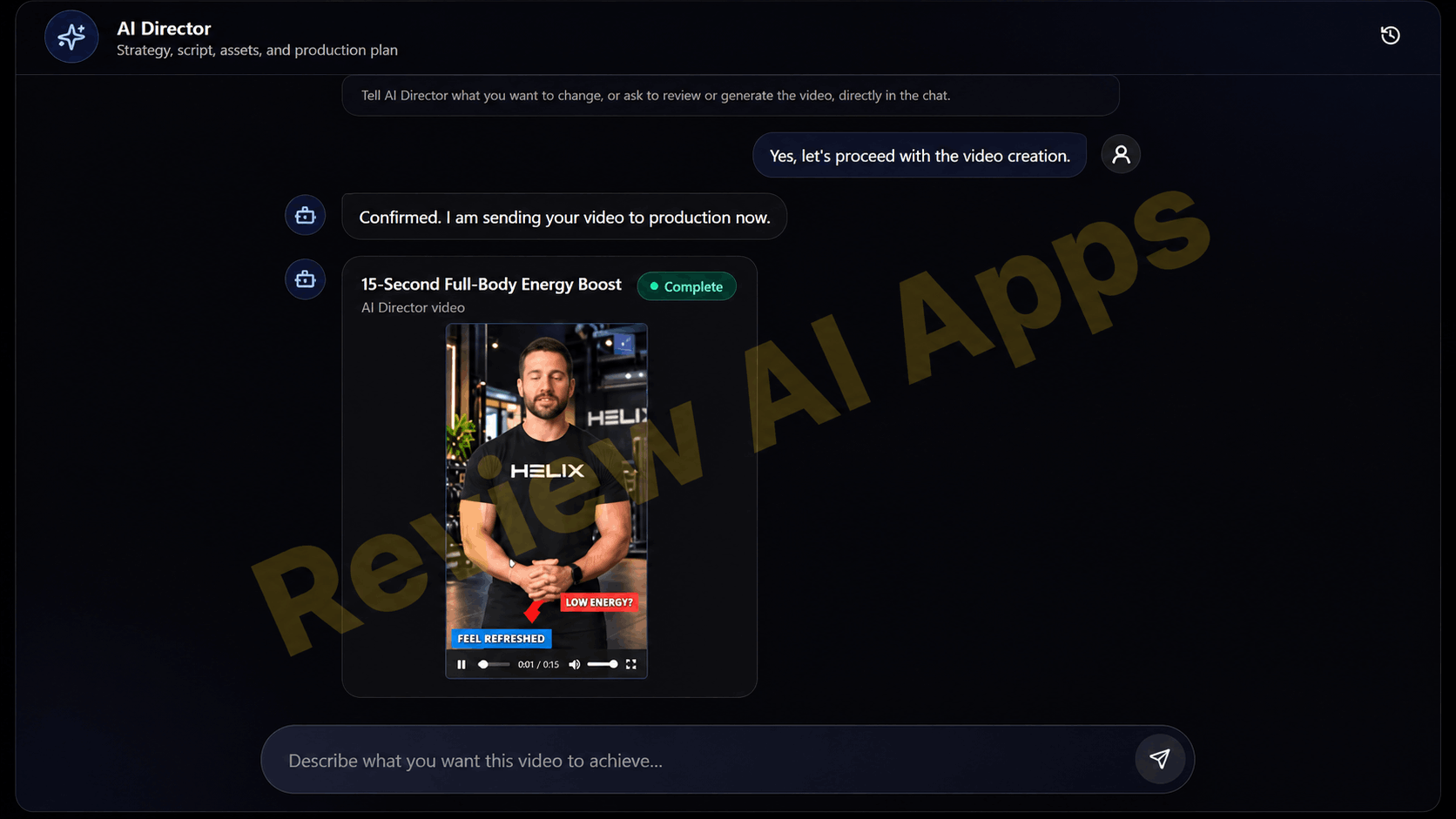
When approved, the completed clip is saved to My Videos and appears in the chat with a “Complete” label and a player.
The walkthrough also pointed out the limitations of the hands-off approach. The plan said 30 seconds, the video was titled “15-Second Full-Body Energy Boost”, and the editor timeline showed about 13 seconds. The intention was for the avatar to do high knees and squats but those exercises were demonstrated with stock footage of other people while the avatar remained in the frame as the presenter. The fair way to think of the Director is as a very fast first draft that you still check.
Inside the Director AI Dashboard
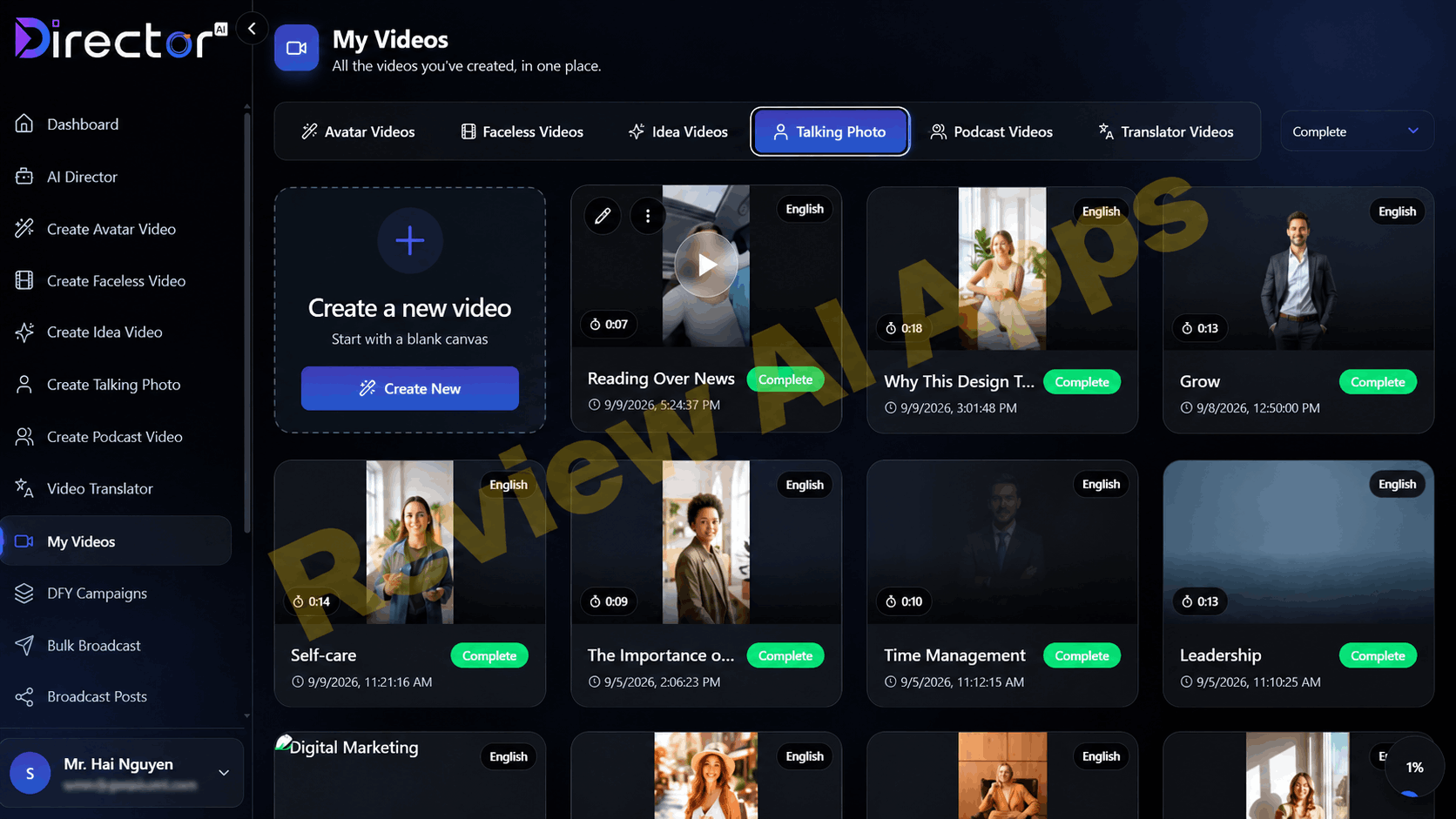
The left menu is clean: Dashboard, AI Director, one for each studio, Video Translator, My Videos, DFY Campaigns, Bulk Broadcast and Broadcast Posts. The walkthrough was on a fully upgraded account, so DFY Campaigns and the broadcast tools are part of the upgrades, not the $37 front end.
My video clips
All your work is in one library, tabs for Avatar Videos, Faceless Videos, Idea Videos, Talking Photo, Podcast Videos and Translator Videos. Each card has a thumbnail, video length, language and a status like Complete or Draft. All the sample videos were short-form clips, mostly 7 to 25 seconds long.
Avatar Video
The Avatar studio is a step by step form: Avatar, Script, Voice, Background, Music and Captions. You choose the platform format (let’s say TikTok) and then an avatar from categories like Creative, Sports and Fitness, Business, Healthcare, Education, Technology and Custom, with an upload button for your own.
Some avatars are holding products such as a bottle of skincare or a coffee mug. This is how Director AI handles the “UGC-style” videos mentioned on the sales page, without a separate UGC module.
One nice touch is that a video titled "Three habits that will change your life in 30 days" features the same presenter in different settings in each scene, from a bedroom to a park to an open field, so it feels less like a talking head on one static backdrop.
Faceless videos
Faceless studio follows the same steps: Script, Voice, Background, Music and Captions. You have four options to choose from for the script: make your own, generate it with AI, upload a script, or upload a video or audio file. A language selector and a live estimate of the duration of the voiceover will appear. The script box has a 1,000 character limit which is about a minute of narration. Director AI is clearly meant for Shorts, Reels and TikTok-length content, not long YouTube videos.
Video ideas
This is one of the best practical tools for affiliates and store owners. You begin with keywords or a URL. For example, in the walkthrough we pasted in an Amazon dumbbell listing, the app fetched 10 product images, let you remove any you don’t want, and generated a 26 second script you can edit before clicking Generate Video.
But fact check. It’s quick. The listing was for a 66lb set and the script described a 5 to 25lb per dumbbell range". Note also that it builds a slideshow from the page's own images and not new footage and that the commercial license doesn't automatically cover reusing a seller's images.
Talking photos, podcasts, translations
Talking Photo makes a still photo into a talking presenter. The Podcast studio makes videos with two hosts talking. Video Translator translates and dubs videos for other markets. 30+ languages on the front end, more language options in the Professional upgrade.
The scene editor
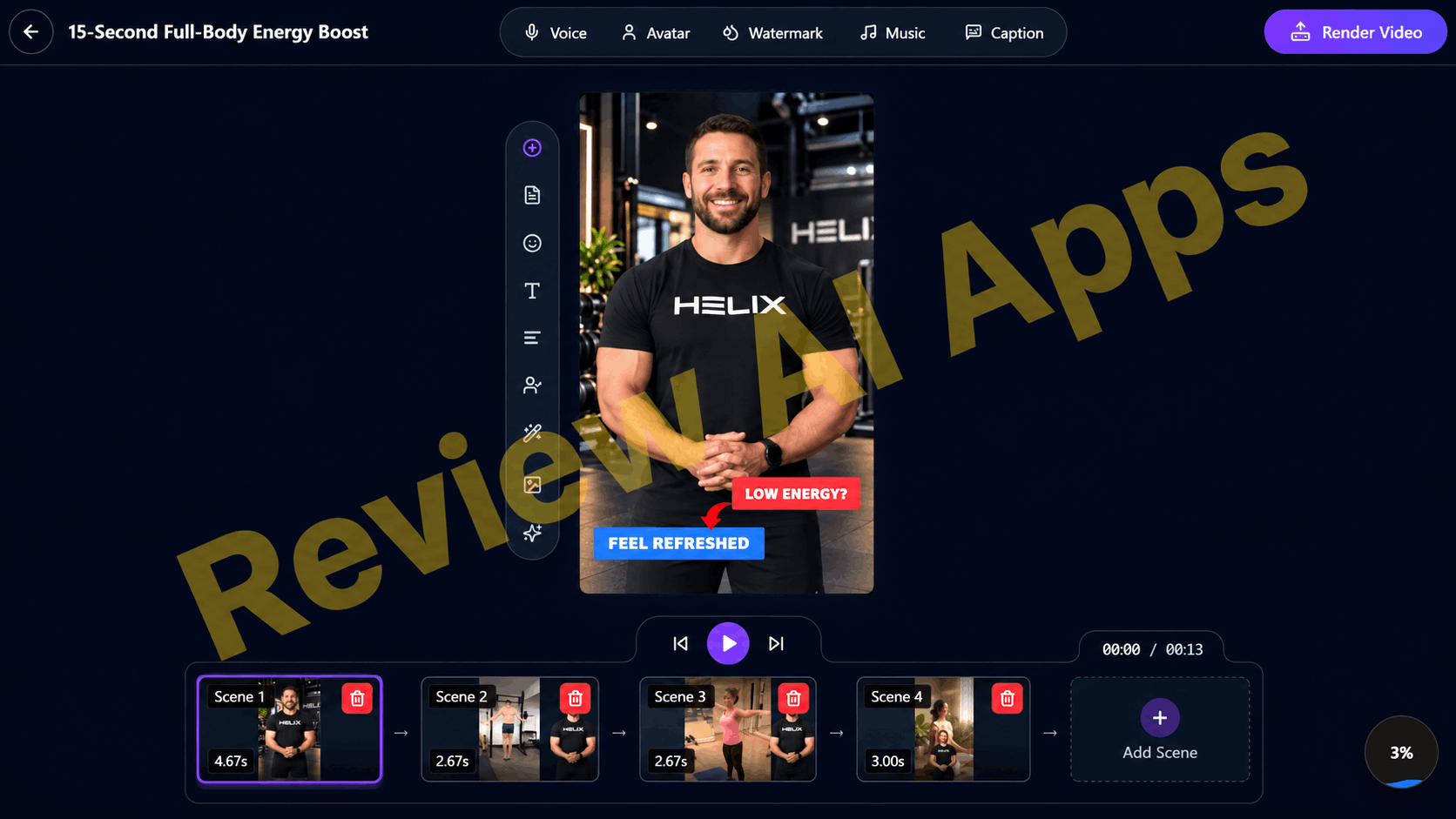
When the video is created you can open it in the editor. At the top there’s Voice, Avatar, Watermark, Music and Caption, and a Render Video button.
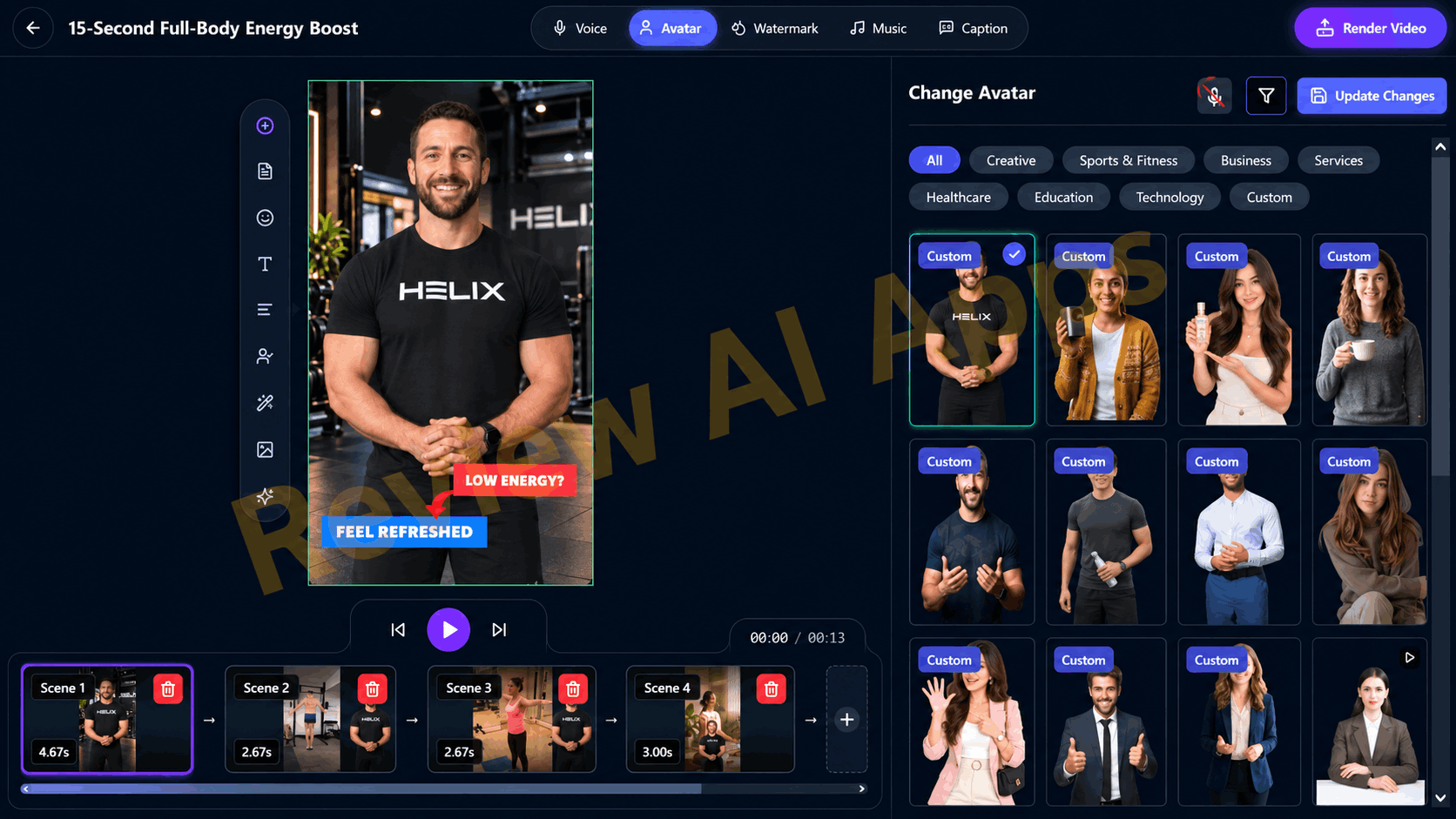
The bottom has a scene timeline as to how long the scene is, a delete button on each one and an Add Scene slot.
The script panel is superior to most tools in this price range. Supporting delivery tags such as [pause], emphasis and “build intensity”, each scene’s script has buttons for both Manual Tag and AI Tag. This means you can actually control how the voiceover sounds, not just what it says.
The voice library features named, pre-built voices like Altair, Atlas, Castor, Cosmo, Ara, Celeste, Eve and Iris, each with a personality description and use-case tags such as Advertising, Sales or Podcast. Search, preview, adjust speed, filter by gender. They are nice system voices, not the flat robotic text-to-speech you get in the cheaper apps.
Captions are also well covered: caption language, a long list of display fonts, size, background and highlight colors, auto-capitalise and word by word "Word Bounce" animation.
Posting on social media
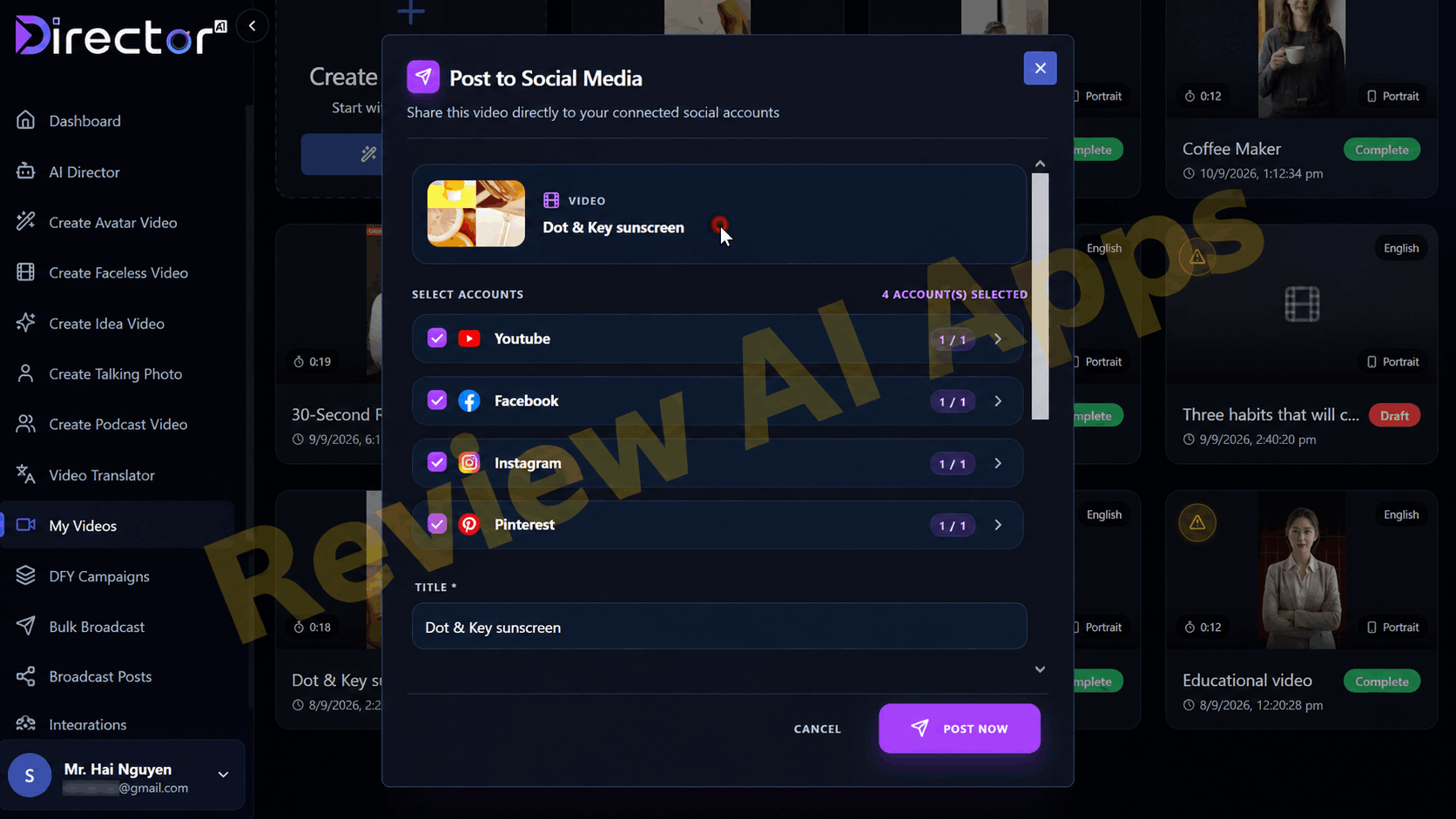
My Videos’ Post to Social Media window shoots a video straight to linked YouTube, Facebook, Instagram and Pinterest accounts.
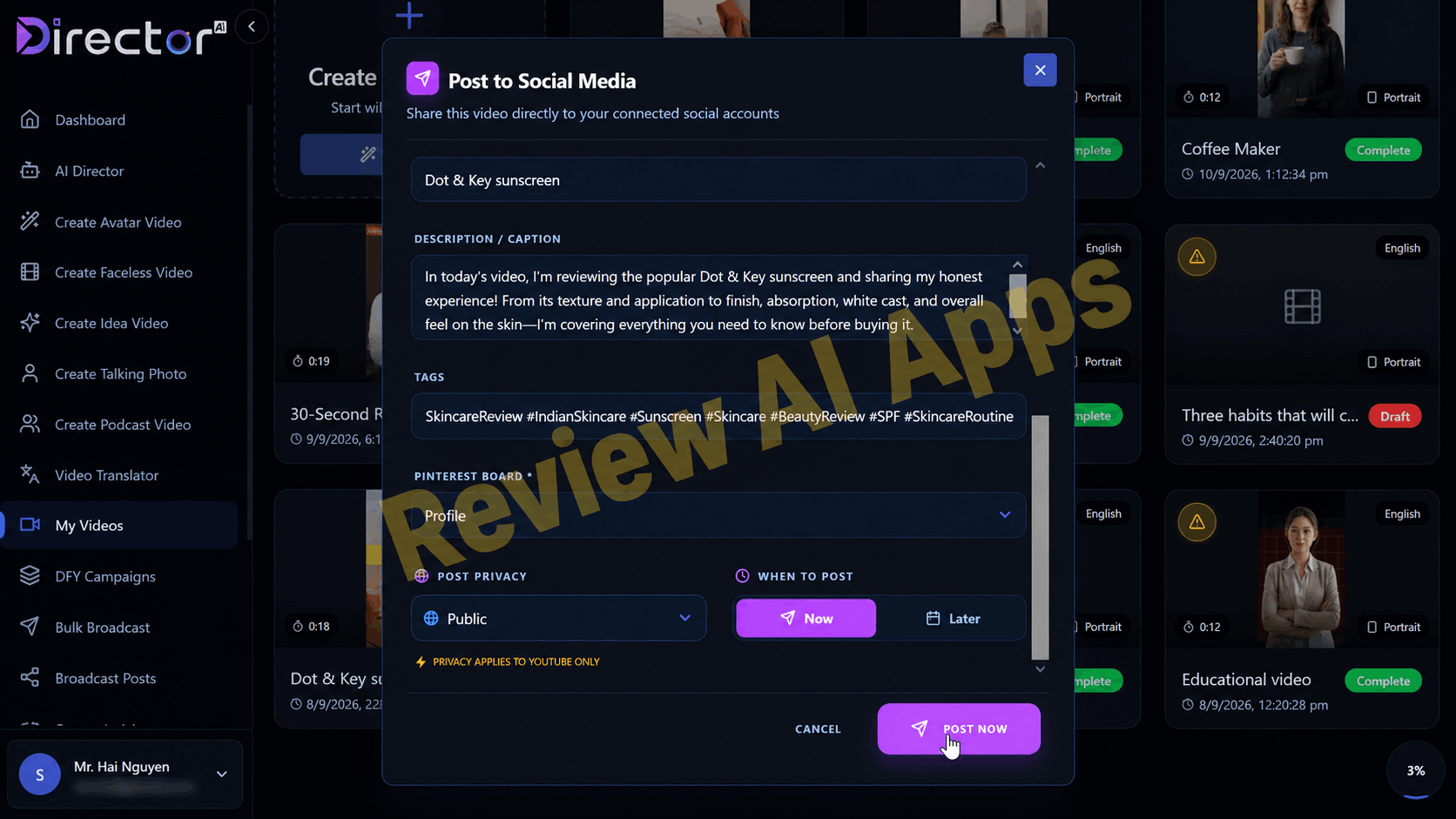
It fills in the title, caption and hashtags, and you can post now or schedule for later. The sales page talks a lot about TikTok, but it is not a direct posting option, and only supported as an export format.
Where the Sales Page Oversells"
Director AI is a real working product, but the sales copy is over and above what the app shows and no honest Director AI review should skip this part.
“World’s FIRST Gen-3 AI Creative Director”: “Gen-3” is a marketing term, not an industry standard. There are already tools that can go from prompt to video, writing the script and picking the visuals. What's different here is the visible, editable Director's Brief - a real strength, but not a world first.
Live Trend Intelligence: This is the headline feature, but the walkthrough didn’t show any trend data in action. The Director’s logic was sound but generic, with no named trends, sources or platform signals. Until the vendor proves it, treat it as a promise, not a verified feature.
“Ready-to-post” videos: the plan and the final video were not always the same in length or visuals, and the product script had a key spec wrong You’ll still have to watch the videos.
First person statements in AI scripts: default writing style makes AI presenters claim personal experience. One caption on a sunscreen read “sharing my honest experience” and a habits script read “number two changed everything for me”. Now that the FTC’s rule on fake and AI-generated reviews is in effect in 2024, and YouTube and Meta are requiring creators to label realistic AI content, you should rewrite these lines before posting them – especially for product reviews and affiliate promos.
“Real Price $197 Monthly”: There is no $197 monthly plan available. It’s a comparison price to make $37 seem like a bargain.
Earnings claims: The sales page claims users are "making $2,750 to $8,500+ a month, bare minimum". The product launches on Oct. 3, so these can't be results from real customers and the page's own disclaimer states results are not typical. Forget them.
Value of bonuses: The value of front-end bonuses is $488 and the value of bundle bonuses is $997. Don't judge them by those numbers, judge them by what they do.
"Post everywhere": direct posting covers four platforms, TikTok is not one of them.
Director AI is for you.
Director AI is most logical for:
Affiliate marketers who need product and offer videos quickly and easily
Reels, Shorts and TikTok faceless page owners
E-commerce sellers needing fast product clips from their listings
Local business marketers and freelancers creating short promos for their clients
Beginners who are faced with a blank prompt and want the tool to tell them what angle and structure are
It’s not so good for:
Long form video needs YouTubers
Brands requiring custom full-motion spokesperson videos on a tight brief
Anyone wanting to publish totally hands-off, without having to review each video
Pros and Cons of Director AI
Benefits
The Director’s Brief is a real step up from a blank prompt box: clear, editable and explained
The Director wants you to sign off on the plan before starting production
Six production formats in one application, and each studio can be manually operated without the Director
The Idea Video tool converts a product URL into a narrated video in minutes
Voice delivery tags (pause, emphasis, intensity) in the script editor
Refined, pre-assembled voices with distinct personality and application tags
Avatars are in different settings in different scenes
Excellent caption styling options
Post and schedule directly to YouTube, Facebook, Instagram and Pinterest
Front end exports are not watermarked
Commercial License & 30 Day Money Back Guaranty
Cons
Live Trend Intelligence, the core value proposition is not obvious in the app
The director's plan does not always match the finished videos
Product info can be wrong in AI-generated scripts
Default scripts have first person experience claims that you need to re-write.
Short-form tool, with scripts limited to 1,000 characters
No direct posting to TikTok
Upgrades come with custom avatars, voice cloning, DFY templates & automation
The sales page is based on inflated value claims and earnings numbers
Final Verdict
Here’s a summary of this Director AI review: The idea of a “AI Creative Director” is not just a gimmick. The planning step removes a lot of the hesitation that slows down short-form video creation by suggesting a format, hook and structure and explaining why. Studios are well built, editor gives more control than usual for a $37 app and Idea Video tool is useful for anyone promoting products.
But the sales page sells a hands-off director that does the research on trends and delivers finished videos, and what the app delivers today is more like a smart first-draft machine with a good editor. There is no trend research, the outputs can vary from the plan and the default scripts need some honest rewriting.
$37 front end is a great way to test the workflow under the 30 day guaranty for short form creators, affiliates, and small agencies. If you want Professional plus another upgrade, the Bundle is the better value, using the DIRECTOR100 coupon. You just figure you’ll be in the director’s seat yourself.
If you have any inquiries about Director AI or need help, email me at reviewaiapps@gmail.com
🎁 VISIT MY BONUS PAGE 🎯