
TubeHarvest Review
Faceless YouTube Videos That Build Your Email List, Plus the Credit Catch Worth Knowing

These days, faceless YouTube tools are everywhere. You type a topic, you get a video, you upload it, you repeat. Most of these tools end when the MP4 is exported, leaving creators with views that disappear as quickly as they appear.
Developer Max Gerstenmeyer and partner Wayne Crowe launched TubeHarvest on JVZoo trying to fix that last step. Every video it creates has its own hosted landing page and free PDF guide on the same topic so that viewers who like what they see have a reason to join your email list instead of scrolling away. One topic goes in and out comes a long-form video, Shorts, a thumbnail, SEO text and a list-building page.
The launch opens Tuesday, November 17, 2026 at 11:00 AM Eastern, right after a live training at 10:00 AM. Launch pricing ends Monday, November 23 at 11:59 PM Eastern. In this TubeHarvest review I will break down exactly what you get at each price point, how the app works from the inside, where the marketing gets ahead of the product and which way of buying actually makes sense.
TubeHarvest Price: Two Ways to Purchase
TubeHarvest can be acquired in two ways. The first is the standard way, buy the front end, then decide on each upgrade one page at a time. The second is the Bundle, one purchase that skips the upgrade pages. They sum up to very different totals, so it is worth understanding both before you click on anything.
Path 1: The Upgrade Funnel and the Front End
Everyone on this road starts with the front end. You can’t buy any upgrade individually. After checkout, each page asks a single yes/no question. Say yes and the upgrade is there. Say no and you are presented with a cheaper, cut-down version of the same thing, called a downsell. Say no to the downsell as well and you just move on to the next page.
Front End: TubeHarvest Commercial ($47 One Time)
That’s the key application. It gives you 10 video packages per month, long form videos up to 5 minutes, 3 shorts per package, 1 thumbnail per package, SEO titles, descriptions and tags, social captions, one landing page template with email capture and a basic lead magnet PDF. It also has a commercial license so you can make videos for clients.
Order Bump 1: Niche Harvest Vault ($9)
Available on checkout page. You get 100 pre-researched faceless niches with 30 topic ideas each. Plus matching affiliate offer categories and lead magnet angles for each niche. This is a research list, not a software feature.
Order Bump 2: Thumbnail + Hook Booster ($14)
Also available at checkout. It upgrades you from 1 thumbnail to 3 thumbnail variations per package for split testing and includes AI-written opening hooks and alternate title pairs. This is the more practical of the two bumps, if you care about click-through rate.
Fastpass ($277 one-off)
This is displayed just after the front end and it acts as a shortcut. All in one purchase you get Premiere, Harvest Growth, the DFY Channel Pack and Whitelabel Starter 50, and you are taken straight into the members area. Fastpass checkout has an optional $97 MegaWhitelabel add-on, but its contents are not described anywhere. If you turn down the Fastpass, you will stay on Upgrade 1.
Upgrade 1: TubeHarvest Premiere ($47/mo)
This is the ONLY real subscription in the main path. This means your allowance increases to 30 video packages per month, long-form videos are extended to 10 minutes, you get 5 Shorts per package instead of 3, and you also get a priority rendering queue with full HD 1080p export.
Downsell 1: TubeHarvest Plus ($27/month)
Only shown if you decline Premiere.
- 20 video packages per month
- Videos up to 8 minutes long
- 3 Shorts per video package
- Standard rendering speed
Upgrade 2: Harvest Growth ($47 One Time)
This is another one to the list-building side. You get 5 landing page templates & 5 affiliate bridge page templates, plus 5 auto-written email follow-up sequences for each lead magnet and additional lead magnet formats: checklist, cheat sheet, swipe file and mini-course.
Downsell 2: Harvest Growth Lite ($27 One Time)
This is described as a basic version of Harvest Growth. The sales material does not say what parts are removed. Check the page carefully before buying.
Upgrade 3: Harvest DFY Channel Pack ($37 one-time fee)
Done-for-you channel profile picture, banner and channel description, plus 30 pre-generated topics and playlists.
Downsell 3: DFY Channel Pack Lite ($17 one off fee)
Same channel art and description minus the 30 topics and playlists.
Upgrade 4: Whitelabel Rights 300 ($297) or Whitelabel Starter 50 ($197)
Both options are on one page and you choose one. Whitelabel means you can brand the software under your own name, logo and colours, set your own pricing and manage client accounts from an admin dashboard: up to 300 accounts (under fair use) on the bigger tier, or 50 on the smaller one. Both can be hosted on a TubeHarvest subdomain or your own domain. They both also require you to add your own API key which means you pay the AI usage costs yourself.
Downsell 4 Whitelabel Rights 25 ($97 one time)
Shown if you skip both whitelabel options. You can re-brand with your own name and logo for 25 client accounts, but it is running on the TubeHarvest domain only and you still need your own API key.
The price you may pay on this path
Minimum is $47 or $70 with both order bumps. If you take every downsell instead of every upgrade you’ll pay one time $188 plus $27 a month. If you say yes to all full upgrades, you'll pay $428 one-time with Whitelabel 300, or $328 with Whitelabel 50, plus $47 a month for Premiere. The front end plus Fastpass is $324.
Path 2: The TubeHarvest Bundle ($297 one-time or $247 with coupon)
The Bundle is an alternative purchase that avoids the upgrade pages. That’s TubeHarvest Commercial, plus Premiere, Harvest Growth, DFY Channel Pack and Whitelabel Starter 50. The checkout page has order bumps and the $97 MegaWhitelabel add-on, but these are paid extras and not included in the price of the Bundle. Apply the coupon code Harvest50 and knock $50 off to bring it to $247.
So now the relevant comparison. The Bundle has the exact same items as the front end plus Fastpass. One is $324, the other $247 with the coupon. If you know you want the whole thing, the Bundle saves you $77, and only works if you choose it before you buy the front end.
One gap to note: the Bundle’s credits are described as a “big credit pool and/or bring your own API key” with no number attached. The sales material does not say if the Premiere-level allowance in the Bundle (or Fastpass) is permanent. There were no refund or guarantee terms published at the time of writing either, so check both on the checkout page before you pay.
How TubeHarvest Works.
The workflow is really simple.
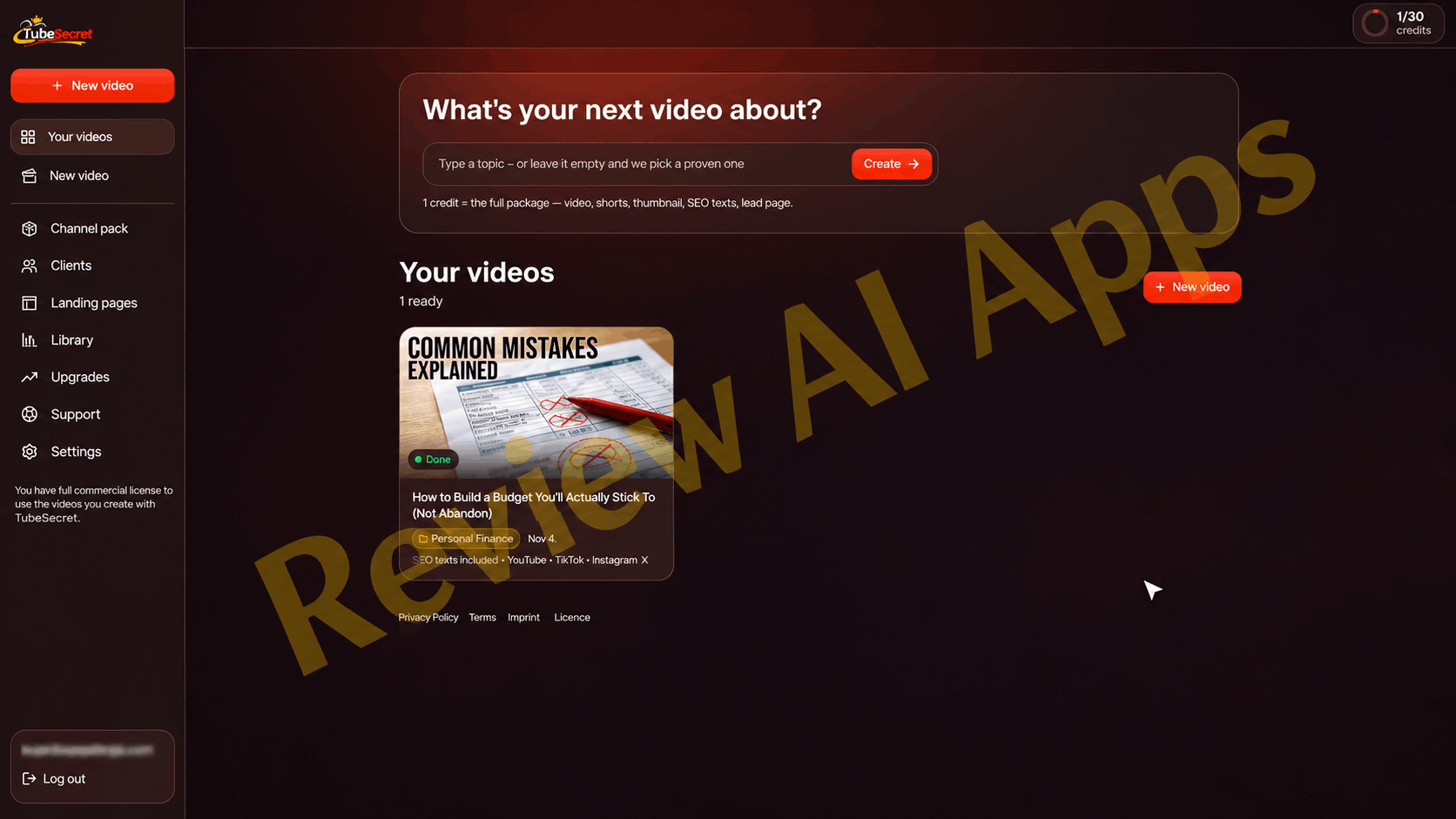
Once purchased, you will receive an email with a one-click login link. You can see your remaining credits and videos in the top right corner of the dashboard. Everything else is found in a left hand menu: New video, Your videos, Channel pack, Clients, Landing pages, Library, Upgrades, Support and Settings.
To make a video, you click on New video and go through a short form:
- Topic: type one in, leave it blank and hit Surprise me, or pull one from the Niche Vault.
- Optional Extras: 'Write 3 hooks' button for the opening, a box for pasting your own script and a field for anything the video must include like your product, offer, facts or call to action.
- Niche style: Select Personal Finance, Hustle and Income, AI and Tech, Health and Fitness, Productivity, Pet Care, Career, or your own custom style. Style determines the look and the stock footage.
- Voice: choose between 9 AI voices with a short preview.
- Length: 3-10 minutes, depending on your plan.
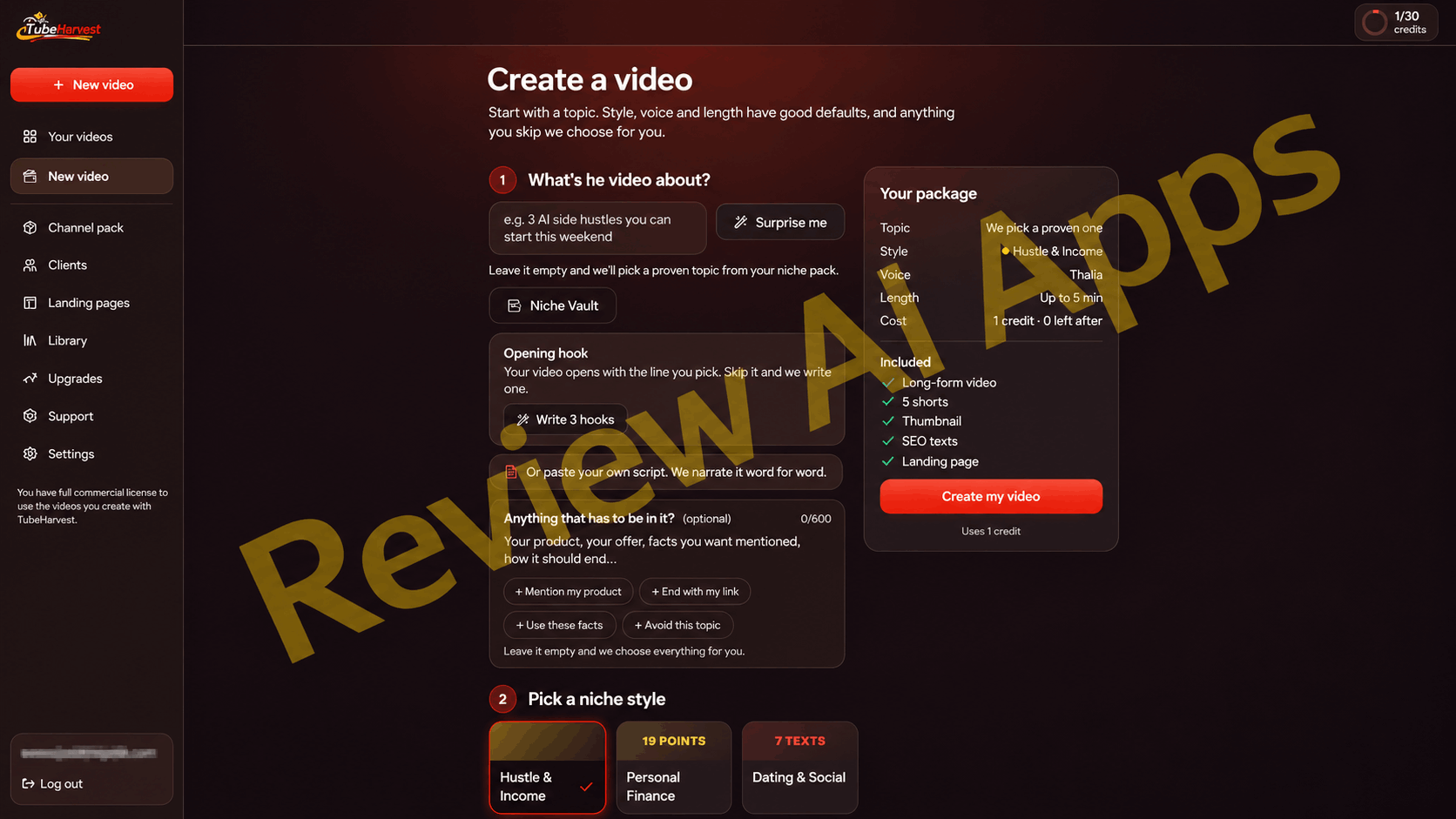
On the right is a panel summarising your package before you commit. Topic, style, voice, length and credit cost. Click "Create my video" and the job is added to the render queue. The page shows each step as it happens, writing the script, designing the thumbnail, finding the footage, recording the voice over, rendering, writing the title, description and tags. The entire build takes around 8 to 10 minutes and you can close the tab while it runs.
What’s Inside Every Package
When the video is marked Done, you open the package and see:
- The long-form video, playable directly in the dashboard
- Shorts taken from the long video, each with its own title and caption
- Thumbnail, can be seen in full size
- Copy button, SEO title, description with chapters, tags,
- Captions for YouTube, TikTok and Instagram
A Download everything button bundles it all into one zip file: the video, the Shorts, the thumbnail, the text, the lead magnet and a license file.
If you watch the demo, just be aware that it is running on a higher plan. The demo account shows 5 shorts per package and videos up to 10 minutes which is Premiere territory. A $47 buyer at the front end gets 3 Shorts and a 5 min cap. There’s no mention of the front end’s export resolution, although full HD 1080p is listed as a Premiere feature.
The visuals are stock-style B-roll matched to the topic, narrated by an AI. That fits the faceless format, but don’t expect custom animation or original footage.
Landing Page and Lead Capture
This is the feature that sets TubeHarvest apart from most faceless video tools and it comes standard with every package.
Each video has its own landing page on the topic with an email signup form and a free mini-guide in PDF. You turn the page on and save it to publish it, and it gets its own public link. When you are back in the package you can see how many leads you have collected and export them in a CSV format.
Paste the embed code from your autoresponder into the page settings to get those leads straight into your email list. You can also save a default page link in Settings once and TubeHarvest will automatically add it to every new video description.
Two practical observations. You will need your own autoresponder to actually email those subscribers, which is a separate monthly cost. And the automated 5-email follow up sequence is not in the front end. It comes with the Harvest Growth upgrade.
With your own script, voice or video
You don’t have to use the AI voice, or AI script. In the section Voice and length, you can switch to your own content:
- Get the AI to read your own script
- Have the AI write the script and record the voice yourself.
- Upload your own audio and the video is centred on what you say
- Upload finished video and TubeHarvest writes only title, description, tags and thumbnail
Each of these modes is 1 credit. The finished-video option is the least efficient, costing a full credit for metadata and a thumbnail, but not actually rendering anything.
How Credits Actually Work
One credit equals one whole package, the sales material states. That’s only true for short videos. Inside the app, 3 to 5 minute videos cost 1 credit, and 6 to 10 minute videos cost 2 credits. Shorts, the thumbnail and the SEO text at no extra cost.
This is most important on the upgrades. Premiere’s 30 credits = 30 videos of 5 minutes, but only 15 videos of 10 minutes. Plus gets you 20 credits, or 10 videos at 8 minutes each. The front end doesn't matter as it is capped at 5 minutes anyway.
Where Product Leads Marketing
Fair enough, the marketing behind TubeHarvest is more subdued than most launches in this space. No income claims and the demo says you should post one or two videos a week. But a balanced TubeHarvest review needs to discuss the gaps between the promise and the fine print.
The cost is ongoing but paid for with a single payment. All packages include AI scripting, AI voice, stock footage, rendering, and thumbnail generation. TubeHarvest hosts your landing pages, PDFs and lead data forever. Front end charges $47 one time for 10 packages a month with no end date, and the Bundle and Fastpass includes a Premiere level allowance for one payment. The vendor knows about these costs, as every whitelabel tier requires the customer’s own API key and the Bundle’s credits are only referred to as a “pool.” Tools priced this way tend to shrink allowances, force users to their own API keys, or change terms later. The only parts that are priced to last are the monthly Premiere and Plus plans.
It’s their domain that your funnel goes through. Your email list is yours but the landing pages feeding it are hosted on TubeHarvest and the demo shows a TubeHarvest link sitting in the video description. If the service goes down or changes their domain or if your account lapses, all the links in all the descriptions will stop working simultaneously. That risk is increased by the fact that the name is listed as a working title on the vendor's partner page. Export your leads regularly so you are never reliant on the platform to store them.
The pitch assumes traffic you don’t have. A landing page converts existing viewers only and a brand new channel starts at zero. The lead count in the demo intro is an animation and not actual results. YouTube has also cracked down on this type of content. In July 2025, it renamed its “repetitious content” policy to “inauthentic content,” which focuses on mass-produced, repetitive videos. Channels that post this kind of content can lose monetisation. AI-generated videos are still allowed when they add real value, so the safer bet is to use TubeHarvest as a jumping-off point, adding your own script, angle or voice rather than churning out content at volume.
Some terms of offer are vague. The Bundle provides an unnumbered credit pool, the $97 MegaWhitelabel add-on is never explained, and Growth Lite is only described as "a basic version."
The vendor's background is mostly training not software. Max Gerstenmeyer has launched traffic and affiliate training products before, and I could not find any previous software tools that he has built and kept going. That doesn’t mean TubeHarvest won’t stick around, but it’s not a long track record for a credit-based AI platform.
Advantages and Disadvantages
Pros: .
- Full set on one topic: video, Shorts, thumbnail, SEO text and captions
- Each video is paired with a built-in landing page and lead magnet PDF
- CSV lead export and autoresponder embed keeps your list portable
- Ability to use your own script, voice, audio or finished video
- Front end is under commercial licence
- Entry price of $47 is low, and the Bundle with coupon is good value for the whole tool kit
- No income claims or inflated promises in marketing
Cons:
- Videos longer than 5 minutes will cost 2 credits, halving the allowance for long-video plans
- Monthly payment for AI use raises questions about long-term sustainability
- Landing pages are hosted on the vendor's domain so links depend on the platform staying alive
- Generic looking videos with no extra work using stock footage and AI voices
- No mention of front-end export resolution. Premiere is 1080p.
- Follow-up emails require the Harvest Growth upgrade and your own autoresponder
- Bundle credit amounts, MegaWhitelabel content and refund terms not published at time of writing
Who Should Purchase TubeHarvest (and Who Should Not)
For affiliate marketers, coaches, and small business owners who want to produce short, topic-based, faceless videos that drive viewers to an email list, TubeHarvest is a good choice. It also works for those who have a day job and can spare an hour or two a week to pick topics, review scripts and upload. If you are a freelancer who wants to offer simple faceless videos to clients, the commercial license will be useful.
If you want long polished documentary style videos, if you are going to mass produce dozens of uploads a week or if you expect the tool to bring traffic by itself, you should probably skip it. It won't build an audience for you, it turns an audience you earn into subscribers.
If you buy here is the simple rule If you just want to test the workflow start with the front end for $47 If you know you want the upgrades, skip the funnel and buy the Bundle with coupon Harvest50 for $247 rather than adding Fastpass later for $324. And whichever way you go, export your leads on a regular basis.
Final Verdict
TubeHarvest delivers on the main points. It takes one topic and creates a complete faceless youtube package in roughly 10 minutes. It includes a landing page and lead magnet that most competitors don’t offer. That’s a handy combo for anyone wanting to turn YouTube viewers into an email list without filming or editing, for an entry price of $47.
The catches are in the details, not the headline: credits that double in cost for longer videos, a one-time price that covers ongoing AI costs, and landing pages that live on the vendor's domain. None of these are reasons not to use the tool, but they are reasons to purchase with clear expectations, add your own flavour to every video, and keep your leads backed up.
To close this TubeHarvest review: it's a useful, honestly pitched tool for building an email list from faceless YouTube content, as long as you treat it as a production assistant rather than a traffic machine.

🎁 VISIT MY BONUS PAGE 🎯
Comments
Join the discussionNo comments yet. Be the first to comment.