
EverPitch Review
7 Things to Know Before You Buy

EverPitch Review - A Brief Overview
Webinars still sell better than pretty much any other format, because people can ask “will this work for me?” and get an answer. The problem is everything leading up to that. The script, the slides, the voice over, and showing up live day after day in a time zone that favours half your list at best.
Todd Gross’s effort to remove all of that from your plate is EverPitch. “Your Green Screen Guy” as he is known in the JVZoo world, Todd has been behind video software launches for years and this time he and Team Todd are tackling the webinar itself. You give EverPitch a topic, a document, a link or even an old Zoom recording It writes the script, designs the slides and gives the talk a voice. Then it runs the result as an everyday evergreen webinar and answers the viewers’ questions out loud. The launch will be on JVZoo from November 16th through the 21st, 2026. The front end will be $37 one time.
That's a lot of promise for a little price. In this EverPitch review, we’ll take a look at what you get, how much each upgrade costs, where the product shines, and where the marketing outpaces it. All of the below is from our first hands-on look at the app, from the Create page to the live room.
EverPitch Quick Overview
- Product: EverPitch, AI webinar builder and host for evergreen webinars
- Seller: Todd Gross & Team Todd
- Start: November 16 - November 21, 2026 (closes 11:59 PM EST)
- Front end: one time $37, 3,000 credits each month
- Bundle: $197 one time early in the launch window, then $227
- Guarantee: 30 days, money back via JVZoo
- Best for: Coaches, course creators, SaaS founders, local service businesses and agencies that want to have a webinar without building one by hand
EverPitch Pricing: How to Purchase
EverPitch sells through two different paths. The Bundle bundles the core upgrades into one checkout, or you can purchase the front end, and pick four upgrades one page at a time. Here’s the cost of each path and what it will unlock before we get into the features of this EverPitch review.
Path 1: The Front End & Upsell Funnel
EverPitch Commercial (Front End) - $37 One Time
Core Software: AI Webinar Builder (Script, Slides & Voice), Automated Evergreen Sessions, Spoken Q&A (up to 20 answers per session), Registration Pages, Reminder Emails, Replay Pages, and Commercial License. And there are 3 bonuses included: A First 7 Days Playbook, a bank of 100 webinar titles and hooks and a pack of seven after-webinar follow up emails. The plan includes 3,000 credits monthly. It costs 40 credits to build a minute, so that comes out to about 75 minutes of new webinar content per month.
Credit Boost - $77/Year Order Bump
The order bump upgrades your account to 8,000 credits per month, roughly 200 finished minutes and renews annually. This is the add-on that matters the most if you plan to build more than one or two webinars per month or translate them.
Upsell 1: DFY Webinars – $67 One-Time
This upsell gives you ten finished, voiced webinars of about 15 minutes each directly into your account. Each one comes with its own slides, script, voice-over, registration page, emails, a poll and an offer card. Topics we’ll talk about include coaching, online courses, local marketing, AI for small businesses, email marketing, faceless video channels, home fitness, selling your home, debt payoff and freelancing. The talks keep the host and product neutral, so you can drop in your own offer without having to re-voice anything. A webinar can be duplicated at no credit cost. One does by editing, by re-voicing.
Upsell 2: Kit Vault – $47 One Time
The Vault includes 24 fill-in-the-blank webinar briefs for different markets, including three product launch kits. Each kit sets the audience, promise, talk structure, tone, length and slide style, with blanks bracketed for your name, offer, price and link. Remember a kit is a short, not a finished webinar. Building from it costs the same credits as building from your prompt.
Upsell 3: Agency - $77 One Time
Agency is a customer licence. You can host, run and charge for webinars for other businesses and the "Powered by EverPitch" disappears from the registration page, live room and replay page. Each webinar can have the client’s logo, colours, email list and checkout, as well as its own analytics page for reporting. The agency adds rights, not credits, and the clients themselves can’t log into EverPitch.
Upsell 4: Ultra – $97/year
Ultra gives you access to the premium AI capabilities
- Single-photo or stock-face generated host-on-camera clips at 150 credits per clip.
- A “Call host” button that allows viewers to speak to the host by voice.
- Avatar face-to-face Q&A session at the end of the webinar, 150 credits per chat.
- Answers in a cloned voice of that speaker, with that speaker's permission.
- Stream to YouTube, Facebook or any RTMP address + MP4 export.
Ultra renews yearly and can be cancelled anytime. Webinars already built are still working when you cancel.
Path 2: The Bundle Deal
EverPitch Bundle – $197 One Time (Going Up To $227)
The Bundle includes Commercial, DFY Webinars, Kit Vault and Agency all in one purchase. It adds the three bonuses, and increases your allowance to 8,000 credits a month, no renewal. Early buyers pay $197 before price jumps to $227 during launch week. Ultra is not included.
MegaBundle Upgrade: Gold ($197/Year) or Platinum ($347/Year)
Buyers of bundles see a single upgrade page with two levels. Gold adds Ultra and the account is $10,000 per month. Platinum includes Ultra, boosts the account to 25,000 credits a month, and has Reseller. Reseller lets you create up to 50 EverPitch accounts for your own customers, and each account comes with 1,000 credits per month at any price you want. Both levels renew every year. If you cancel, you will keep the Bundle and everything you have built.
Which Way Makes More Sense.
Anyone serious will see that the math clearly favours the Bundle:
- Buying the four core products separately costs $228 and you still only get 3,000 credits per month.
- Add the $77 Credit Boost to equal the Bundle's 8,000 credits. That moves the first year to $305 and adds $77 each year thereafter.
- The Bundle is the same products, same credits, paid once for $197 or $227.
If you just want to test the idea, go with the $37 front end.
EverPitchとは?
Delete the launch copy EverPitch is a combination of two tools that normally live apart:
- An AI presentation generator that writes a talk that’s meant to be spoken, designs the slides and records the voice-over.
- Evergreen webinar platform with registration pages, reminders, scheduled live room, offer card, checkout connections and analytics.
The difference is the room, compared to a normal automated webinar tool. Most evergreen platforms just replay a video. EverPitch reads the chat and answers real questions, aloud, by name, using only what is in your webinar.
How EverPitch Works
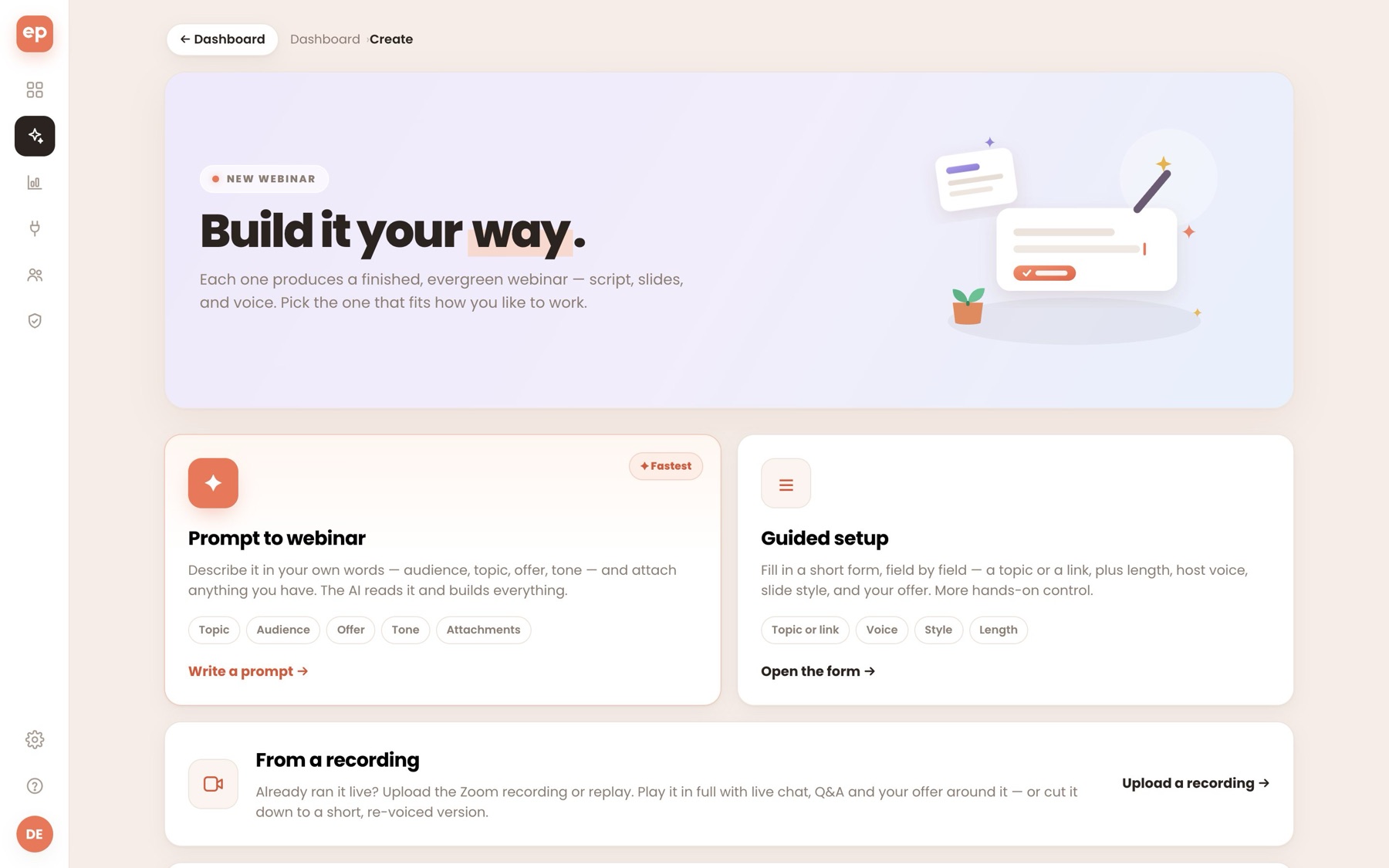
It all starts on the Create page, which has four ways to get in:
- Prompt to webinar: describe the audience, topic, offer and tone in your own words and attach a sales page, deck or PDF if you have one.
- Guided setup: Short form on topic or link, host voice, slide style and length.
- Upload a Zoom recording or replay (up to 2 GB) from a recording Then either play it in full with chat, Q&A and your offer around it, or cut it down to a shorter, re-voiced version.
- Done-for-you webinars: Add a finished webinar or start with a kit, if you bought those upgrades.
You are able to set the length from about 5 to 60 minutes based on a prompt and select from one of 30 voices. There are 11 slide styles to choose from, including Swiss Grid, Neo-Brutal, Aurora Glass, Magazine, Neon Grid, Chalkboard, Boardroom, Blueprint, Pastel Pop, Luxe Noir and Classic. You can also let the AI decide. You paste a Youtube demo link, and EverPitch puts it into a useful spot in the talk, with a spoken lead-in.
A single click starts the build. A 15-minute webinar is back as a full deck of about two-dozen slides, each with its own attached spoken script.
Editing in Slide Studio
This is where EverPitch shines the brightest. Each slide has an AI tab where you can type in things like “turn this into a before and after comparison”. The slide is built on the spot and the voice still lines up.
An Edit tab enables you to:
- change type of slide;
- upload, create or exchange an image;
- rewrite eyebrow, headline and spoken script verbatim
You can also restyle the whole deck with one click, set your brand colours, import your own PDF deck and add video slides.
Language & Pages
Adding a language creates a translated, re-voiced version of the webinar with a separate registration page. Visitors are automatically redirected to their language.
Pages and connections around the webinar are also included:
- 31 registration page templates, prepared for your niche.
- Calendar invites and reminder emails
- A replay sales page created from 20 templates.
- A join button that you can put on any website.
- Checkout with Stripe, Paypal, Lemon Squeezy or Razorpay.
- Integrations with Mailchimp, ActiveCampaign, Kit, GoHighLevel, GetResponse, Brevo, AWeber, Zapier, Make and n8n.
Scheduling options include evergreen sessions every 15 minutes, on demand replay, fixed times and just-in-time entry.
Inside the Live Room
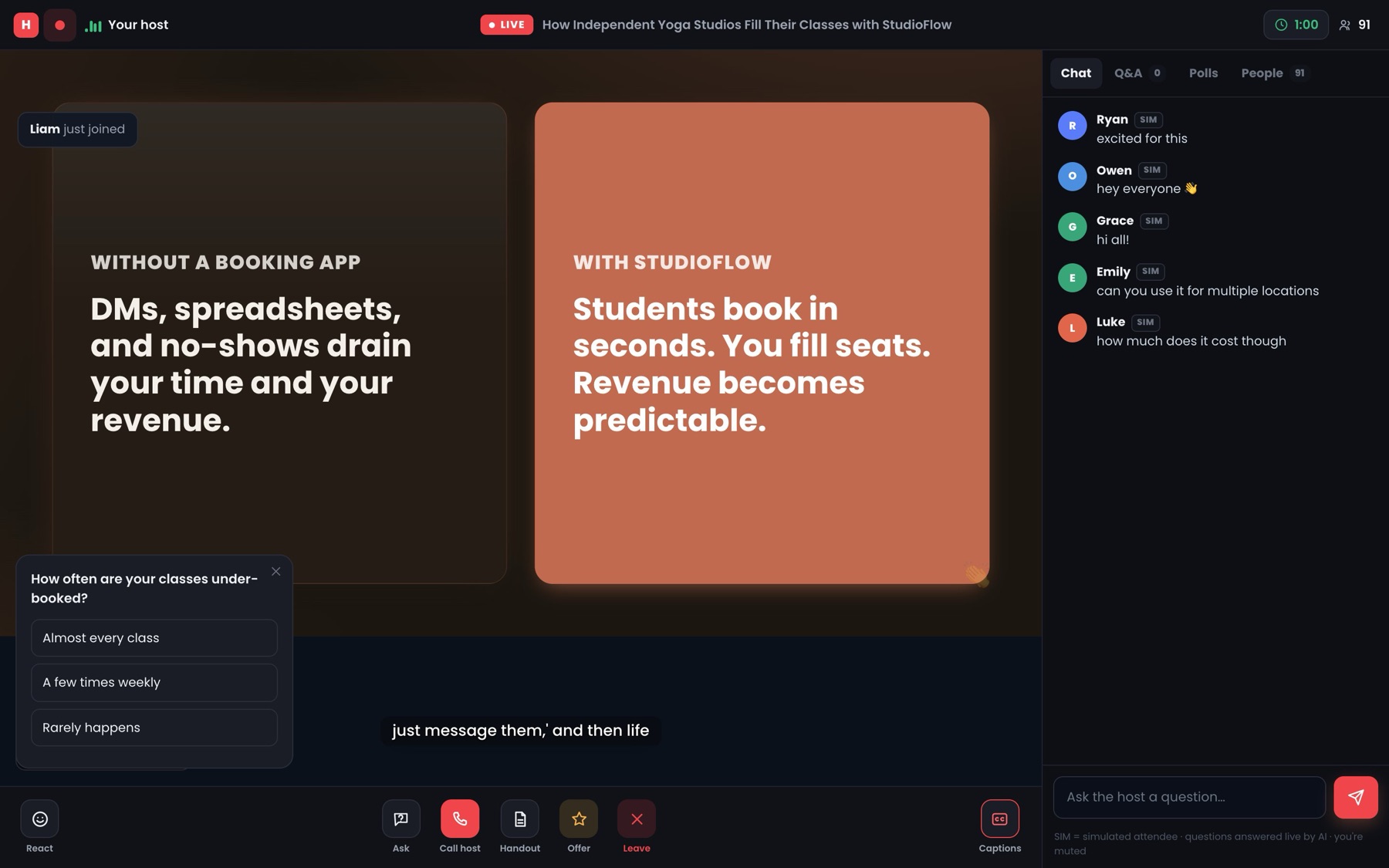
Audiences sign up and enter a room that looks like a live webinar, with a “LIVE” badge, captions and a shared clock so everyone is on the same moment. Handouts and an offer card appear on cue, a timed poll. Late joiners land in sync.
The best part is the Q&A. Questions are saved for the end by default, and the host answers each question out loud and by name. During our hands-on preview, a viewer asked if the software could function in studios with multiple locations. The host said that the webinar hadn’t covered multi-location setups and that they didn’t want to make anything up. This is exactly the behaviour you want from an AI to answer for you.
Then analytics show registrations, show-ups, offer clicks, revenue, results by language and drop-off by slide.
Where the Hype Leaves the Product Behind
EverPitch is a better product than most of the launches in this space which makes its gaps all the more important to spell out. A honest EverPitch review must cover these.
The artificial intelligence can make your proof
This is the main problem. In the webinar build we looked at, the prompt described the product, the audience and the offer, but there were no stats and no customer quotes. The finished deck still had:
- quote from an owner of an independent yoga studio in a named city;
- some confident percents about the industry;
- outcome claims like “52% fewer no shows” for a product with no history behind those numbers.
This is not caught by the Q&A safeguard, since it sees the script as your content. If there’s an invented stat in the script, the host reads it out loud as if it’s fact. Anyone publishing an EverPitch webinar should read through every slide and delete or replace any number or quote that they cannot back up. Running fake testimonials on a sales webinar is a fast track to refunds, complaints and legal trouble.
The simulated audience is made to look real
EverPitch has an optional simulated audience. To its credit, each simulated chat message has a "SIM" tag, and the registration page mentions in small print that some activity may be simulated. But the feature is meant to persuade:
- The people counter passed 130 and only one actual person was registered.
- Simulated names are matched to each viewer's country so the room looks like a real local crowd.
- People joining pop-up notifications don't have a SIM label.
- The simulated chat includes buying signals like "trying the free trial after this call.
The disclosure is real but quiet next to the “LIVE” badge and big headcount. How much of this you turn on is up to you, and your reputation.
The Bundle Page Oversells
The Bundle sales page lists these features as what you get:
- host on-camera segments;
- Call the host;
- the flesh-and-blood avatar;
- Stream on YouTube;
- Export to MP4.
All these are from Ultra, which is not in the Bundle. That exclusion is only listed in the small print next to the price and in the FAQ. If those features are why you are buying, budget for Gold at $197 a year on top of that.
3,000 Credits Disappearing Faster Than You Think
Seventy-five minutes a month might seem generous until editing, re-voicing and translations take up credits again. Ultra shrinks it down. It’s your viewers who initiate the avatar conversations, not you. Avatar conversations and host clips are 150 credits each. Twenty avatar chats on the front end alone would take your whole month. For serious users, the Credit Boost or the Bundle is not optional, but mandatory.
“Broadcast Live” Means Streaming a Recording
Ultra’s streaming converts the webinar to an MP4, streams that file to YouTube and Facebook, on a loop if you want. It helps with reach, but those viewers chat there in the platform’s own chat so the EverPitch host that answers questions is not part of that stream.
The Worst Upsell: The Kit Vault
24 well-structured prompts on the Vault, which can be very helpful for beginners. But $47 gets you briefs, not webinars and you still pay full credits to create each one. The money is better invested in the DFY library.
The Big Question: Single Payment, Ongoing AI Costs
All EverPitch webinars are fuelled by paid AI services. The voice list, including names such as Sulafat, Achird and Charon, corresponds to Google’s Gemini text-to-speech catalogue of 30 preset voices. That means real API costs for the vendor for every minute completed, on top of the script writing and image generation that goes into it. This is exactly the logic that EverPitch's own Ultra page cites to justify its annual cost: on-demand AI costs money each time it is used.
The front end is $37 one time and promises fresh credits each month with no mention of how long that lasts. That doesn’t mean the platform is going away, and Team Todd has a long track record of launches. But it’s the classic risk of one-time-price AI software: credit allowances can shrink and features can be moved behind upgrades. Store copies of your scripts and exported content off platform.
EverPitch vs Monthly Webinar Tools
The existing automated webinar platforms charge a monthly fee. EverWebinar costs between $79 and $199 per month. EasyWebinar, WebinarJam and eWebinar start at $36 to $49 per month. They host and playback your webinar, but you still create the presentation. EverPitch makes and hosts it for a one-time fee. On paper, the value gap is huge. In practice, you’re trading a mature, subscription-funded platform for a newer one with an untested business model, which many small businesses will still find worth it at $37 or $197.
Pros and Cons of EverPitch
Good things
- From one prompt, document, link or recording generates a full, voiced and designed webinar
- Prompt driven editing of slides keeps voice consistent
- Spoken Q&A answers by name & within your content
- Includes registration pages, reminders, checkout, integrations and analytics
- 11 slide styles, 30 voices, translations and re-voicing
- Front end and Bundle one-time pricing
- No income claims, voice cloning with consent, 30-day guarantee
Downsides
- Scripts created may include fake statistics and testimonials
- The audience in the simulation should look like a real crowd
- 3,000 monthly credits is tight once edit, translation or Ultra comes in
- The Bundle page suggests Ultra features that it does not have
- Kit Vault has nothing to offer except structured prompts
- Long term credit supply depends on the vendor taking the ongoing AI costs
Who Should Purchase EverPitch?
From this EverPitch review, the tool is for coaches, course creators, consultants, SaaS founders and local service businesses who know their offer but have never got a webinar finished. Agencies that sell simple webinar packages to local clients will also get value, as long as they match Agency with enough credits. If you have an old Zoom presentation sitting in a folder, the recording mode alone would justify the price of the front end.
Who Should Not Use It?
If EverPitch is not the right tool:
- you want a really live, interactive experience;
- you want a mature platform, with years of reliability behind it;
- you don't want to fact check each slide before it goes out;
- you intend to make extensive use of the simulated crowd.
That last one is a shortcut that usually costs more trust than it gains.
Final Verdict: Is EverPitch Worth Your Money?
To wrap up this EverPitch review: the product delivers what it promises in the headline. Takes an idea to a finished, voiced webinar fast, edits by conversation, and runs a room that answers questions without making things up. The front end is $37 and is a low-risk way to see if AI webinars are something that works for your business. If you plan to use it regularly, the Bundle at $197 is the stronger buy because the extra credits are a one-time payment, not an annual fee.
But go in with clear eyes:
- Consider every generated number and testimonial as a placeholder until you have verified it.
- Set your own rules for the imaginary audience.
- Your real limit will be the credit allowance, not the feature list.
That said, EverPitch is one of the more practical launches we’ve seen in recent times, and the 30-day guarantee gives you room to test it out.
Comments
Join the discussionNo comments yet. Be the first to comment.