KDPGlobal Review
KDPGlobal Review: 16 Markets Tested - Is It Worth $17? (54)
KDPGlobal Review on a Brief
Most Amazon KDP publishers run into the same wall sooner or later. They spend days finding a niche, writing or outsourcing a manuscript, paying for a cover, wrestling with formatting, and then they publish one book in one language on one store. KDPGlobal is built on this idea. This is the real bottleneck. Seun Ogundele is not selling “another AI book writer”. He is selling a publishing agent that takes one keyword, turns it into a complete book, localizes it for other countries and gets it ready for the Amazon stores worldwide.
That’s a bold promise for a $17 front end. The launch period is October 26th through October 31st, 2026. In this review of KDPGlobal I’ll go through what you get, how much every upsell costs, what the member’s area actually does when you build a book, and where the sales page says something different than the software. If you are considering adding KDPGlobal to your publishing workflow, this should give you a good idea before you buy.
- Product: KDP Worldwide
- Vendor: Seun Ogundele.
- Date of launch: October 26, 2026, 10:00 AM EST
- Cart closes: October 31, 2026, 11:59 p.m. EST
- Platform: Launchpad
- Front end price: $17 one time ($14 early bird within first few hours of launch day, $27 after launch closes)
- Upsells: 9 OTOs with secret discounted pricing for each
- Bundle deal: no on this launch
- Guaranty: 30 days money back guaranty (with wording to be agreed on)
- Product Type: Credit-based SaaS, cloud-based
Pricing and Upsell Funnel for KDPGlobal
KDPGlobal doesn’t have a package deal. The only way to buy is the standard front-end + upsell path, one offer at a time, and the way the discounts are delivered matters.
Front-End: KDPGlobal ($17)
The front-end is $17 one time, or $14 in the early bird window on launch day. You get the core app, which includes global niche research, research tools, the keyword studio, the Agentic Book Creator, the manual Book Creator, the Globalizer for translated editions, the Publishing Center, and as bonuses, a stack of guides and templates. The app is based on credits, and the first upsell is upfront, saying the basic version “comes with limits.”
OTO 1 : KDPGlobal Unlimited ($67 Deluxe / $167 Premium, downsell $47)
This is 2 level upgrade. Unlimited Deluxe for $67 includes unlimited book creation in every genre. Unlimited Premium $167 All caps on books, covers, translations, research and publishing are removed. Unlimited devices, free updates, priority processing and premium support, and the built-in KDPGlobal marketplace. A pop-up offers Premium for $47, less than the cost of the lower-priced Deluxe tier, and has a “no thanks” link.
OTO 2: KDPGlobal Done For You ($197 Gold / $297 Platinum, downsell $97)
This is a done-for-you setup service. Gold $197 Includes configured branded dashboard, templates and prompts, niche selection, audience targeting by country and age, tuning of settings. Platinum + Buyer Traffic $297 You also get account optimization, a customer-facing “ChatGPT-like” platform you can charge users for, AI sales staff, and chatbot features. You refuse and Platinum comes back for $97.
OTO 3: KDPGlobal Automation ($47, $27 downsell)
This is promised to put KDPGlobal on full autopilot so it “runs itself 24/7.” The page talks about earning while you sleep, but doesn’t go into specific automation settings. The price at exit is $27.
OTO 4: KDPGlobal Income Maximizer ($47, downsell $27)
The page is named “Profit Booster” and it promises to speed up results “by over 100 times”, without explaining what it is that is changed inside the software. When you try to leave, it drops to $27.
OTO 5: KDPGlobal Limitless Traffic ($97, downsell $77)
This delivers 1000 to 2000 clicks from the vendor's own traffic source, to any link you want. For a KDP publisher it doesn’t seem to add any value as book buyers search for books on Amazon. The cost of exiting is $77.
OTO 6 – KDPGlobal DFY Money Site ($67, downsell $47)
This means done for you affiliate review sites, filled with clickbank offers, hosted for you. Publishing is a different revenue model. The price to exit is $47.
OTO 7: KDPGlobal AI Income Site ($47, downsell $27)
Done-for-you AI tools directory with 7,000+ tools listed, AdSense & banner ad slots, premium listings & affiliate links. Delivered in 72 hours. Again, it's nothing to do with Kindle books. Exit price = $27.
OTO 8: KDPGlobal Reseller ($197, downsell $97)
The Reseller license allows you to sell KDPGlobal through the vendor’s own funnel and keep the revenue. Hosting, payments and support is taken care of for you. The exit pop up brings it down to $97.
OTO 9: KDPGlobal AI Traffic Machine ($47, downsell $27)
It’s a “AI visibility” tool that tracks how often your brand is mentioned by ChatGPT, Gemini, Claude, Perplexity and Google AI Overviews, with schema fixes and a basic SEO suite. You turn it down and it drops to $27.
The True Cost of the Full Funnel
The front end and the top tier of all the upsells at list price total $1,030. It is $830 for the lower tiers on OTO 1 and OTO 2. Say no to all upsells, yes to all pop ups and the whole stack is $490.
That is my biggest complaint with this funnel. Each OTO has a “WAIT STOP” pop-up that only comes up after you click “no thanks”. The buyer who says yes right away pays the most, and the buyer who acts like they are leaving gets $20 to $200 off. If you want any of these upgrades, click “no thanks” first and check the pop-up price before you buy.
Who is KDP Global?
KDPGlobal is run by Seun Ogundele, who describes himself as a “Top 1% Vendor”. On his launch page, he claims to have made between $7.5 million and $8 million from past launches and won 27 Deal of the Day awards on WarriorPlus. Support is offered by a help desk.
Some of the upsell pages still have branding from his old product, GooglAI. The page titles say GooglAI and the later upsells still mention Veo 3.1, Nano Banana Pro and Gemini sales pages. That’s not to say the core app is fake, but it does mean the upsells were repurposed from a previous launch instead of being built for book publishers.
Inside KDPGlobal: How It Really Works
The sales page describes a one button machine. The member area is more structured and in some ways more sensible.
The Dashboard
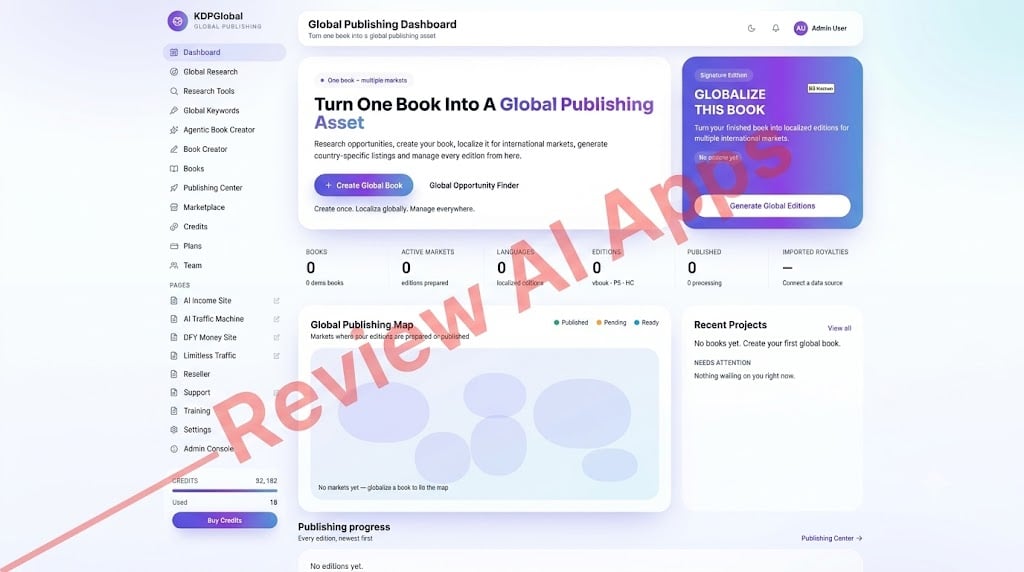
The dashboard is called the “Global Publishing Dashboard” with the tagline “Turn one book into a global publishing asset.” It tracks books, active markets, languages, editions, published titles and imported royalties, with a world map that fills in as you add editions. The sidebar has Global Research, Research Tools, Global Keywords, Agentic Book Creator, Book Creator, Books, Publishing Center, Marketplace, Credits, Plans, Team. Under that is a “Pages” section that links directly to the upsells. All screens have a credits balance and a "Buy Credits" button at the bottom.
Step 1. Research a Niche
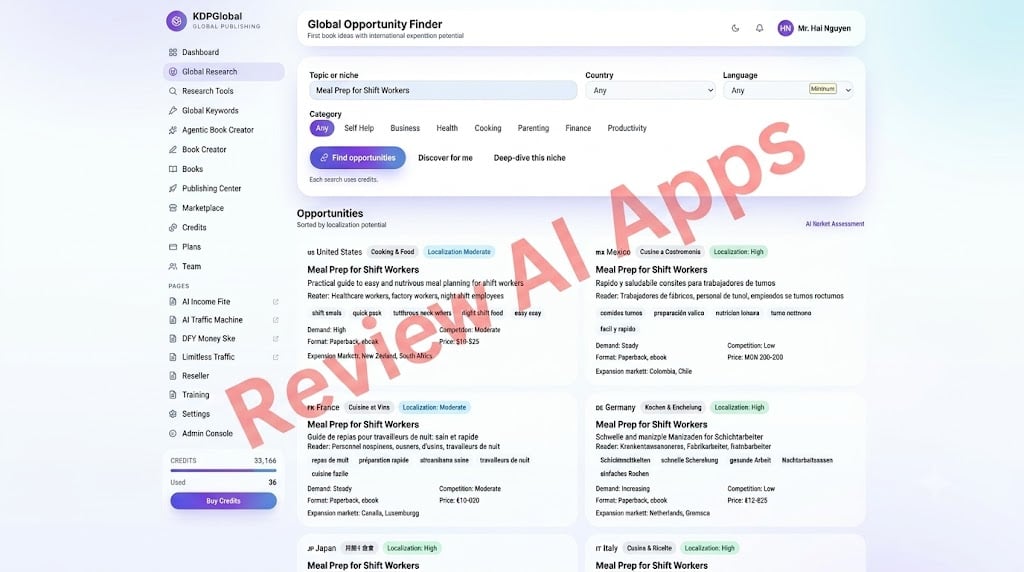
The Global Opportunity Finder accepts a topic, an optional country and language, and a category. I tested it on “Meal Prep for Shift Workers.”
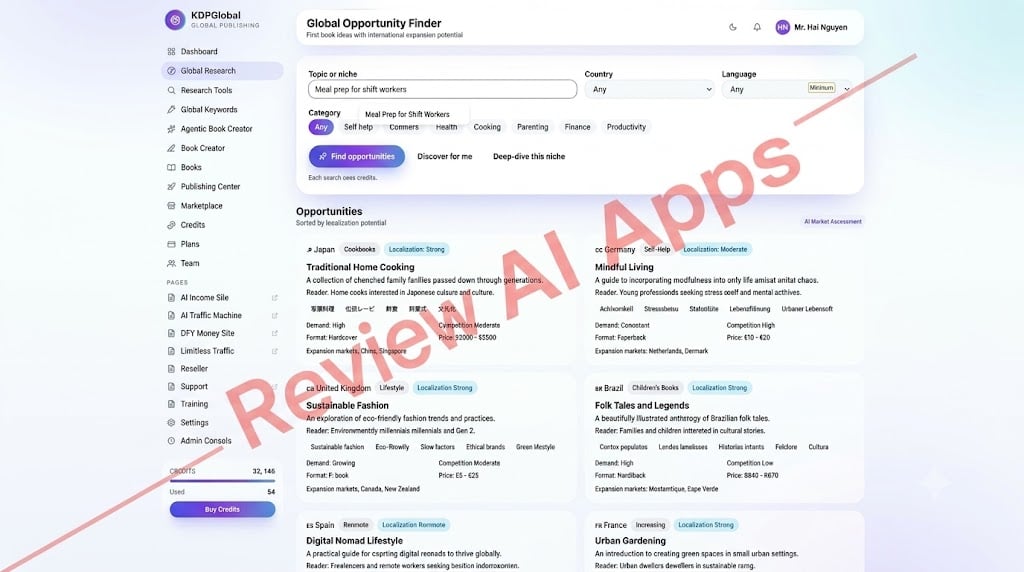
It returned one card per market with a localized title and subtitle, a reader profile, keyword tags, demand and competition levels, format, a local price range and related expansion markets.
A “Discover for me” button suggests new niches by country and “Deep-dive this niche” shows how the idea could be adapted for each market.
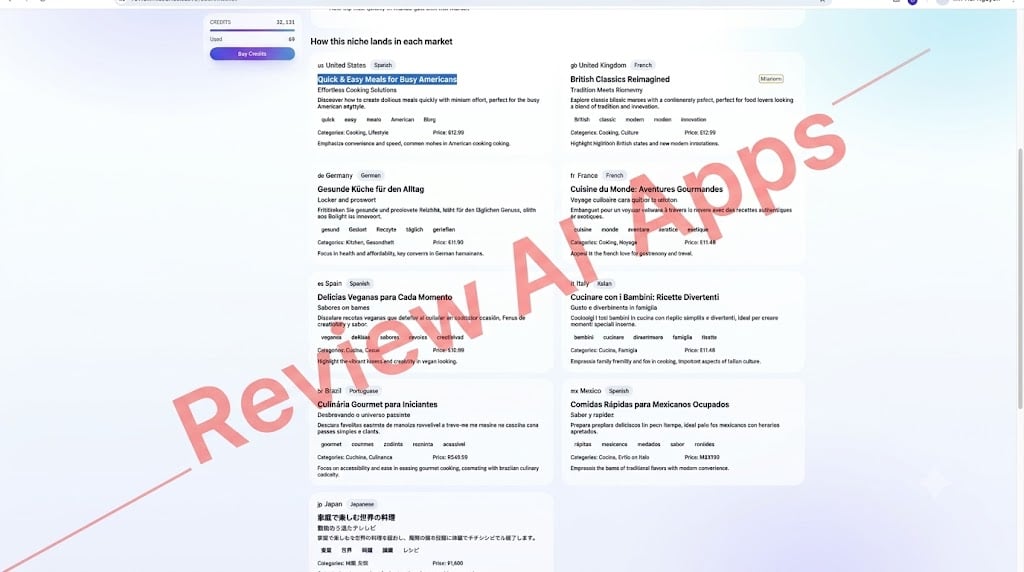
These cards are good for idea generation. But they are called 'AI Market Assessment' and the deep dive went off on a tangent. My meal prep idea became vegan recipes for Spain, cooking with kids for Italy and British classics for the UK.
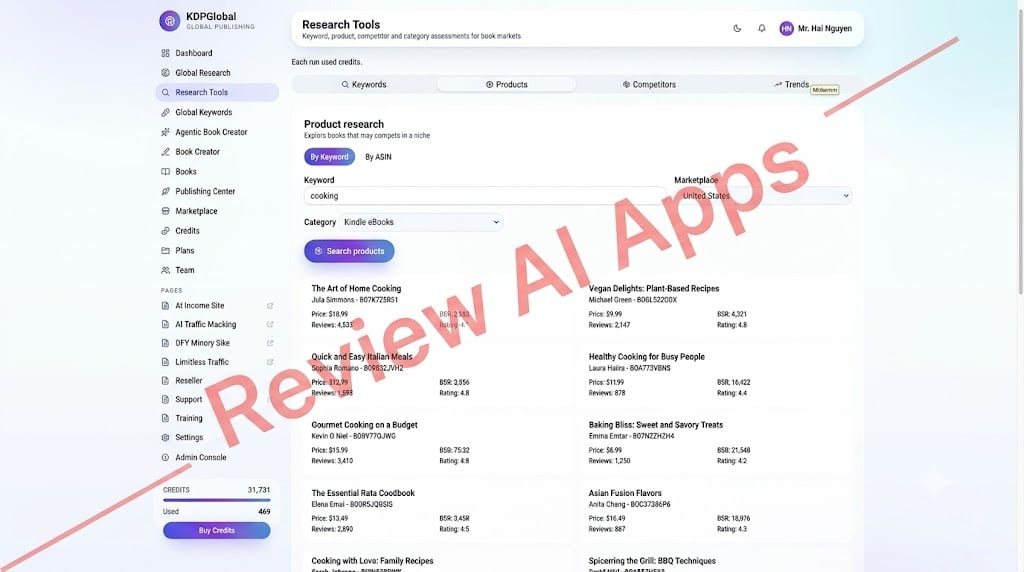
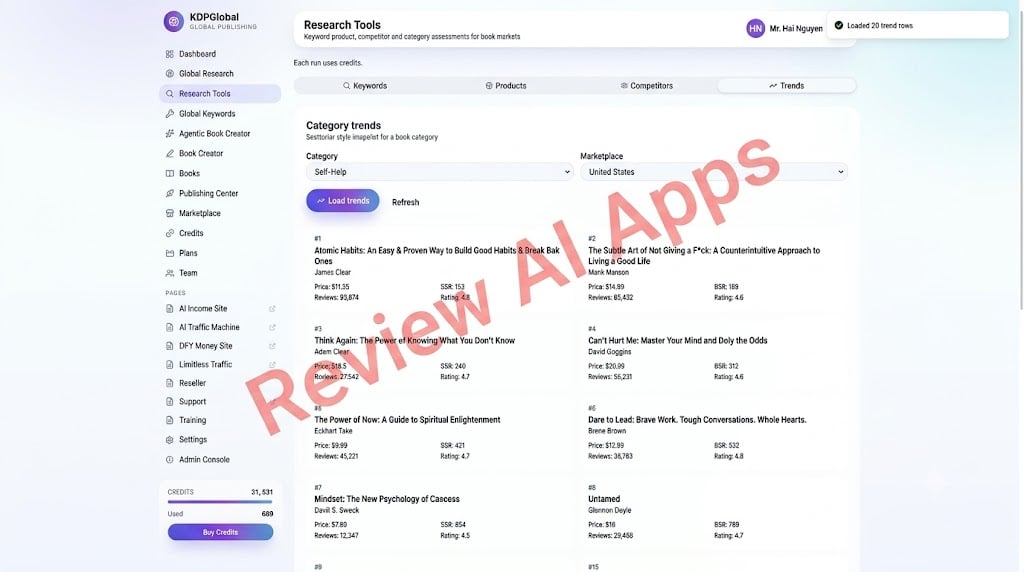
Research Tools section has tabs for Keywords, Products, Competitors and Trends.
Global Keyword Studio creates keywords for each market, tagged with intent and placement (title, subtitle or content).
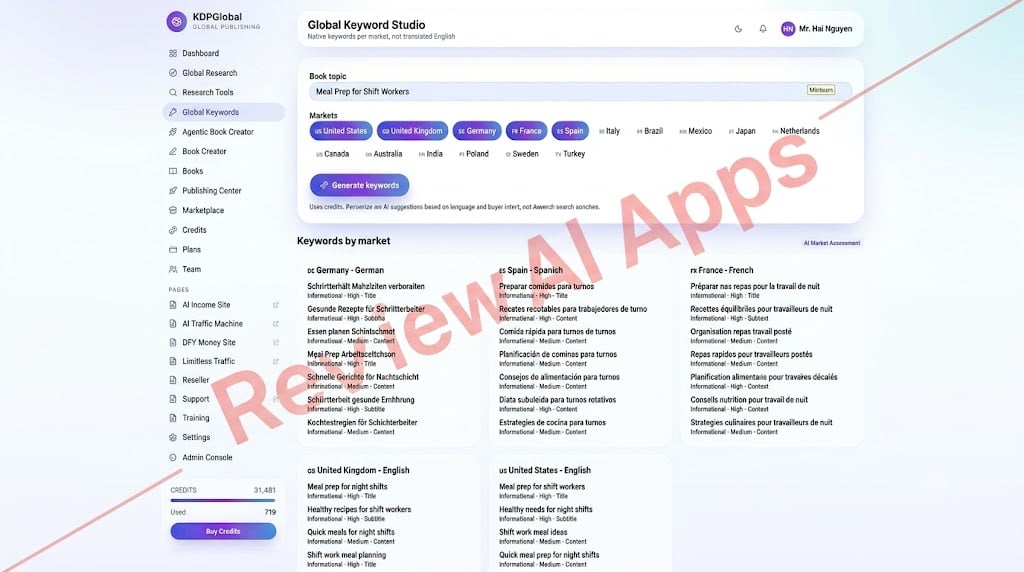
Again, these are AI suggestions, “not Amazon search volumes.” Treat all of this as idea generation, not hard market data.
Step 2: Create the Master Book
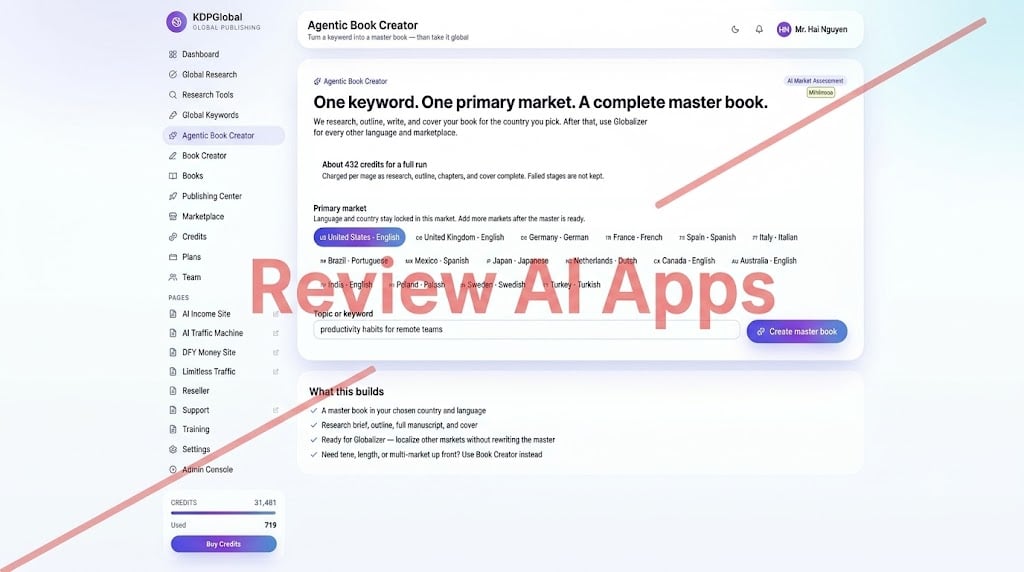
The app, fundamentally, is the Agentic Book Creator. “One keyword. One main market. A full master book.” is its slogan.
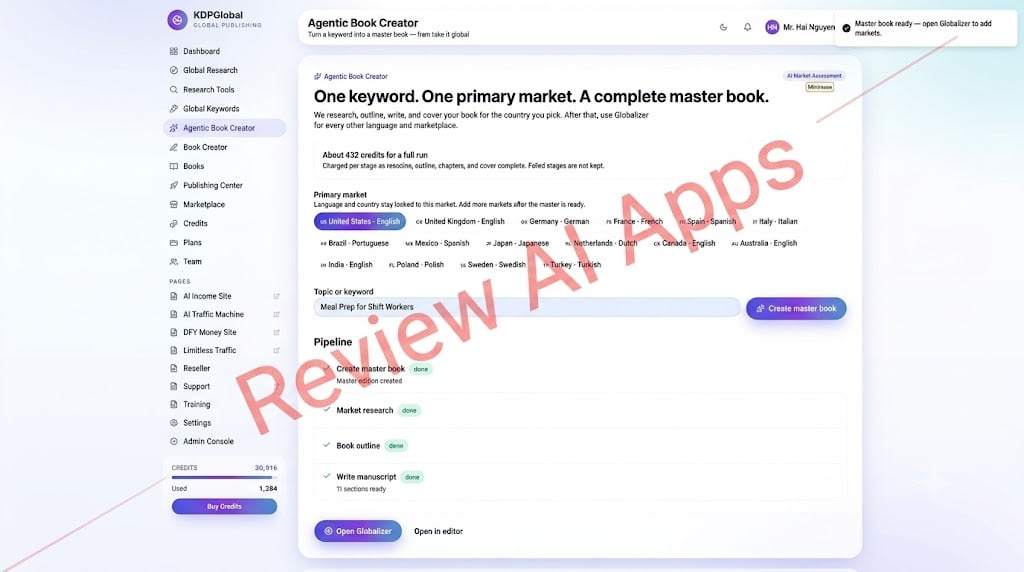
You put in a keyword, select a main market, and press “Create master book.” The app runs a pipeline: market research, outline, then manuscript. The page estimates about 432 credits for a full run, charged by stage. My test was around 565.
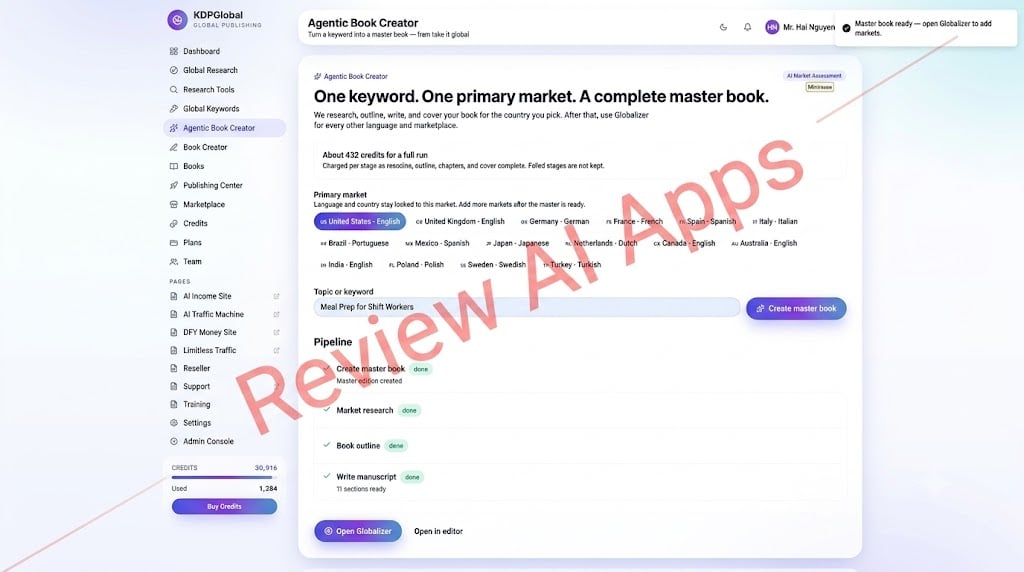
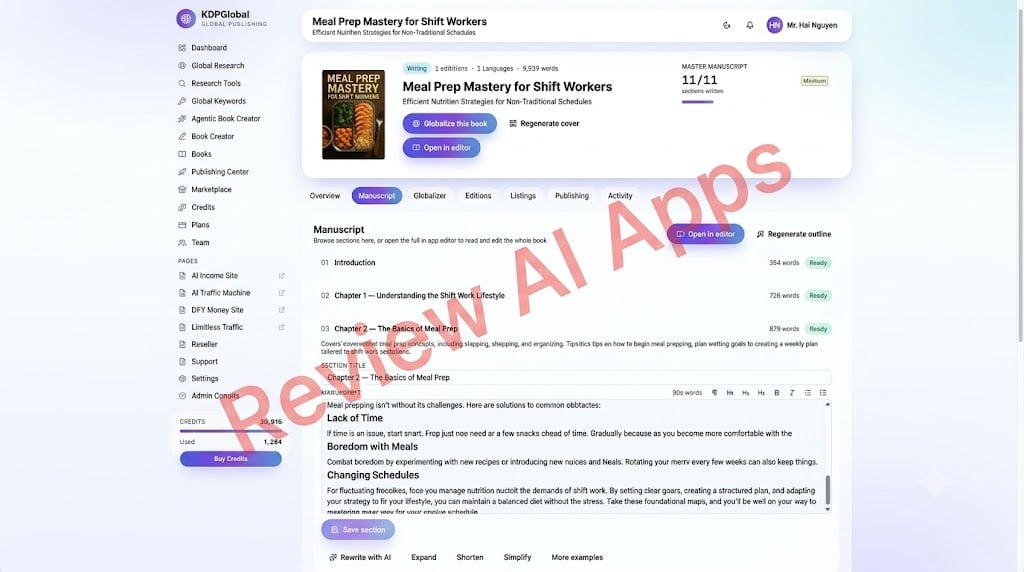
The result was Meal Prep Mastery for Shift Workers: Efficient Nutrition Strategies for Non-Traditional Schedules. It had 11 sections, about 9600 to 9900 words, and an AI cover with a photo of food.
The chapters were between 700 and 900 words long, so this is a short practical guide, not a full-length book. The writing was clear, organized but generic. For example, Chapter 2 addresses such common problems as “Not Enough Time,” “Getting Bored with Meals,” and “Changing Schedules.”
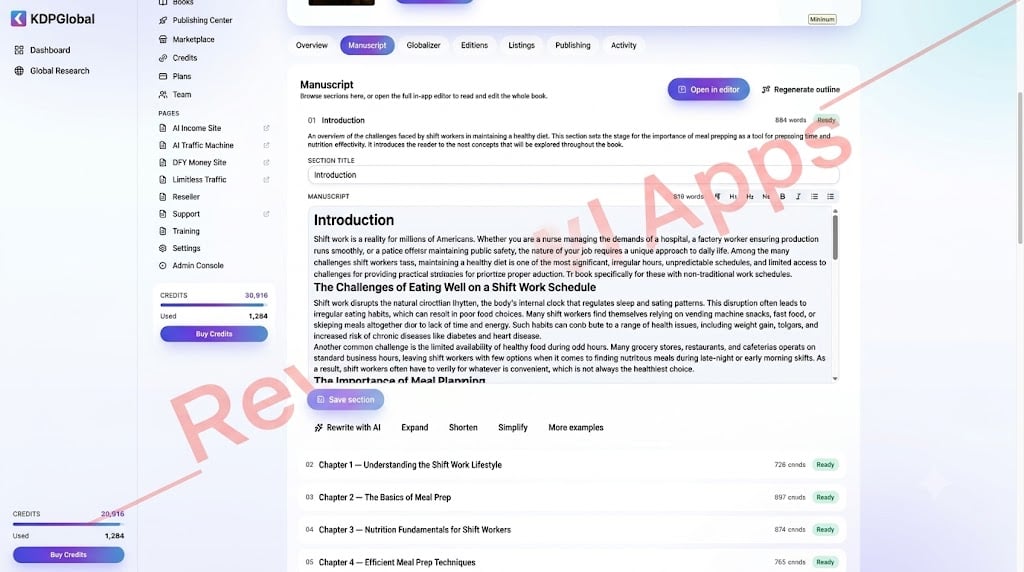
One of the best features of the app is the editor. Open any section. Edit it in a rich-text editor. Regenerate the outline. Use Rewrite with AI, Expand, Shorten, Simplify, and More Examples on a single section. For more control over tone and length up front, there is also a separate manual Book Creator.
Step 3: Internationalize the Book
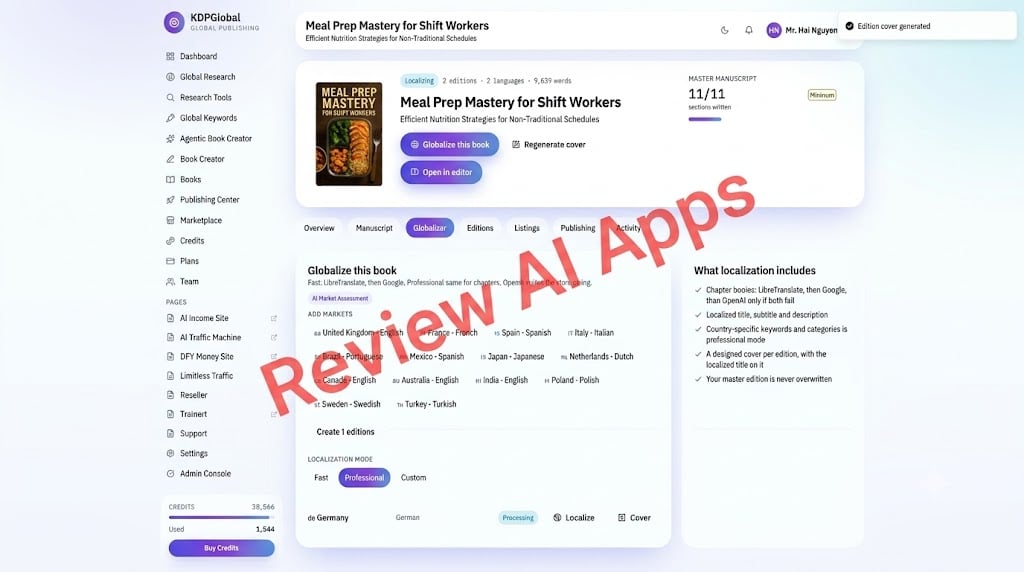
When the master book is ready, the Globalizer allows you to add markets. The app lists 16: US, UK, Germany, France, Spain, Italy, Brazil, Mexico, Japan, Netherlands, Canada, Australia, India, Poland, Sweden and Turkey. You pick Fast, Professional or Custom mode. Each edition has a local title, subtitle and description, its own cover art with the translated title and country-specific keywords and categories in Professional mode. Your master edition is not overwritten.
The detail that matters is how chapters get translated. The app says that it first passes chapter text to LibreTranslate, then Google, and only if both fail does it use OpenAI. This is the old school machine translation. Most German readers just say "Meal Prep" but my German edition came back titled "Meister der Mahlzeitenvorbereitung für Schichtarbeiter", a literal word-for-word translation. One German edition used about 260 credits with its cover.
Step 4 - The Publishing Hub
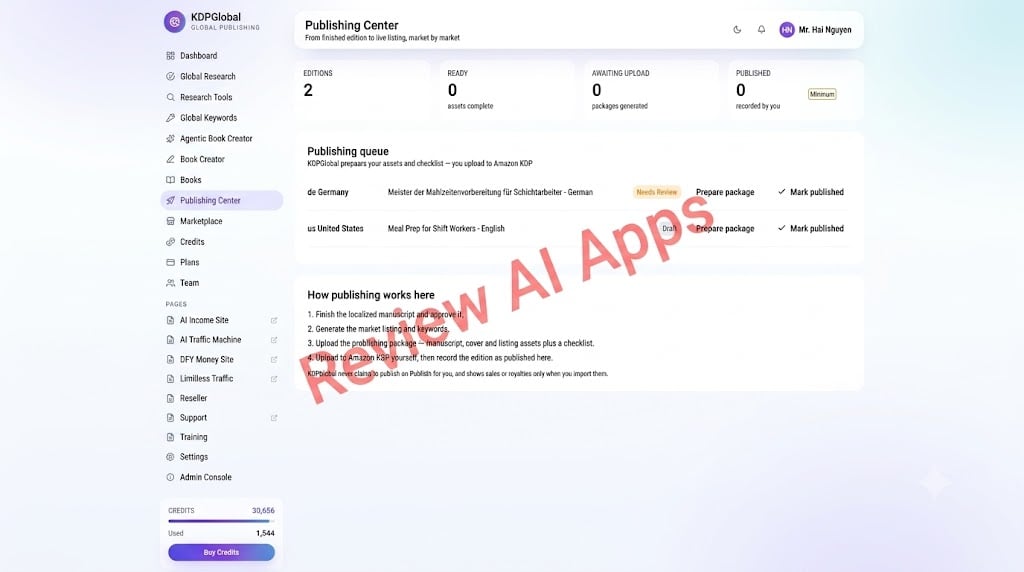
This is where the sales page and the software part company. The Publishing Center shows a queue of editions with status "Needs Review" or "Draft", plus buttons "Prepare package" and "Mark published". And it lists the steps involved: approve the manuscript, create the listing and keywords, receive a package with the manuscript, cover, listing assets and a checklist, upload to Amazon KDP yourself and note that it’s published. The app says it doesn't publish to Amazon for you, and it only displays royalties that you import.
That’s the right way to deal with KDP and keeps your account in line with Amazon’s rules. But it’s not “one click publishes all 10 language editions to all 21 Amazon stores.”
Advantages: Who is KDPGlobal for?
- Existing KDP publishers who want to experiment with foreign language versions of their books without having to start each one from scratch.
- Those new to it who want a guided journey from niche idea to upload-ready package in a single app.
- Freelancers who want to provide short guides, localized listings or translated editions to clients under the commercial license.
“The big advantage is the time. The app manages the outline, first draft, cover, localized listings and upload checklist. The app’s editor facilitates easy revisions. It also prompts you to do a review step before anything goes to Amazon, which is healthier than the'set and forget' story on the sales page.
Where is the sales page
This is the part that counts the most in any honest KDPGlobal review, because the sales page and the actual app don’t add up.
- Self-publishing. On the sales page, KDPGlobal claims to “publish directly to Amazon” and that your book is live “60 seconds later.” The app says the opposite: it prepares the files, and you upload them.
- Quality of translation. The sales page promises "native quality translation" adapting idioms and cultural references. Chapter text goes through LibreTranslate and Google in the app. Every edition should be checked by a native speaker, especially the Japanese.
- Languages. The sales page offers 10 languages including Chinese and Arabic . Neither is available in the app, which offers Polish, Swedish and Turkish instead.
- Unlimited, no limits. Every action costs credits and there is a "Buy Credits" button on every page. A book localized in 10 markets will cost nearly 3,000 credits, with each master book costing about 565 credits and each edition costing 260. Review the plan for the allowance it contains.
- Audio books. The sales page is heavy on AI narration and “one-click” Audible publishing. I saw no narration step anywhere in the book process. Don’t buy KDPGlobal for audiobooks, as ACX (Audible’s primary route) requires human narration as well.
- “Real-time” Amazon analysis. AI estimates the results of the research, as they are stated in the labels of the app itself.
- Claims of income. The disclaimer admits that the "$635 Per Day" you see on the sales page and "$1,000 an hour" on the upsells are not your typical
- Rückerstattungen. The 'conditional guaranty' means you have to prove you did the work and asked for help. Any refund wipes out all the projects on your dashboard.
Pros and Cons of KDPGlobal
Benefits
- Research, writing, covers, translations and listings all under one roof for the low $17 front-end
- Clean, organized workflow from niche idea to upload package
- Powerful section editor with Rewrite, Expand, Shorten, Simplify and More Examples
- Each localized edition has its own title, description, keywords and translated cover
- Master edition is never overwritten
- Manual upload with checklist keeps you KDP compliant
- Includes commercial license
Cons
- Runs on credits even when the sales page says "unlimited"
- No auto-publishing to Amazon, you upload each edition yourself
- Chapter translation is done with LibreTranslate and Google, not native-quality AI
- No Chinese or Arabic, despite both being advertized on the sales page
- No audiobook narration in the workflow
- Research data is AI-guess and deep-dives can go astray
- Books are brief guides of around 10,000 words
- Nine up sells, all with a “no thanks” pop up to hide a lower price - many of which have nothing to do with KDP
Final Verdict: Is KDPGlobal Worth It?
KDPGlobal is a different product, and much better than it's sales page suggests. The sales page is selling a robot that publishes books in 10 languages to 21 stores while you watch Netflix. The app is a neat production tool: it takes an idea, generates a short master book, machine-translates it into localized versions, and gives you the package to upload yourself. That’s helpful, and in the fine print it is honest about its own limitations.
If you go in expecting that, $17 is a fair price to try it out.” Write a book with it, then edit it properly in the built-in editor. Localize only in markets where you can get the translation checked. Upload each edition yourself with the checklist the app provides. Keep an eye on your credit balance; a few full books with multiple editions can add up quickly.
The funnel is mostly a buy on the front-end. OTO1 is the only upsell that actually improves the publishing tool. If you want OTO1, click away first so you see the Premium price of $47 not $167. The other upsells are other business models and you can pass on them.
So, this KDPGlobal review comes down to this: a decent AI publishing assistant with a clever multilingual workflow, marketed with promises of automation, translation quality and audiobooks the software itself doesn’t make. Buy it as a production tool, not a royalty machine, and you'll be a lot happier with it.
Comments
Join the discussionNo comments yet. Be the first to comment.