Blog2Vid Review
Can This AI Tool Really Turn Blog Posts Into Ranking Videos?

Every content creator hits the same wall at some point. You have dozens, maybe hundreds, of blog posts sitting on your site and you know video is where the traffic is right now, but turning even one article into a decent video takes hours you don't have. That's exactly the problem Cyril Gupta and his team at Teknikforce want to solve with Blog2Vid, a new AI tool that's launching in late September 2026 that promises to take any blog URL and churn out a finished video with visuals, voiceover, music and captions in a matter of minutes.
This is a space that Technikforce knows well. Blog2Vid's company has a long history of AI marketing tools, and if you've followed any of their previous launches, you'll recognize the playbook: a front-end tool, a stack of one-time upsells, and a bundle deal for people who'd rather skip the decision fatigue. In this Blog2Vid review, I'll walk you through what you actually get, how much it costs, what actually works when you login and use it, and how the marketing overstates what the tool can realistically deliver.
Blog2Vid Review - Inside The Member's Area
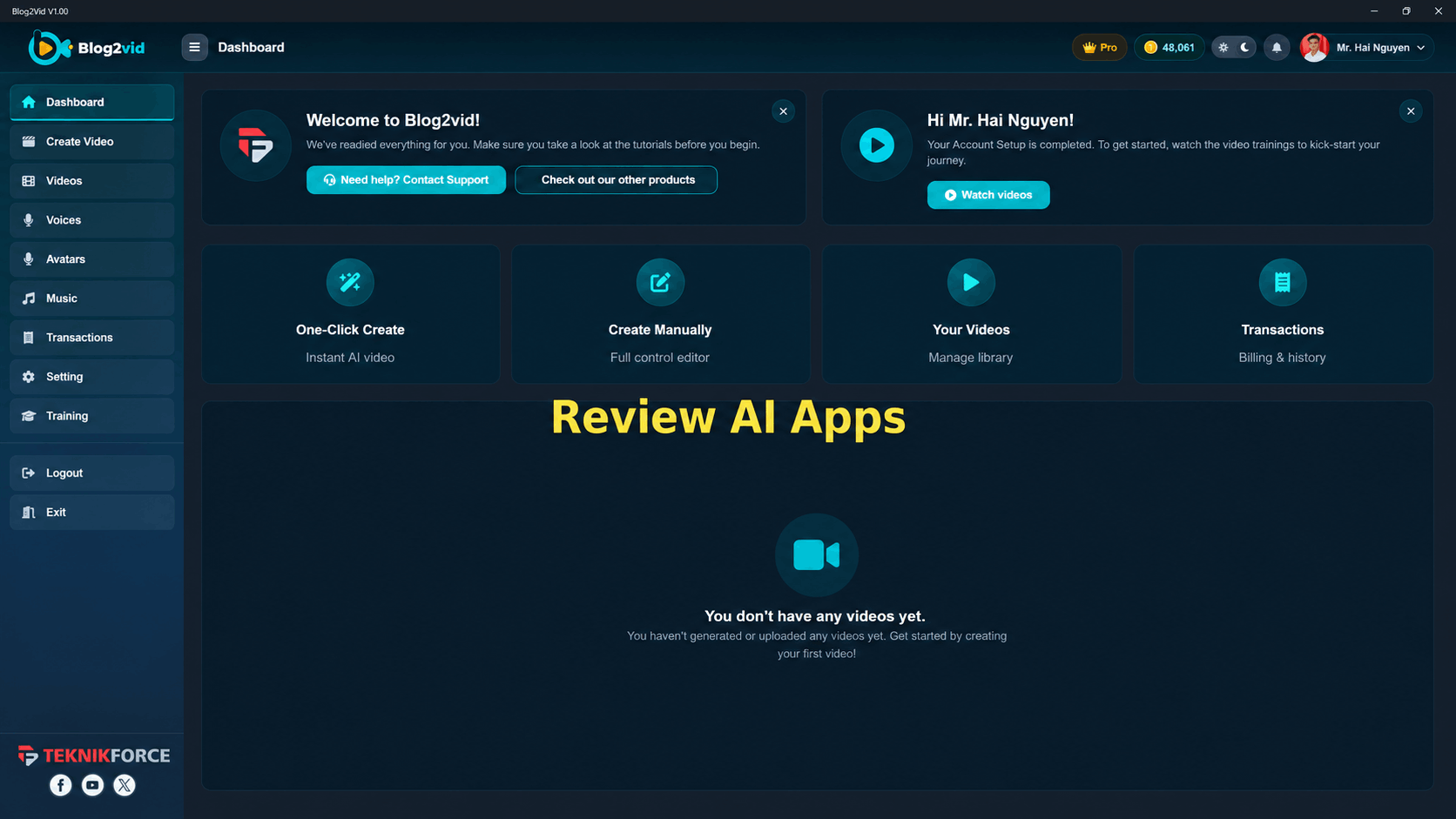
After download the application, this is the member's area
1. Create your Video
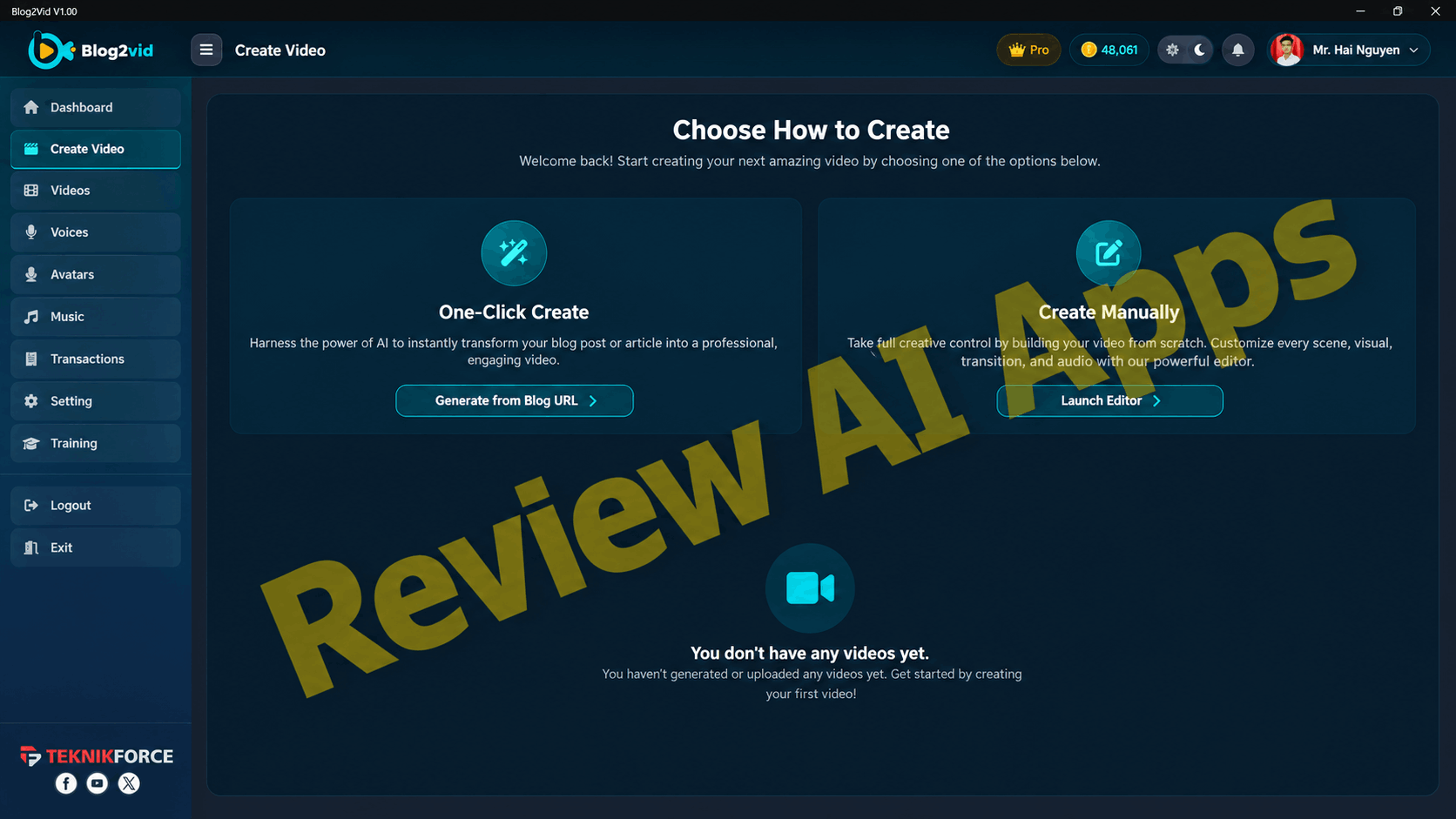
You can use AI to generate your video, or you can create it manually.
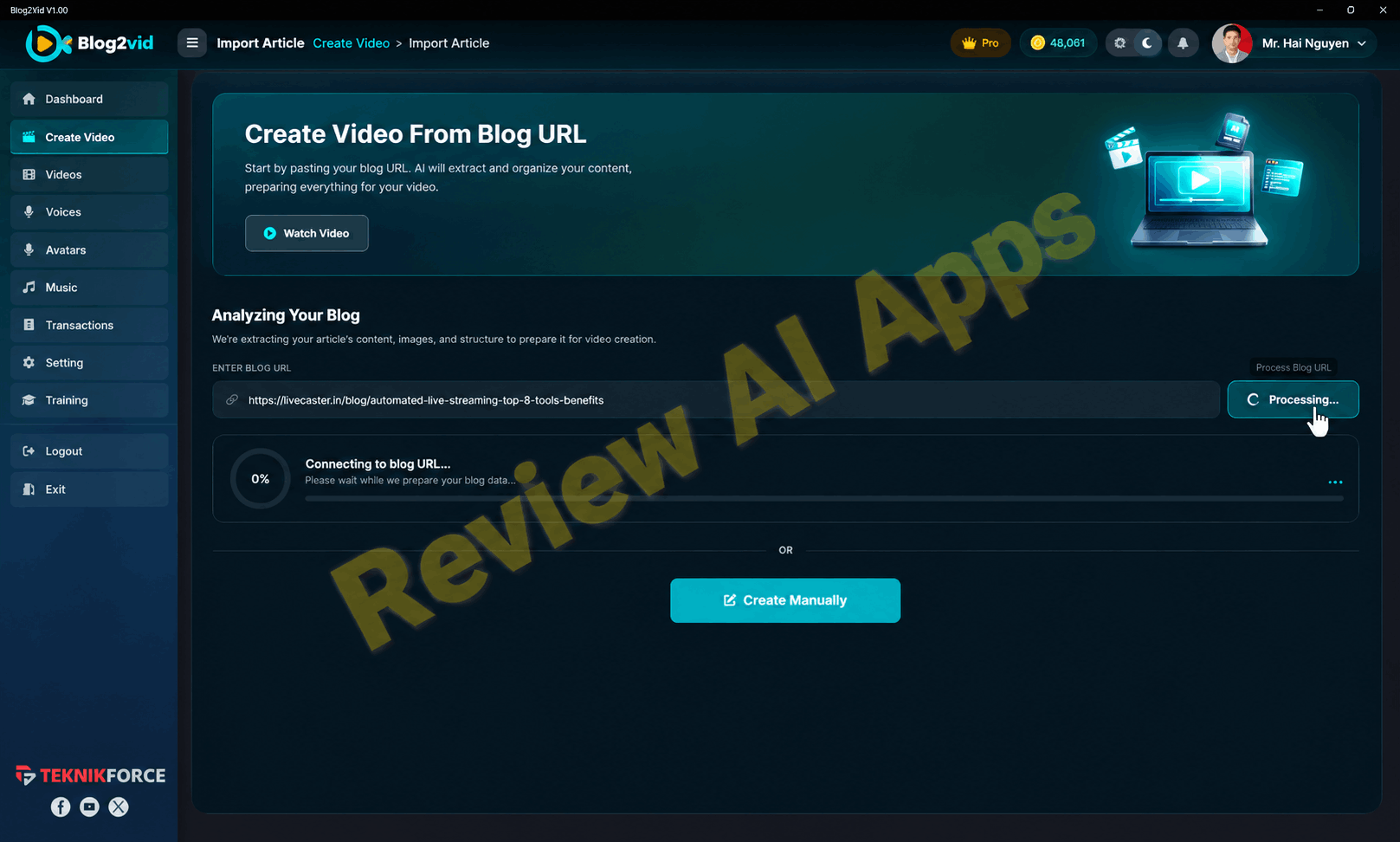
To start, just provide any blog url, the app will fetch the article.
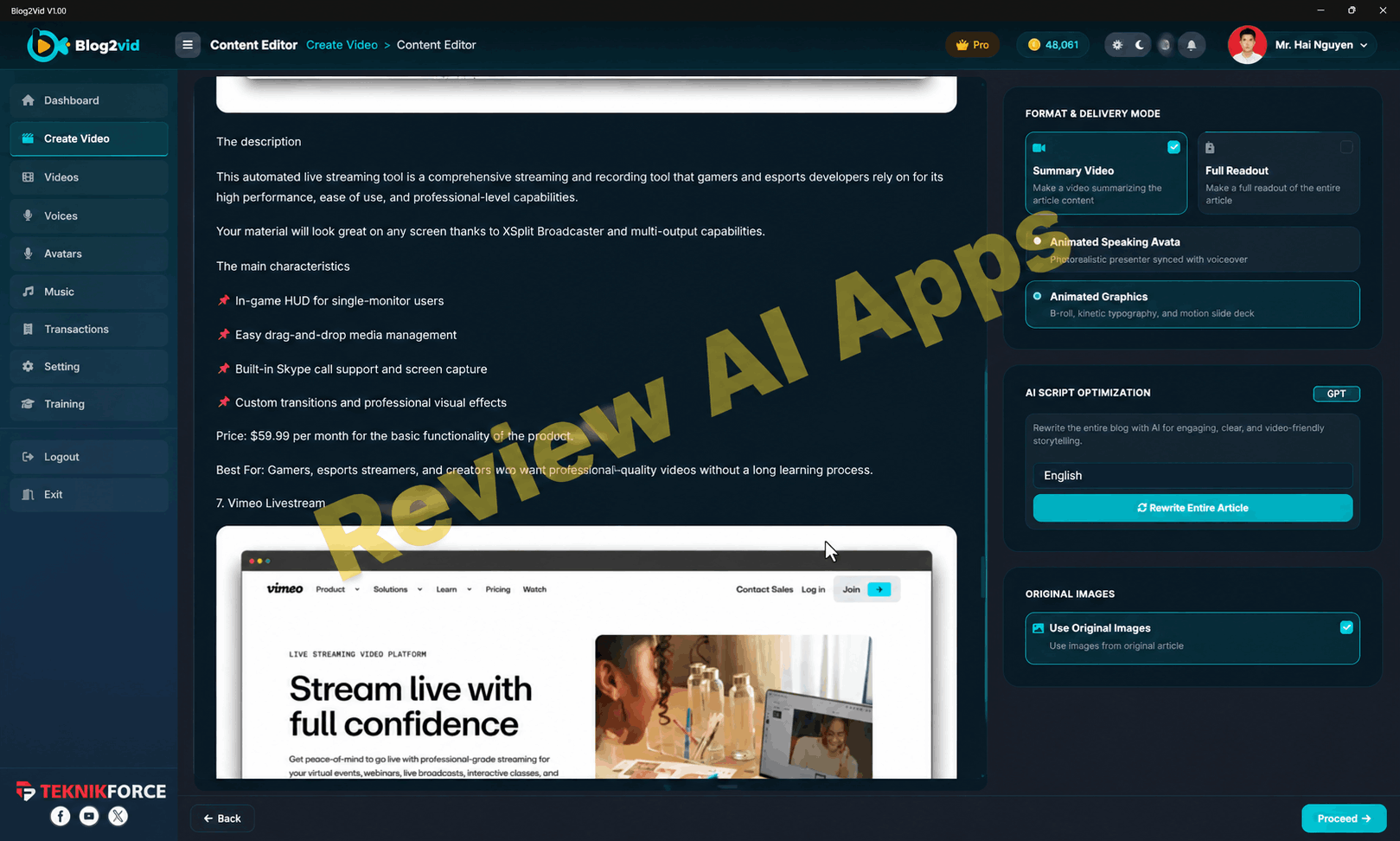
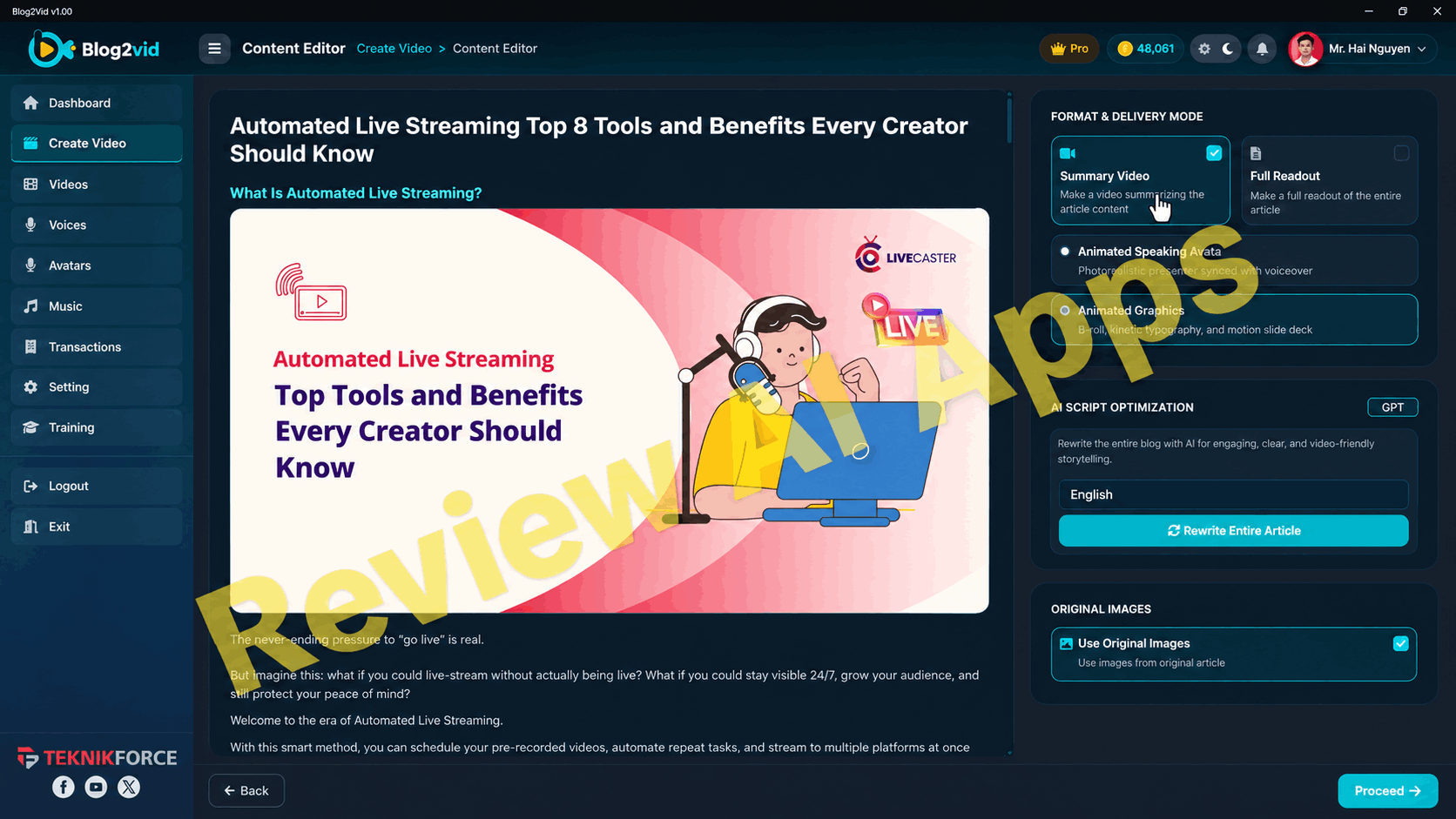
Then, you will visit the content revision dashboard. At here, you can let AI engine to optimize your script or do whatever you want.
Blog2Vid Two Options to Purchase
Before we get into features, it's worth understanding how the purchase works, because Teknikforce structures this different to a simple "buy now" button. When you get to the sales page you are presented two different pathways and your choice will determine the rest of your buying experience.
Option 1: Blog2Vid Elite
The first option is $32 one-time fee for the usual front-end offer called Blog2Vid Elite. This means a nice 20,000 credits for welcome and a limit of 5 videos generated per day. If you select this option, then you are presented with a series of one-time upsells, all of which you can accept or decline individually.
Option 2: The All-Inclusive Deal
The second path is the All-Inclusive Deal, which costs \(297, also one-time. With this choice, the front-end offer is bundled with each of the upsells below into one purchase, and you skip the individual upsell pages entirely. It's a "pay more up front, skip the decisions" option, and it has one small follow-up offer of its own: 140 more resale licenses for \)99.
If You Take the Elite Route: The Upsell Sequence
If you go out on the Elite route, this is what you will be offered along the way.
OTO1: Blog2Vid Pro — $67
The first up-sell is Blog2Vid Pro for $67. This bumps up your credit allowance to 50,000, raises your daily video limit to 30, and unlocks a few features that Elite doesn't: voice cloning, unlimited-length videos (Elite caps you at 25 minutes per video), and two years of free product upgrades.
OTO2: Blog2Vid Reseller — $197
The second upsell is Blog2Vid Reseller for $197. That gets you 70 resale licenses, which means you can sell access to the software itself to other people and keep the money, with Teknikforce handling fulfillment and support on the back end.
OTO3: Articalize Pro — $67
Then there is the third upsell Articalize Pro for $67. This is another tool that is related but different. Rather than create videos from a blog, it extracts content from social platforms like Youtube, Reddit, Quora and X and converts that into original blog articles, including AI graphics and one-click publishing to WordPress.
OTO4: Tarantula Pro — $67
The fourth upsell is the Tarantula Pro for $67. This one is worth a pause, because it's actually not related to video creation at all. Tarantula Pro is a standalone SEO site-crawler and auditing tool, comparable in concept to Screaming Frog. It's built to audit your own site or a competitor's site for technical SEO issues, broken links and ranking opportunities. On its own merits it is a genuinely useful category of tool but has nothing to do with turning blogs into videos and its presence here looks more like a way of boosting average order value than a natural extension of the core product.
Order Bumps
In addition to those four upsells, there are three smaller order bumps that appear during checkout: a 50,000 Credits Boost for $44, a Seller's Pack for $29 and an Unlimited Daily Videos add-on for $14. Worth noting for those closely tracking Teknikforce's launches, these three bumps are priced and named exactly the same as the order bumps on their previous CampaignBuilders launch. That's not necessarily a bad thing, but it does tell you this is a reused funnel template, not pricing built specifically around Blog2Vid's own economics.
Blog2Vid Pricing At A Glance
| Offer | Price |
|---|---|
| Blog2Vid Elite (Front-End) | $32 one-time |
| OTO1: Blog2Vid Pro | $67 one-time |
| OTO2: Blog2Vid Reseller (70 licenses) | $197 one-time |
| OTO3: Articalize Pro | $67 one-time |
| OTO4: Tarantula Pro | $67 one-time |
| Order Bump: 50,000 Credits Boost | $44 one-time |
| Order Bump: Seller's Pack | $29 one-time |
| Order Bump: Unlimited Daily Videos | $14 one-time |
| Blog2Vid All-Inclusive Deal | $297 one-time |
| All-Inclusive Upsell: 140 Extra Licenses | $99 one-time |
What Blog2Vid Really Does
So now that the purchase paths are over, here's what you're actually buying. Blog2Vid - Takes a blog post URL, pulls the article text and any available images, and allows you to use it as is, or have the AI reword it to fit video pacing. From there it maps out a scene-by-scene structure, creates a visual for each scene, adds an AI voice over, layers in background music, slaps on captions, and renders the whole thing into a finished video file ready to upload to YouTube, TikTok, Instagram or Facebook.
Inside the Member Dashboard
I actually went through the member dashboard, instead of just reading the sales copy and the workflow holds up as described. When you sign in you have two options to begin with, One-Click Create where you paste a blog URL and let the AI do all the work, or Create Manually which gives you a full editor to create the video from scratch. Choosing the URL path starts a brief "connecting to blog URL" phase, then disintegrates the article into its constituent scene cards, each of which combines a block of narration text with a generated visual sourced from or inspired by the images in the original article.
Video Style and Format Options
From there you get a real feeling of control. You have the option of a Summary Video that condenses the article into a short highlight reel or a Full Readout that narrates the entire piece. You choose a look. Choose from Animated Speaking Avatar, where a photorealistic presenter delivers the narration on-camera, or Animated Graphics, which relies on B-roll style imagery, kinetic typography and a motion slide deck feel instead. You might also request an AI to rewrite the whole article in a more video-friendly wording, and you can decide if the video has images from the original article, or new ones.
Video Settings and AI Model Choices
Then you set the video settings. You can choose an aspect ratio (square, vertical, or widescreen), a length of time between 15 seconds and 15 minutes, and which AI model does the text and image generation. Here you have a real choice, not just its own in-house model, you have GPT, Gemini, Claude, Grok, and Kimi for text, and GPT, Nano Banana, Flux, Seedream, and P-Image for visuals, each rated by quality and each showing its own per-image credit cost.
| AI Model Category | Options Available |
|---|---|
| Text Models | GPT, Gemini, Claude, Grok, Kimi |
| Image Models | GPT, Nano Banana, Flux, Seedream, P-Image |
Voiceover and Music
Voiceover setup is equally deep. You can select OpenAI's engine or upload a custom voice, choose a target language, set special delivery instructions (such as pace or tone), and choose from eleven named voice avatars, each described by character (crisp and professional, warm and natural, deep and authoritative, etc.) or have the system pick a random one. Music operates in a similar way, with a large library of pre-set tracks tagged with moods across genres such as cinematic, lofi, corporate and acoustic, plus the option to select music generated by AI or that you upload yourself.
Captions and the Scene Editor
Captions also have their own settings screen, including options to show captions, highlight each word as it's spoken, and display emoji. There are 15 named caption style presets, from a clean minimal look to bold, punchy, high-impact text styles clearly modeled on the kind of captions popularized by creators like Alex Hormozi. Once all is ready you land in a scene-by-scene visual editor where each generated image can be separately regenerated with a new prompt, animated into a short video clip (billed separately, at roughly 52 credits per second of animation), or given a pan-and-zoom style motion effect.
The Test Run
In the trial, the final product was a truly complete video: a single run generated a 3 minute 44 second video, using GPT for the text, OpenAI for the voice and Nano Banana for the images, and costing 307 credits. It's worth noting that one rendered video did feature a caption glitch, a garbled on-screen text fragment that didn't align with the spoken narration cleanly, which is the kind of real-world hiccup you should expect to run into periodically with any AI-generation pipeline like this one.
Languages, Formats, and Support Terms
There are a few other details you should know before you buy, beyond the core creation flow. Blog2Vid supports multiple output languages, meaning you can convert the same article into videos for different regional audiences, not just English. Blog2Vid also supports short form content sized for TikTok or Reels, and longer form videos designed for YouTube, as long as they fall under the length limit associated with your plan. You don't lose access to the finished video once a render is complete. They live in a Videos library inside the dashboard, so you can go back, download or regenerate them later. On the support side, Blog2Vid provides a standard 30-day money-back guaranty, 24/6 live chat support and a posted 24-hour ticket response commitment, the same terms carried across the front-end offer and each of the four upsells. That's not unusual for a launch in this category, but it's worth noting that the guaranty window and support channels are the same no matter which purchase path you take.
Where Marketing Oversells Blog2Vid
It wouldn't be a fair review of Blog2Vid if I wasn't honest about where the sales messaging goes beyond what the tool can actually deliver, and there's quite a bit of it here.
The "Rank Number One" Promise
The biggest one is the core promise itself. The sales page headline states that the videos will "rank number one on Google, YouTube and AI Engines." No software, no matter how good its output is, can guaranty a specific ranking position. Rankings depend on competition, domain authority, backlink profiles and platform algorithms completely out of any video tool's control. This is a common overstatement for this entire category of launch product and even Blog2Vid is not immune.
The Testimonials
The sales page also features quotes from famous marketing and SEO personalities, names that should ring a bell for anyone who follows content marketing. Here, it's worth being skeptical: it's far more likely these are general commentary about the value of video for SEO, lifted from unrelated interviews or articles, rather than a specific endorsement of this particular product. Anyone referencing this launch should double check the way those quotes are presented on the live page before treating them as real testimonials for Blog2Vid itself.
The Credibility Stats
Credibility stats on the page, like more than 120,000 users around the world and a 4.9-star rating from more than 200 Google reviews, also don't quite jibe with a product that, at the time of writing, hadn't opened to the public yet. Those numbers are probably referring to the company of Teknikforce as a whole with all of their past products, not proof of Blog2Vid's own track record. That's a big difference.
The "10x" Claim and the Reseller Income Math
The Pro upsell includes a specific claim of a "10x increase in ranking power" which is precisely the type of number that sounds impressive and specific but has no stated methodology or benchmark behind it. And the Reseller upsell gets to the nitty-gritty of your income, showing what you would earn selling various amounts of licenses at various price levels, up to nearly $21,000 for selling all 70 licenses on offer, immediately followed by fine print disclaiming any guaranty of income or success. That's a common pattern in this type of offer and it's worth flagging it clearly rather than repeating the income numbers at face value.
One-Time Cost Versus Recurring AI Costs
Underneath all of this is a deeper question that is worth addressing directly as it is more important than any single exaggerated headline. And that is, how does a one-time payment of $32 to $297 compare to the monthly subscriptions charged by larger AI video platforms like Synthesia, HeyGen or Pictory?
The truth is, it's not a perfect comparison, and knowing why can help you manage your expectations. The larger, enterprise scale AI video platforms charge monthly because there are real ongoing compute costs from the underlying AI providers for every single generation, every voice clip, every rendered frame. In addition to infrastructure, ongoing model upgrades, and support staff that all scale with how much you use the platform. Recurring subscription is how you sustainably pay for that kind of recurring cost.
Although it's sold as a one-time payment, Blog2Vid is still built on that same category of paid AI infrastructure behind the scenes. Which is why it uses a credit system and is not actually unlimited as some of the marketing language would have you believe. In practice, a medium-length video ate up 307 credits, and animating a single image will cost roughly 52 credits per second. All that comes out of a generous 20,000 or 50,000 credit welcome pack, which doesn't automatically replenish with time. The daily video limits baked into each tier – 5 a day on Elite, 30 on Pro, 25 on the All-Inclusive plan – are not a limitation of the software. They're a business decision to protect margins and leave room for future credit top-up purchases, like the 50,000 Credits Boost order bump offered at checkout.
So the one-time price really does pay for the software license itself, and it's a good deal for light to moderate use. But anyone trying to produce videos at any real volume, day after day, will eventually hit the credit ceiling and have to either buy more credits or upgrade tiers. Which is a materially different promise than the "pay once, unlimited forever" impression the sales page tries to create. It's not so much a bait and switch, but it's a gap between the marketing framing and how AI compute economics actually work.
Who Makes Blog2Vid Make Sense For
It's easy to dismiss Blog2Vid as a sales pitch or as hype-checking, but it's actually a useful tool for a specific kind of user. If you're a blogger, content marketer or small agency with a backlog of existing articles and are looking for a quick way to repurpose that content into video without learning video editing software or hiring a video editor, this tool does what it says on the front. You have more control over voice, visuals, captions and pacing than a lot of tools in this price range in this area, and the fact that you get to choose between a few different AI text and image models rather than being stuck with one is a real plus.
Where it makes less sense is for anyone expecting guarantyd search rankings, anyone planning to generate large volumes of video daily without factoring in the credit system, or anyone attracted in primarily by the reseller license upsell expecting easy passive income from reselling access. What doesn't hold up under scrutiny are the expectations set (largely by the sales page itself) of this offer.
Final Judgment
To put it simply, there is a cautiously positive assessment of the tool itself. The feature set is deep for the price point, it works as advertised, and the underlying blog-to-video workflow solves a real, common problem for content creators. Its failure is entirely in the marketing layer around it: unverifiable ranking promises, credibility stats that probably don't apply to this specific product, an unsupported "10x" performance claim, and a one-time pricing scheme which quietly depends on a credit system to stay in business long term.
Blog2Vid is a reasonable pickup at the front-end price. Treating this as a genuinely useful content repurposing tool rather than a guarantyd traffic machine, and going in with realistic expectations that 'unlimited' comes with a credit ceiling attached. Just plan for the possibility that heavier use down the line means buying more credits, because no one-time payment changes the underlying cost of the AI doing the actual work.