AI VideoSongs Review
8 Upsells, Real Costs and Verdict
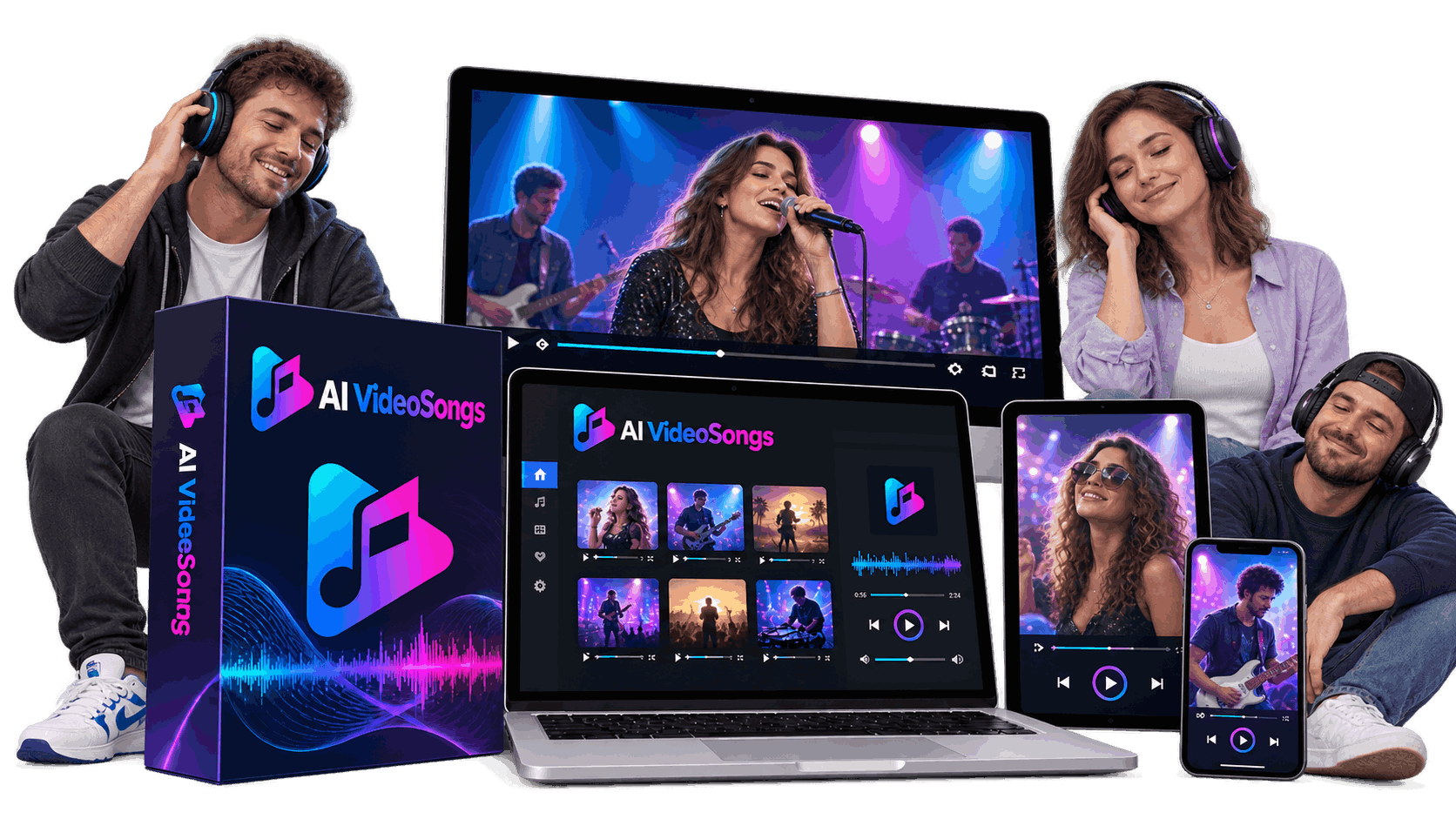
A Quick Look at AI VideoSongs Review
Personalized music videos are having a moment: a birthday song with the birthday girl’s face, a pre-wedding video of the couple ‘singing’ their love story. These things are shared by people, and some people pay. That’s the space AI VideoSongs is aiming to fill.
The same vendor behind TalkGen AI, which launched in September 2026, Akshat Gupta, has a new app called AI VideoSongs. The pitch is straightforward: upload a photo or type in a song idea, pick a genre and a language, hit generate and get back a completed music video with AI-written lyrics, AI vocals, background music, lip-sync and cinematic scenes. The vendor bills it as the “world’s first” app of its kind and guaranties studio-quality results in three clicks.
The launch is scheduled from October 23rd to October 27th, 2026 and the front-end price will be $17. In this AI VideoSongs review I’ll take you through what you get for that $17, how much each of the eight upsells cost and what they unlock, what the member area actually looks like, and where the sales pages cross the line from enthusiasm into pressure. Let’s start with the money. This is where a lot of buyers are surprised.
Product: AI VideoSongs photo/text to music video application
Seller: Akshat Gupta
Launch window: October 23, 2026 (11:00 am EST) to October 27, 2026 -
Front end price: $17 one time
Promo code: VSONGS3 (flat $3 off)
Upsells: 8 OTOs (one time offers)
Usage: 100 credits per music video rendered, cool down time between videos
Additional credits: one-time packs from $27 (3,000 credits)
Refund policy: Most pages are covered by a 30-day money back guaranty
Checkout platform: LaunchPad
Pricing & The Upsell Funnel
This launch does not come in a bundle deal. You buy the front end and then you are led through a chain of 8 upsell pages one after the other. You can accept or reject each one. There’s a hidden coupon on a separate “upgrades” page, and a pay-as-you-go credit option for those who want no upsells at all. Both are discussed at the end of this section.
Front End: AI VideoSongs ($17)
The core app is the front end: music video creator, ten genre categories, AI lyrics and vocals, storyboard and 15 ready-made AI models. Upsell pages tell you the base account is limited, but they never tell you how limited. In the member’s area we see that the app uses credits. There is a “Buy Credits” link in the sidebar. To render a finished music video costs 100 credits. So whatever plan you’re on, your actual output is based on your credit balance.
OTO1: Unlimited Edition Silver \(67 / Gold \)97
The first upsell is for unlimited creation, styles and projects, HD downloads, commercial use and “VIP processing priority.” It has two levels, Silver for $67 and Gold for $97, both one-time payments and with identical feature lists. Most importantly, the account I was using had both the “Unlimited” and “Pro” badges on the dashboard and it still had a credit counter and still charged 100 credits per render with a cooldown timer between videos. “Unlimited” here does not mean unlimited.
OTO2: PRO Edition ($67)
With the PRO upgrade, you get a Music Video Director PRO, a Concert Video Maker, a Bulk Creator, an Advanced Editor, a Remix Engine and priority rendering. The page offers PRO Regular and PRO Full Access as well as two price blocks ($67 and $65), but does not specify which is which. PRO Full Access also includes “White-Label Agency Mode” which overlaps with the agency and whitelabel upsells further down the funnel.
OTO3: DFY Edition (67$)
The done-for-you upgrade assures that your account will be set up by the vendor’s team, loaded with AI music videos and shorts, “proven money making methods” will be implemented, you’ll get one-on-one support and free traffic. It’s $67. This page connects some of the most audacious income claims in the funnel to this offer, like “being paid at least $10k every month,” with no evidence to back it up.
OTO4: AI Workers ($97)
This upgrade bundles 20 AI “agents” for websites, funnels, email, graphics, copy, SEO, chatbots and more. The price is a one-time payment of $97. It has nothing to do with making music videos. Before launch, the page says “96.2% users bought this upgrade” and there’s a “GreenPages” offer leftover from another product.
OTO5: 1st Page Ranker ($47)
The Ranker upgrade is a backlink and indexing tool that will get your videos to the first page of Google, YouTube, Bing and Yahoo. Then the page says “Regularly $97, Today Only $47.” And it boasts “guaranteed” first page rankings in 24 hours and “$2-5k daily” earnings. No tool can guaranty rankings and automated backlinks are exactly what search engines don’t want.
OTO6: 10X Traffic ($47)
The upgrade claims to deliver between 1,000 to 3,000 clicks per day from the vendor’s “traffic pool” to any link the user chooses. The price is $47. It says $500-1000 extra profit a day and shows a 30-day guaranty and a 365-day guaranty. There is nothing to say where these visitors come from.
OTO7: Agency License ($97)
The agency upgrade allows you to create accounts for your clients from your own admin panel, provides you with pre-made sales materials and claims the vendor will take care of support for your clients. It’s priced at $97. In one spot, the page even refers to itself as a “StoreFlucnece Agency License,” another telltale sign of reused copy.
OTO8: Whitelabel License ($197)
The final upsell gives you the ability to rebrand AI VideoSongs with your own name, logo and domain, sell accounts and even run your own launch on JVZoo or WarriorPlus. It’s priced at $197. It’s for marketers who want to sell software.
The Upgrades Page & the Secret 35% Coupon
If you say no to the upsells, you can then locate a “upgrades” page that displays all 8 OTOs again with the code VSONGS35 for 35% off. The discount isn’t visible in the normal funnel. The only code being offered is $3 VSONGS3. Those who say yes to full price will pay more than those who say no and come back later.
Pay-As-You-Go Credits The Non-Upsell Option
If you don't want any upsells there is an easier way - buy credits when you need them. On a “Extra Credits” page the vendor is selling three one-time credit packs. The credits don’t expire, but they are non-refundable.
Starter: $27 for 3,000 credits (30 videos or so)
Pro: 7,000 credits for $47 (around 70 videos)
Enterprise: 50,000 credits for $67 (around 500 videos)
That’s about 90 cents, 67 cents or 13 cents per video at 100 credits per video . Even the Unlimited account is credit metered so a casual user is better off with the $17 front end plus a credit pack than the eight step funnel. One warning: the credit page exists on a different domain and doesn’t name AI VideoSongs, so make sure the credits show up in your account.
The Costs of the Full Funnel
At the prices listed, the front end plus all eight upgrades (Silver tier on OTO1) is around $703. If the 35% code applies to every upgrade, the same set drops to around $463. The $17 front end is where most buyers realistically start.
Inside the AI VideoSongs Member Area
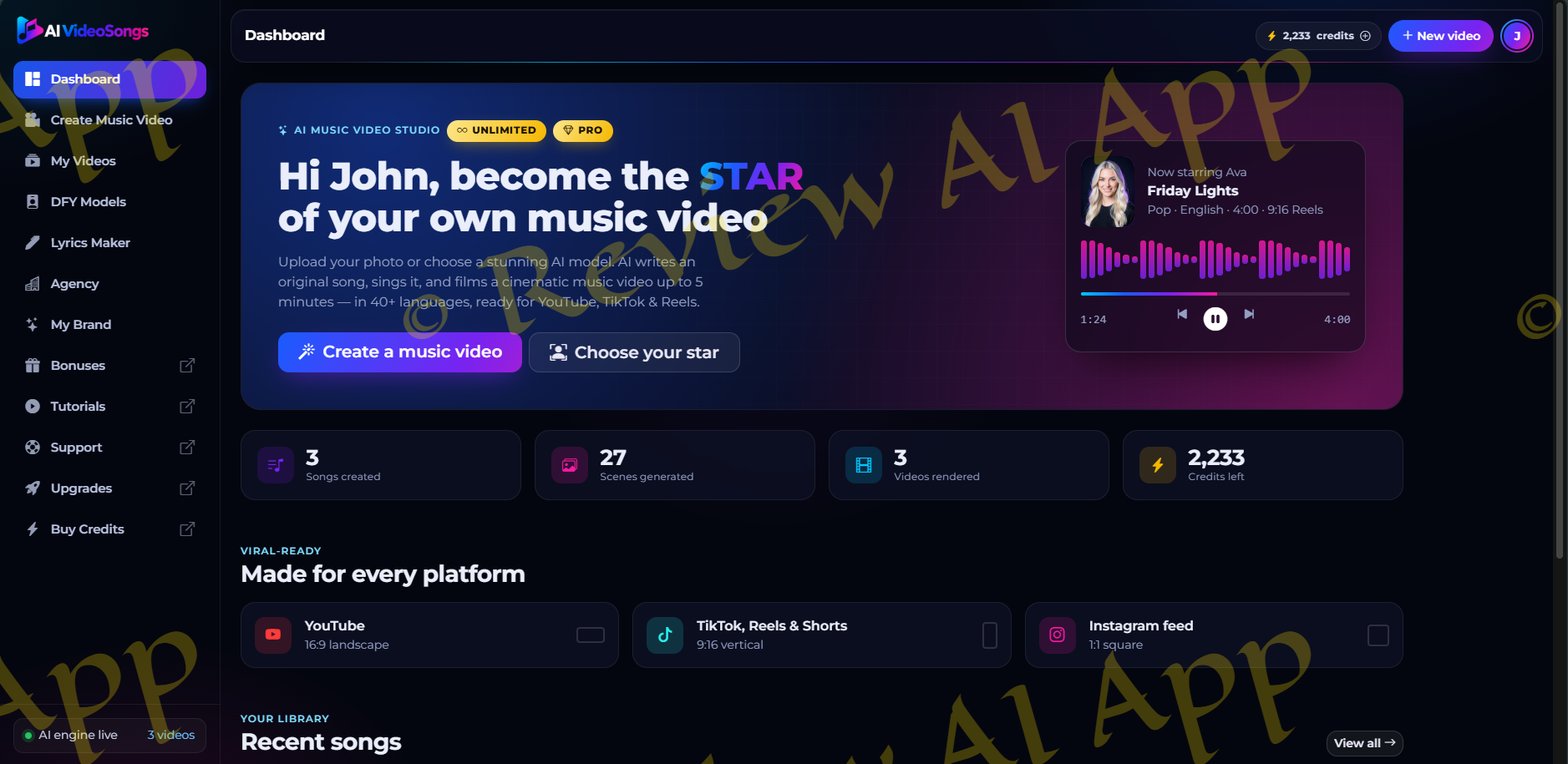
The Dashboard
The dashboard opens with a big banner “become the star of your own music video”, two buttons (“Create a music video” and “Choose your star”) and a demo song player.
Below that are four counters: songs created, scenes generated, videos rendered and credits remaining. There’s also a “Made for every platform” row confirming three output formats: YouTube 16:9, TikTok/Reels/Shorts 9:16, and Instagram 1:1.
The sidebar adds My Videos, DFY Models, Lyrics Maker, Agency, My Brand and Buy Credits. The beginner-friendly layout is clean.
Choose a Category
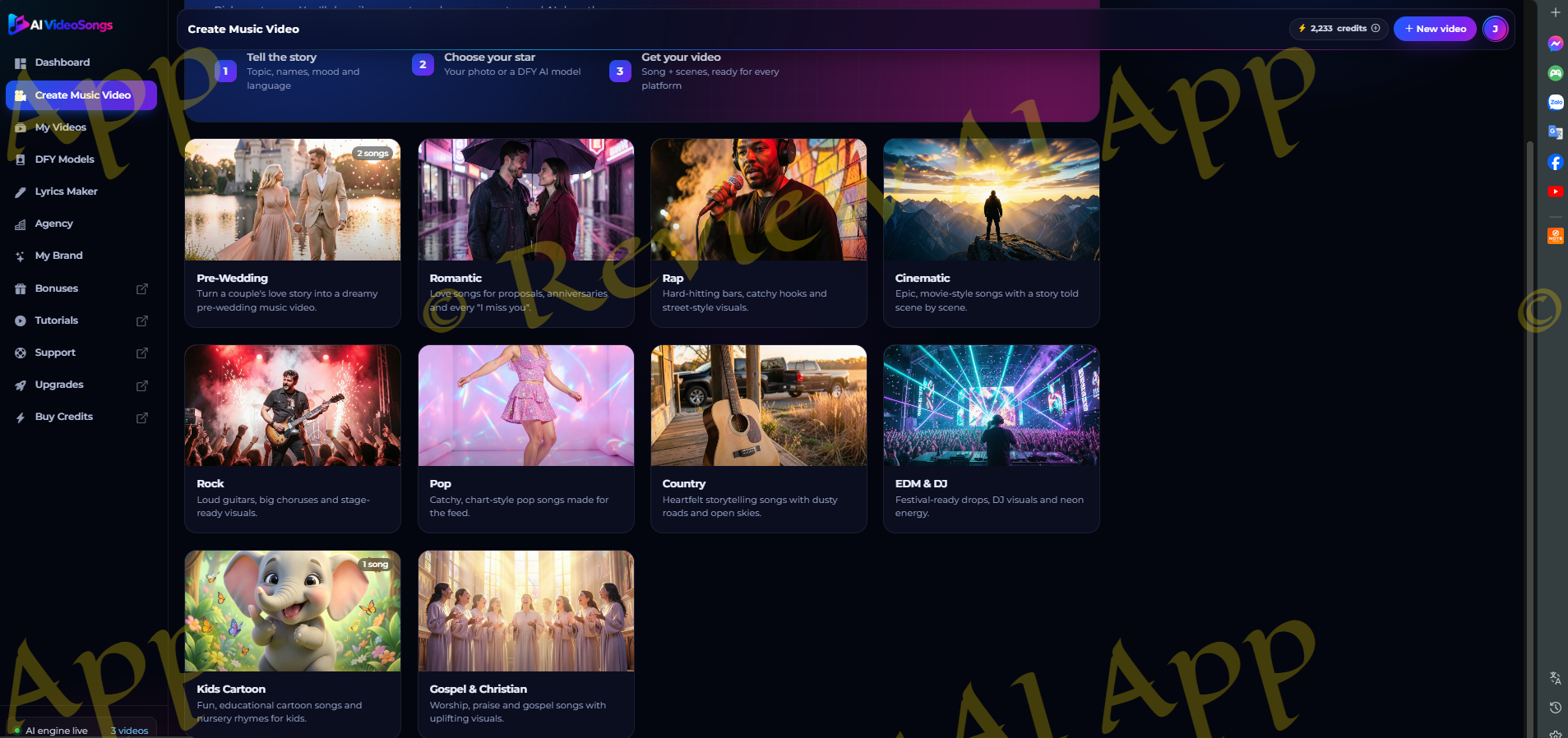
Create Music Video begins with a three-step overview (Tell the story, Choose your star, Get your video) and a grid of ten categories, each with a cover image and short description: Pre-Wedding, Romantic, Rap, Cinematic, Rock, Pop, Country, EDM and DJ, Kids Cartoon, and Gospel and Christian.
The Video Song Maker
I tried the Cinematic category. The writer is one long form divided into four sections, with a live preview card on the right that updates as you complete it.
Block 1. Tell the story
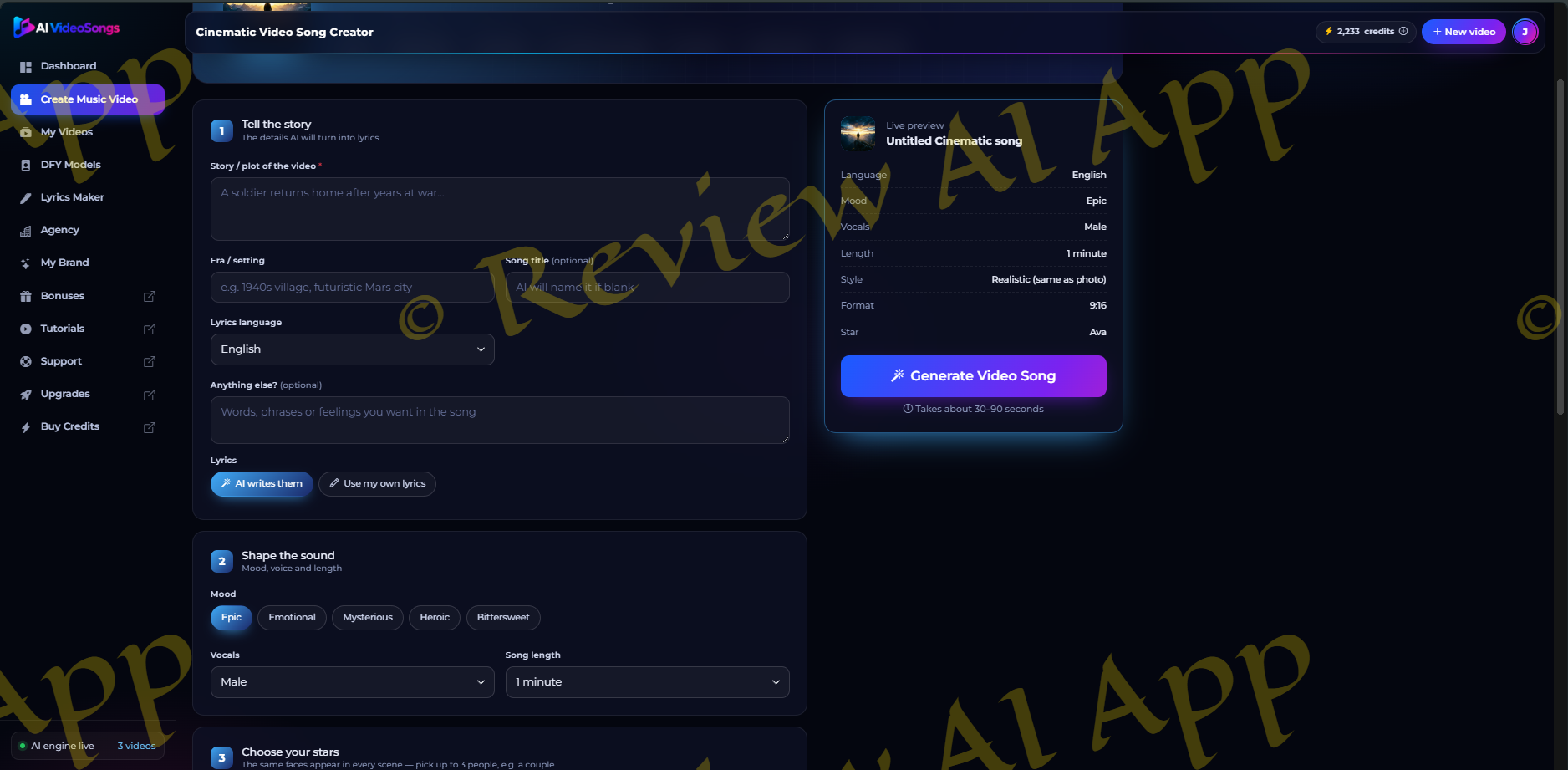
A plot box, an era or setting box, a song title box (optional), a lyrics language dropdown, and a “anything else” box for phrases you want in the song.
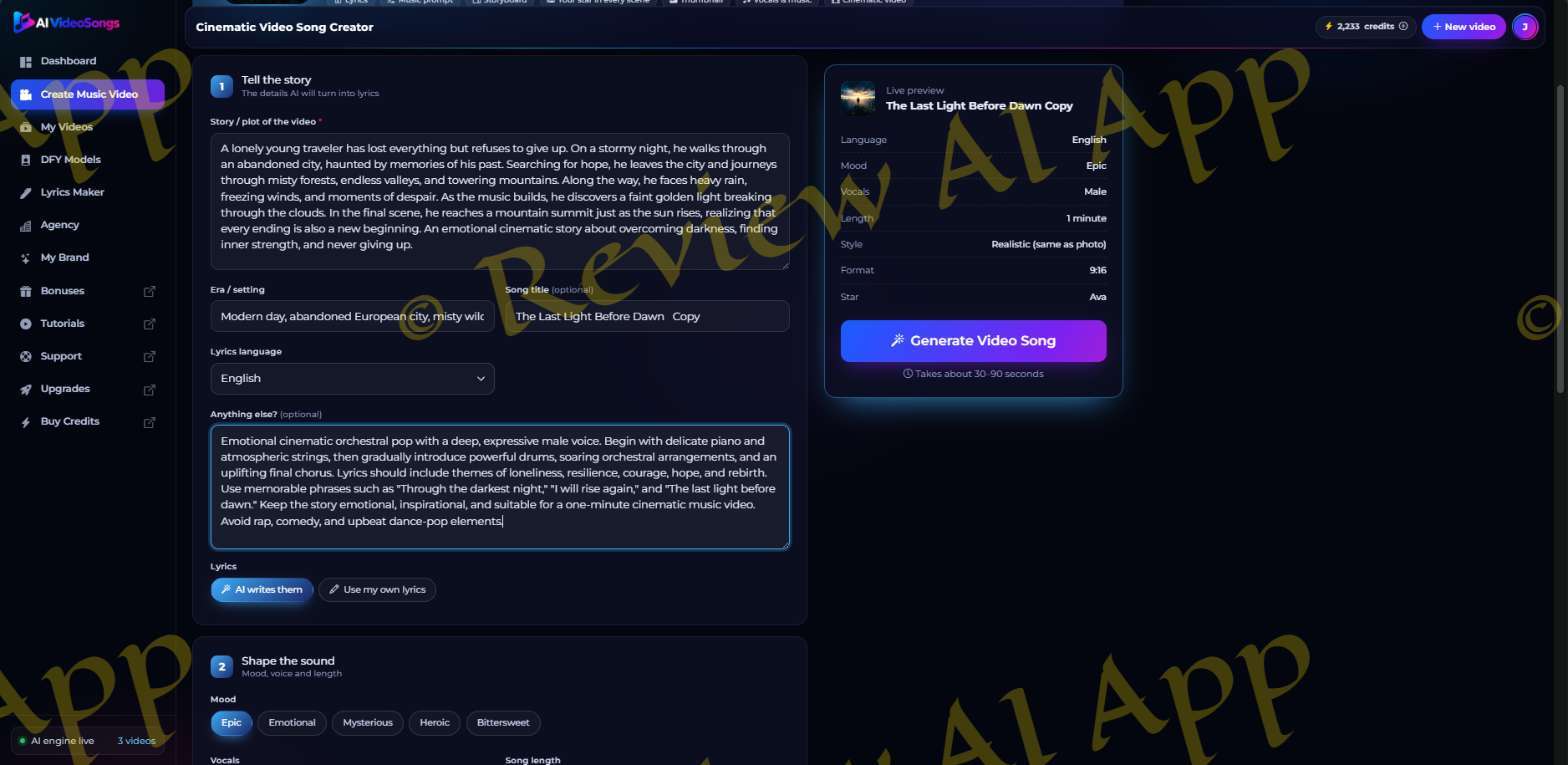
The AI is able to write the lyrics, or you can paste your own.
Block 2, Shape the sound
Mood chips, Cinematic: Epic, Emotional, Mysterious, Heroic, Bittersweet. A vocals dropdown. A song length dropdown set to one minute.
Block 3. Choose your stars
pick an AI model, upload your own photo or let the AI choose. You can pick up to three people, like a couple for a love song, and the app says the same faces show up in every scene. The library has 15 tagged characters ranging from a K-pop idol to an EDM DJ, and includes three child singers.
Block 4, Design the video
six visual styles (Realistic same as photo, Hollywood blockbuster, Epic fantasy, Sci-fi, Period drama, Moody noir) and the three aspect ratios.
The “Generate Video Song” button says it will take 30 to 90 seconds.
The Story Board
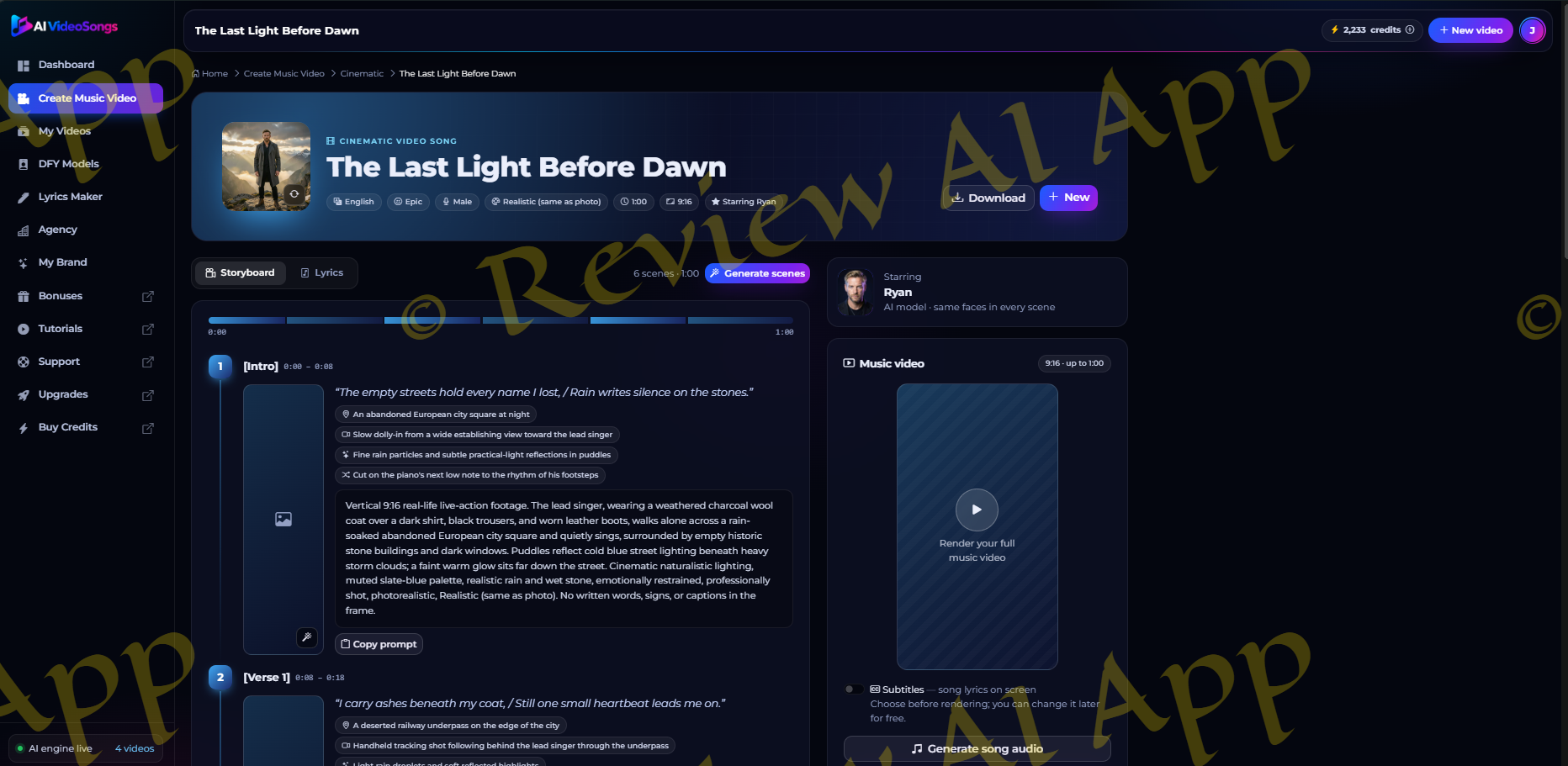
My test was a one minute epic about a lonely traveler walking from an abandoned city to a mountain summit at sunrise sung by a male voice starring Ryan in 9:16. The storyboard broke the minute into six timed sections: Intro, Verse 1, Pre-Chorus, Chorus, Bridge and Final Chorus/Outro. Each section shows the lyrics, tags for location, camera move, effects and transition, and a detailed scene prompt with a Copy button.
The lyrics were on-theme, containing the phrases I requested, and the scene planning was thoughtful. This storyboard is the best thing in the app.
On the right side you get a “Generate song audio” button, a subtitles toggle (set before rendering, but changeable later for free) and the “Render music video” button, which costs 100 credits. There are also two copyable text boxes for a music prompt and a thumbnail prompt. It’s labeled “Use with the lyrics in any AI music generator” for the music prompt.
That label is revealing. AI VideoSongs is a well structured layer that writes lyrics, plans scenes and writes prompts and then runs them through generation models in the background. Music technology, useful but not proprietary.
Create and Render Movie
Click on “Generate scenes” and all six sections of the storyboard are drawn as a vertical still with the status changing to “All scenes ready.” The stills are photorealistic and Ryan’s face, coat and boots are the same throughout from the rain-soaked city square in the intro to the alpine summit in the outro. The consistent character claim passed my test. Each scene also has a refresh icon to regenerate one image.
The slow part is the rendering. I clicked Render music video, and the panel displayed a progress bar (Editing scenes 4 out of 7, 95%) and the note Keep this page open, a full video takes 5-15 minutes. After a few minutes, the finished clip popped up, along with a Download MP4 button. I checked my balance and it was 2233 and then I checked again and it was 2133. So 100 credits. You can turn on subtitles later at no extra cost.
The final MP4 is exactly 60 seconds, 720 x 1280 vertical at 30 fps, stereo audio, about 24 MB. The storyboard is followed quite closely, the intro panning in from the rainy square to a close-up of Ryan singing, then the underpass and forest scenes and the chorus with the planned crane-style reveal of the valley. Ryan - Every shot looks like it's the same person. Each scene is a little animated clip, with some gentle movement of the camera, not anything complex. The song fades out over the last two seconds. 1080p is not okay for TikTok and Reels, 720p is.
Then the surprise came. Below the download button there was a timer that said "You can make your next music video in 26:25 min." So, apart from credits, there is a cooldown between videos, on an account that has both Unlimited and Pro badges. If you were going to be batch producing clips for clients, then the math changes to one finished minute of video, and then a wait of almost half an hour.
AI VideoSongs: What They Can’t Do
The audio expectations should be modified. AI VideoSongs is nowhere near the same league as dedicated AI music platforms like Suno, or voice specialists like ElevenLabs. Those companies train their own models, while AI VideoSongs packages third-party generation into a single workflow, as its “use with any AI music generator” label indicates. Budget AI audio. Not a studio release. “Studio quality” is marketing.
The other issue is limits on usage. So, I have 2,133 credits left on my account - that will make around 21 more videos but you can't do them back to back because of the cooldown. Add 5 to 15 mins rendering time per video and this is a tool for a few clips a day, not a production line. None of this is “unlimited” and the sales pages never say it.
Third, the five minute claim. Default song length is 1 minute. My test project was limited to "up to 1:00." Test how longer songs are treated before planning on 5 minute clips.
Last of all, platform longevity. Every render costs the vendor actual money. One time payment AI apps are often tightening credits over time. Buy it for what it does now.
The Sales Tactics: What I didn't like
And this is the part of the review of AI VideoSongs that I care about the most, because it impacts how much you pay in the end.
The decline buttons, first. The wording of the "no" option on most upsell pages makes you feel stupid for saying no. OTO2 page has "I want to limit my earnings" under the decline button OTO1: "No Thanks I Don't Want To 10X My Income" OTO4: "I'll Work Manually" OTO5: "I'm Happy With Waiting For Long" OTO7: "I dont want everything done for me so that I can reap the profits" This technique is sometimes called "Confirmshaming" and is scammy. No one’s earnings are capped by saying no to a $97 add-on. Feel free to click those decline links.
Secondly, unverified income claims such as “at least $10k a month”, and fake “25 spots left” counters.
Third, the “Unlimited” label on an account with credits and a cooldown timer, and the hidden 35% coupon that rewards people who say no over people who buy right away.
About the vendor Akshat Gupta
Akshat Gupta is a digital product creator who regularly publishes AI apps via launch platforms and can be reached via his Facebook page. His latest offering, TalkGen AI, was an image-to-talking-video app and followed pretty much the same playbook: $17 front end, $67 Unlimited and Pro upgrades, a hidden 35% coupon, and credits in back of the "unlimited" wording. The same template is used for AI VideoSongs, but applied to music.
The vendor ships working software but expects usage limits that aren’t clear until inside the member area.
Pros and Cons of AI VideoSongs
Pro's:
Entry price low at $17 – 30-day refund window
Clean, beginner intuitive interface
10 custom moods for genre categories
15 AI pre-built models, your photo or up to 3 stars per song
Detailed, timed storyboard with lyrics, camera moves and scene prompts
Photoreal scene stills with identical face in each scene
The final MP4 is very close to the storyboard
Affordable pay-as-you-go credit packs that never expire
Six visual styles and three aspect ratios for YouTube, TikTok and Instagram
Disadvantages:
Audio quality isn’t as good as dedicated tools like Suno or ElevenLabs
100 credits per render even on "Unlimited" accounts
Bored for like half an hour between videos
5-15 mins per video rendering time
Default song length is a minute, far from the five-minute headliner
output 720p, not 1080p
Eight upsells most of which have nothing to do with making better music videos
Strong decline-button language on upsell pages
Huge income claims, unproven and fake scarcity
Final Word: Is AI VideoSongs a Good Deal?
AI VideoSongs is a fun, well-designed tool for a very narrow job: turning a photo or simple idea into a personalized music video with no music or editing skills. The creator form is easy to follow. The storyboard takes a story and turns it into timed lyrics and scenes that the final video will follow. The $17 front end is a reasonable experiment for birthday songs, wedding clips, kids and light social posts, and the 30 day refund gives you time to test it.
What it is not is a serious music production tool, or unlimited. The existing AI music and voice platforms are in a different league on audio and every completed video costs 100 credits, takes several minutes to render and has a cooldown before the next one.
Simple advice on the funnel: Get the front end, render a few videos and see if the credits and the cooldown work how you work. If you want more output try a credit pack before any upgrade and see if the VSONGS35 code works before paying full price for an OTO. Skip the ranking, traffic and done for you offers, ignore the income claims, click the decline links without thinking twice. Sentences like “I want to limit my earnings” say more about the sales page than they say about you. This concludes our AI VideoSongs review.
Comments
Join the discussionNo comments yet. Be the first to comment.