AI MovieMaker Unlimited Edition Review
9 Upsells, 1 Big "Unlimited" Question
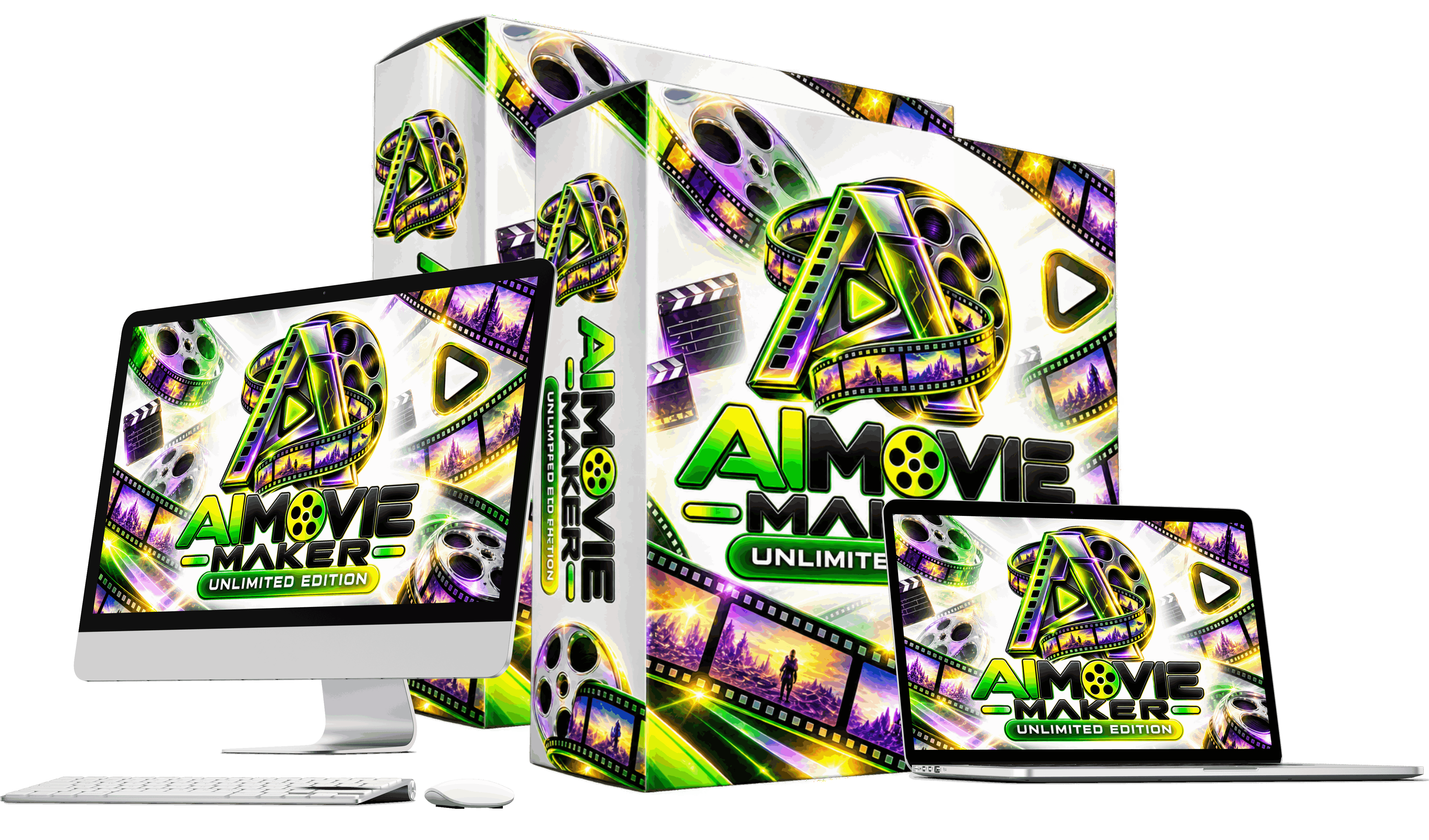
AI MovieMaker Unlimited Edition Review - The Overview
Product: AI Movie Maker Unlimited Edition
Vendor : Uddhab Pramanik
Platform: SoftProHub (moviemaker.softprohub.com)
Launch: October 21, 2026, 11 AM EST, on LaunchPad
Front-end Price: $14.95 One Time Fee
Upsells: 9 OTOs, $47 to $197
Bundle Deal: not available in this launch
Guaranty: 30 Days Money Back Guaranty
Best for: beginners creating narrated, template-based story videos for YouTube and social media
Pricing and the Upsell Funnel
The front end is the doorway, priced at $14.95. Behind that are nine upsells that total well over the price of the main product.
No Bundle Deal or FastPass for this launch. There is only one way to buy – buy the front end, then take each upsell one at a time, accept or decline. There is no discounted package to get everything at once.
At the time of writing, the detailed upsell pages weren’t fully published, so the descriptions below are based on the upsell names and what I could see in the member area.
Front End AI Movie Maker Unlimited Edition ($14.95)
The front end is a one-time payment with lifetime access, no monthly fees & a 30-day money back guaranty. It allows you to access the core movie workflow: movie templates, scene generation, narration and the final movie merge. The key question is how much of the “unlimited” promise sits here and how much sits in OTO1. I return to that later, because it is important.
OTO 1: Unlimited ($67)
The most important upsell, and a question for its name. The front end is already called "Unlimited Edition", but the first upgrade is also called "Unlimited". The most probable reading is that the $14.95 version has usage limits not mentioned in the sales copy, and OTO1 removes them. If you are going to make videos regularly, count this upgrade into your real cost.
OTO2 DFY ($47)
DFY stands for Done For You and most likely refers to the “Done For You” section in the sidebar. Such upsells usually involve ready-made projects, scripts or channel assets. Helpful for beginners, but not necessary to use the core tool.
OTO3: Movie Channel ($97)
This appears to match the "MovieSite OTT" in the sidebar. OTT is a streaming style website similar to a little Netflix type page to host your own movies. Having a site and having viewers are two different things. Traffic is still your job.
OTO4: Shorts Viral Machine ($67)
This one is designed for YouTube Shorts, Instagram Reels and TikTok. The front-end feature list already promises auto-cutting movies into short clips, so it’s not clear which short-form features need this upgrade. I would consider auto-cutting as an upsell feature until the vendor tells me otherwise.
OTO5: Monetize Master Plan ($197)
This is the highest priced item in the funnel, at $197. Judging by the name, it's probably a training or strategy package that shows you how to make money with your AI movies. Training can help, but it’s not software. If all you want to do is make videos, this is the easiest upsell to skip.
OTO6: Agency ($97)
The Agency upgrade usually allows you to create and serve up client accounts, meaning you can offer video creation as a service. This only makes sense if you already have clients or a clear plan to get them.
OTO7: VIP Business Edition ($47)
This probably corresponds to the “Enterprise” section in the sidebar. Enterprise plans often come with additional features, higher limits or business tools. It is one of the cheaper add-ons at $47 but its precise content was not clear in my account.
OTO8: Franchise ($97)
The Franchise upgrade typically gives you resale-style rights, meaning you can sell access to the software under the vendor’s system and pocket the profit. This is not a creative tool, this is a business opportunity product.
OTO9: Whitelabel ($197)
Whitelabel is the highest level. Typically it allows you to re-brand the software as your own and sell it to your own customers. My review account was at the Whitelabel level so I could see all of the sections in the sidebar. To a front end buyer these features will be invisible.
The True Cost of the Full Funnel
That’s the simple math. Front end is $14.95. The nine upsells add $913 . Buy them all, and it comes to $927.95, or about 62 times the front-end price.
Not every buyer will buy every upsell, nor are they obligated to. A more realistic working setup is the front end + OTO1 Unlimited, which is $81.95. That’s the number I’d use to determine whether this tool is a good value, not the $14.95 headline price.
How Does AI Movie Maker Unlimited Edition Work
Let's see what's inside the app. Member area is dark with green highlights and a long sidebar menu. The major sections are Dashboard, Trending Genres, Movie Ideas, Script Writer, Movie Creator, My Movies, Voice Studio, Movie Producer, Poster Studio, Max Edition, Done For You, MovieSite OTT, Unlimited Traffic and Enterprise. This is what the workflow looks like from start to finish.
Step 1: The Dashboard
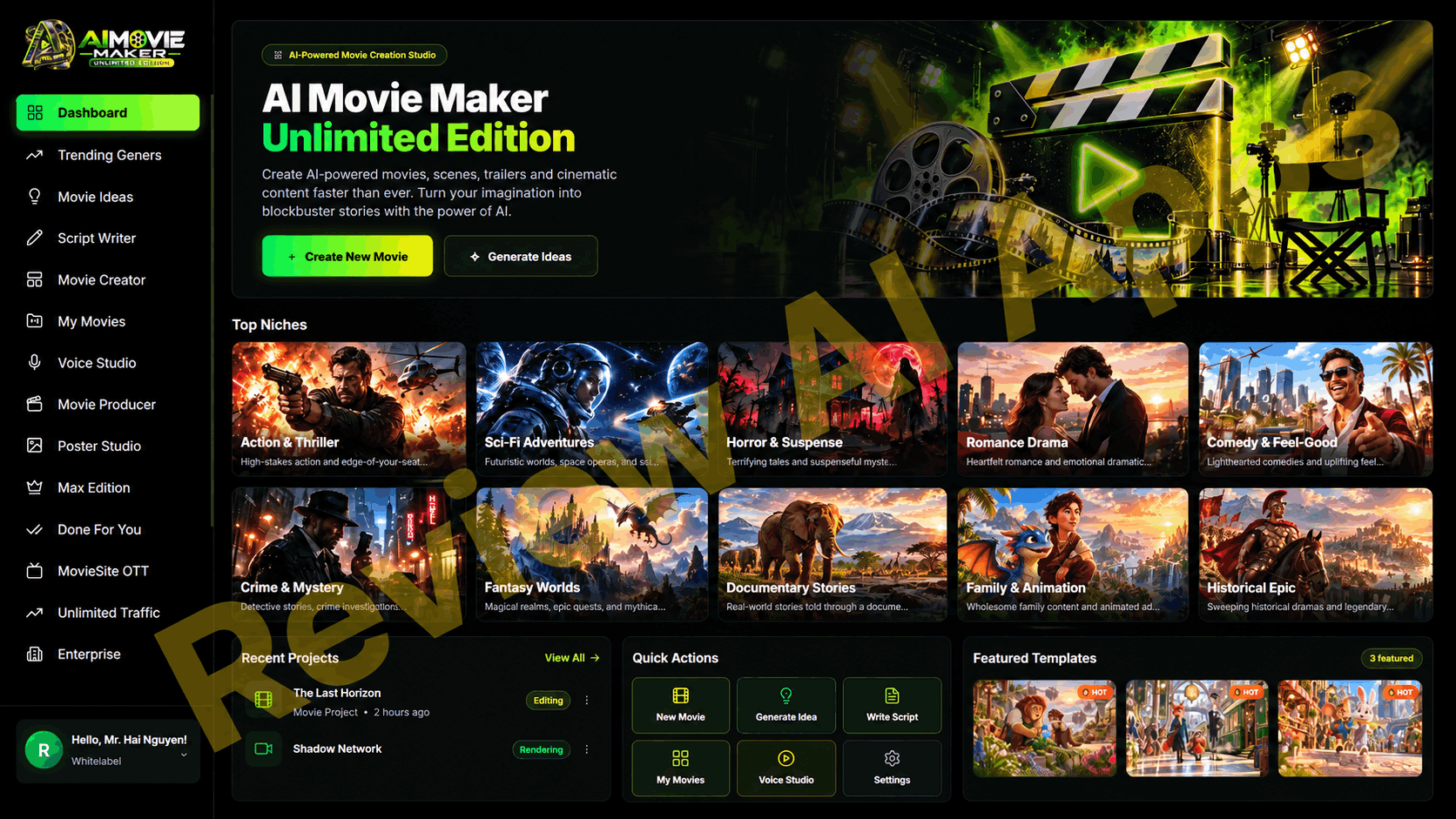
The dashboard opens with two buttons, Create New Movie and Generate Ideas, and a Top Niches section featuring ten genres from Action and Thriller to Historical Epic. Below that are Recent Projects, Quick Actions, and Featured Templates. It’s clean and easy to follow even for a first time user.
Step 2: Top Genres
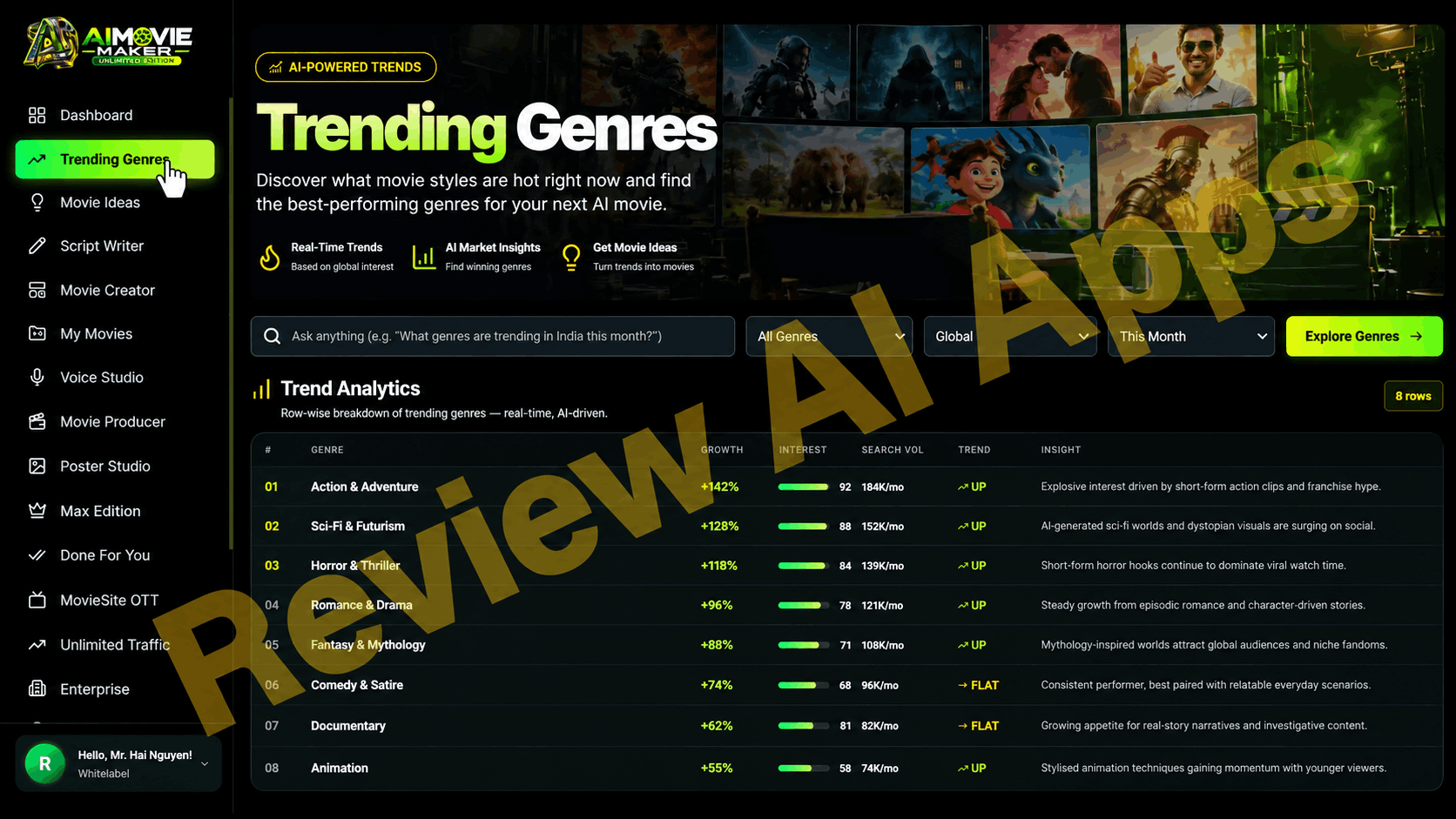
This page shows a “Trend Analytics” table that includes genre, growth percentage, interest score, monthly search volume, a trend arrow and a short insight for each row. You can also type a question, filter by genre, region and time period and click on Explore Genres.
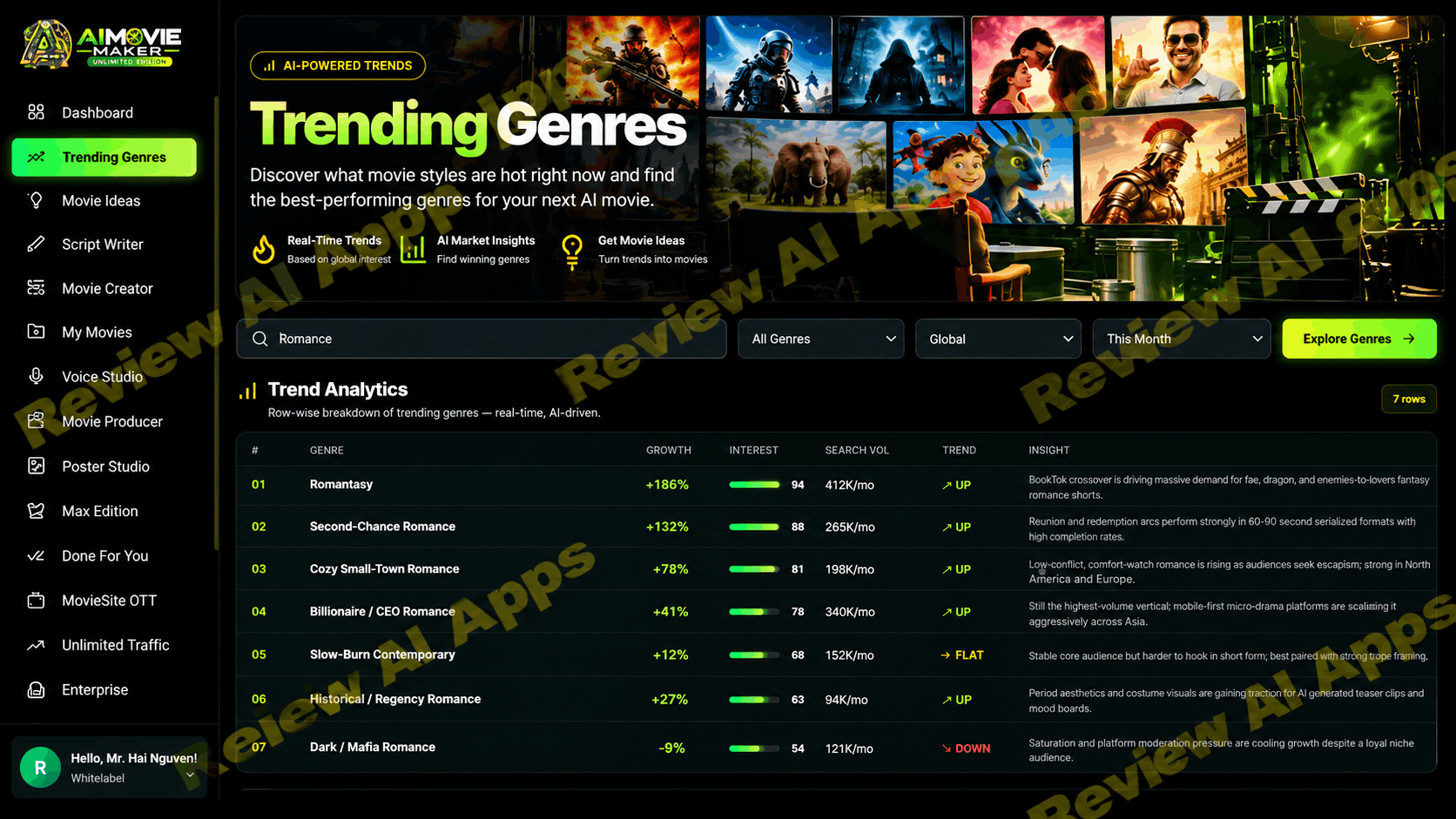
I typed in “Romance” and it gave me a new table of sub-genres: Romantasy, Second-Chance Romance, Billionaire or CEO Romance, etc. with numbers for each.
Seems good. No data source is visible. Scores step down very nicely. New tables come up instantly for any keyword. These are probably AI generated estimates, not actual market data. Use it for brainstorming, not research.
Step 3: Ideas for Movies and Script Writer
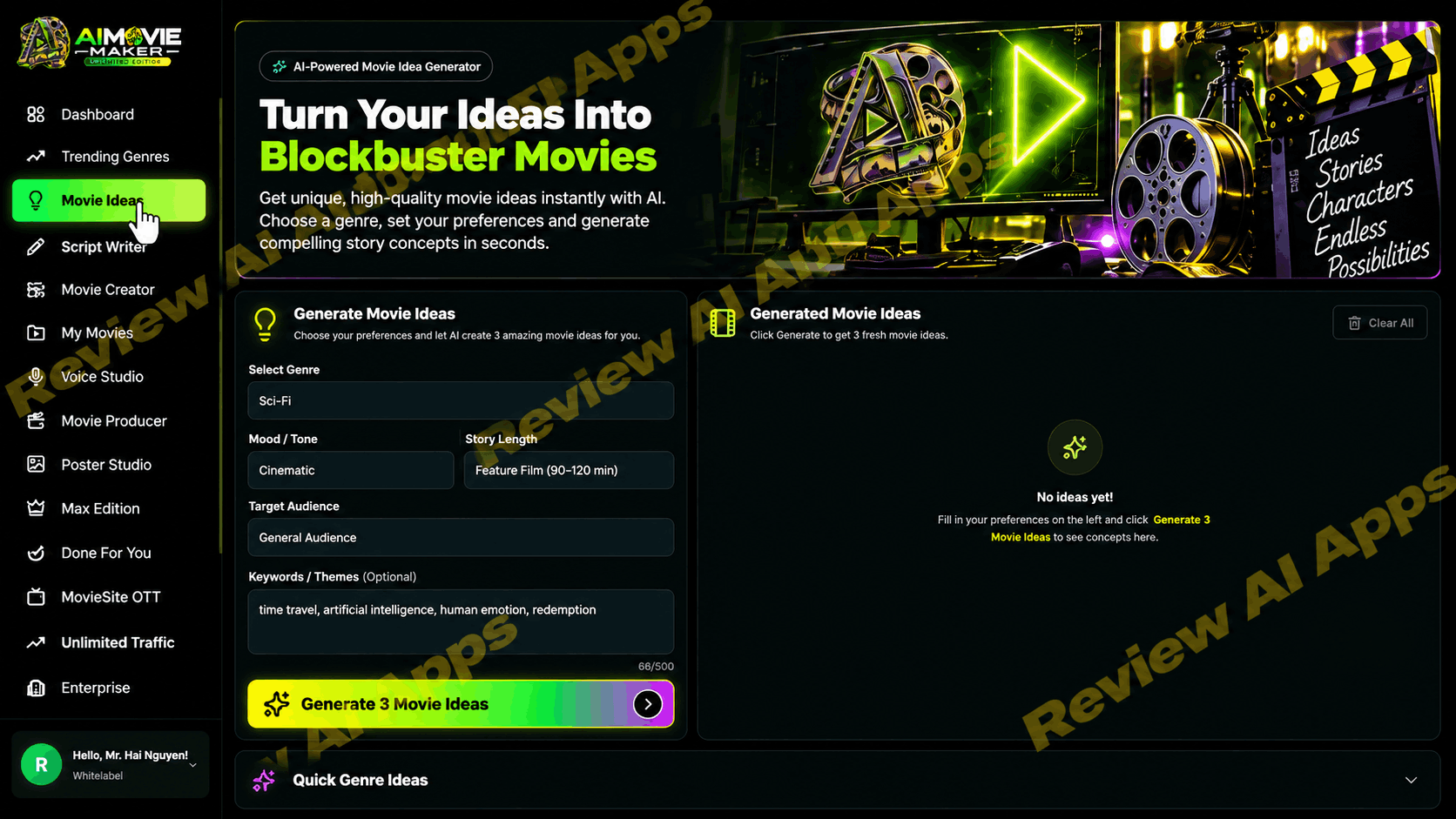
Movie Ideas is a simple form Select genre, mood, story length, audience and optional keywords, then click Generate 3 Movie Ideas. The length option “Feature Film (90 to 120 min)” only affects the story concept. It does not mean the app will make a 90-minute film. Then a script writer helps turn the concept into a written script.
Step 4: Movie Maker & Templates
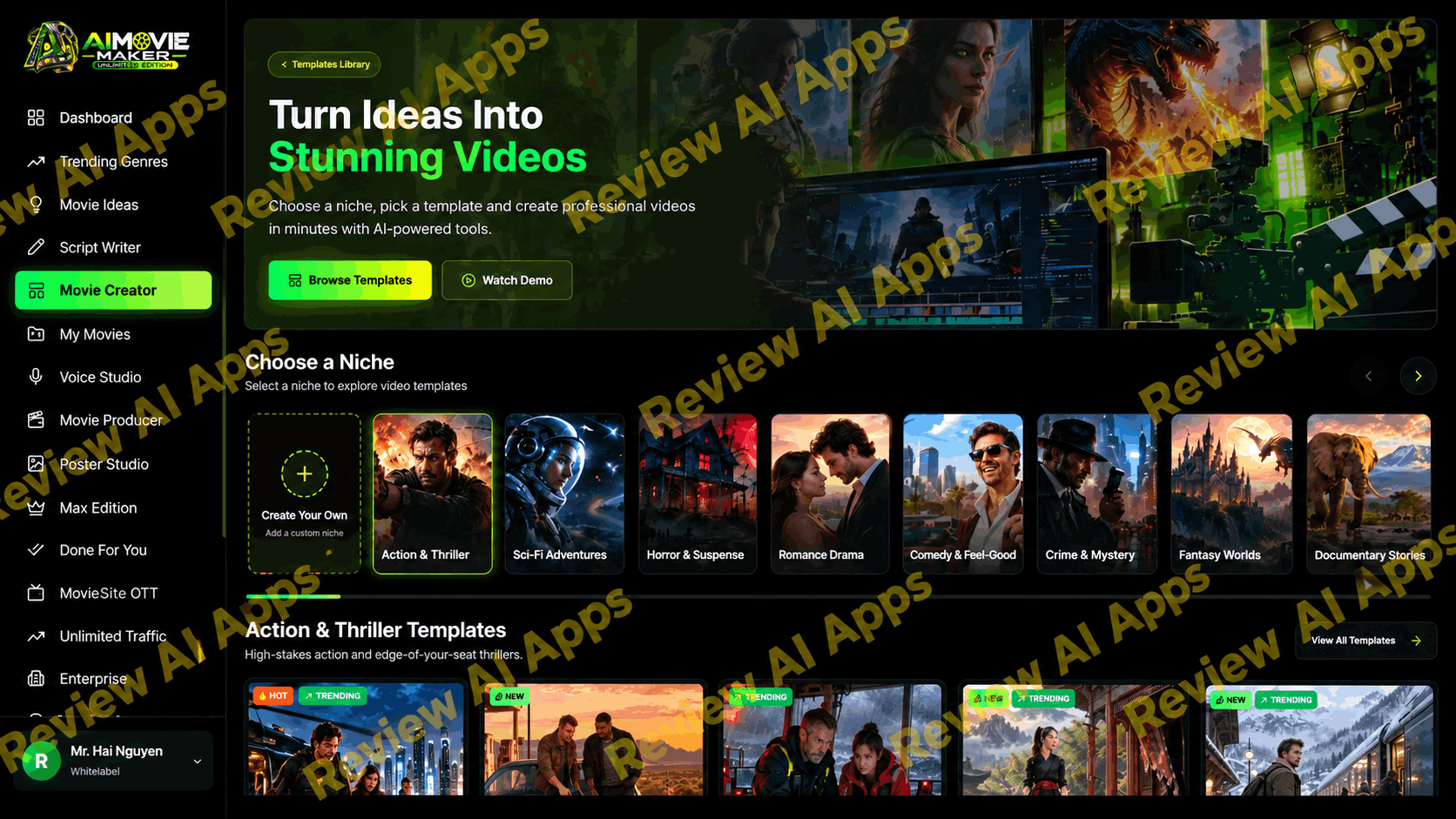
The heart of the app is Movie Creator. You select a niche from a horizontal carousel or tap Create Your Own to add a custom niche.
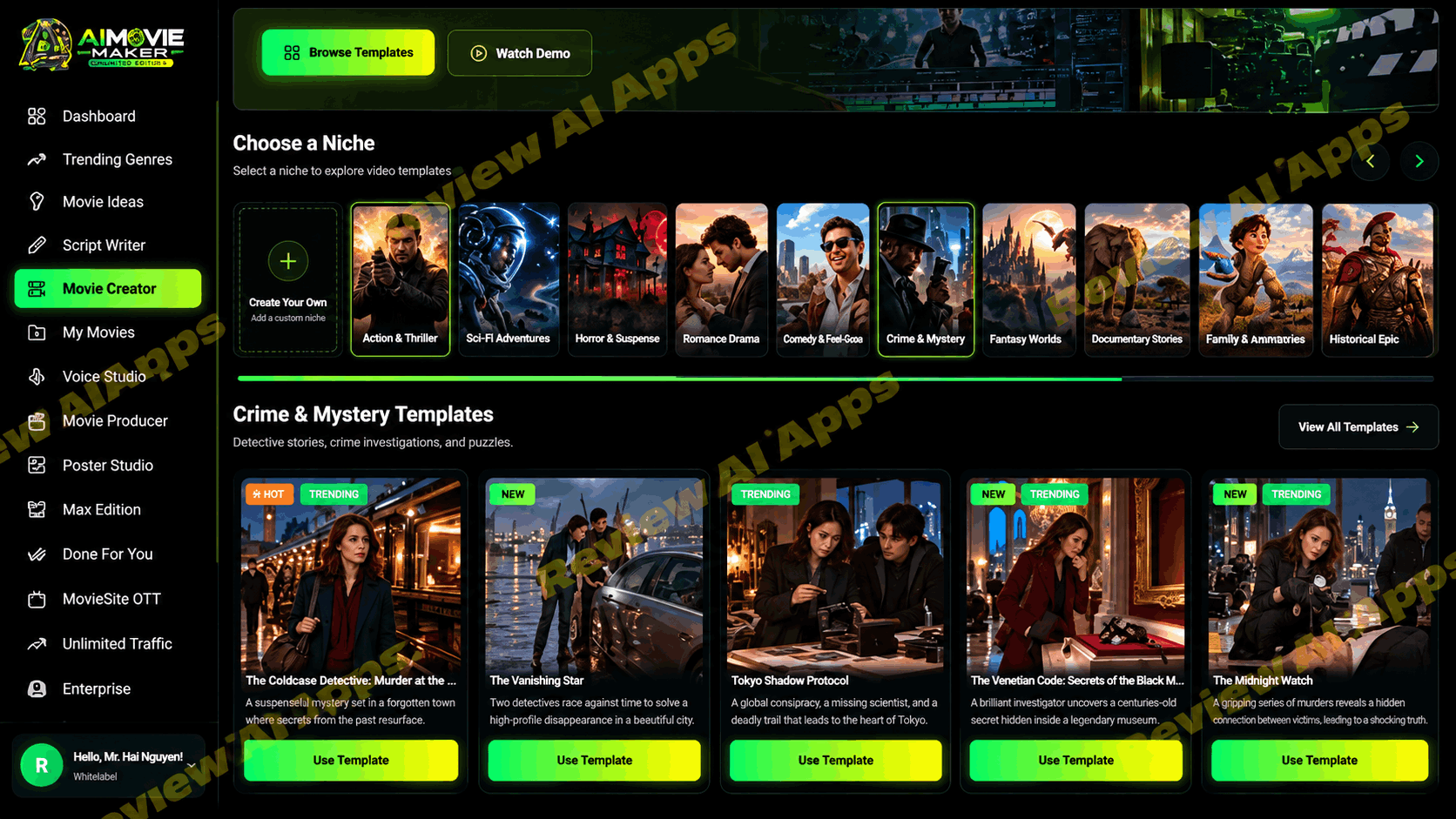
For every niche you get a row of pre-made templates with labels like HOT, NEW and TRENDING. For example, in the Crime and Mystery niche, I saw templates such as The Caledonian Nocturne, The Vanishing Star, Tokyo Shadow Protocol, The Venetian Code and The Midnight Watch. You click Use Template to build a project.
Step 5: Scene by Scene Generation
This is where the real work takes place and it is important to understand. AI Movie Maker Unlimited Edition doesn’t create you a complete movie with a single click. Each template is a sequence of scenes. Each scene includes a pre-generated input image and a fully editable text prompt. You hit Generate and the app takes that image and prompt and makes a short video clip out of it.
Scenes unlock in order so Scene 2 stays locked until Scene 1 is finished. In my projects each scene was about 10 seconds. The prompts are long and particular. One described a cloaked messenger running across a rain-soaked bridge toward a Gothic castle, with camera direction, lighting and a direction to preserve the character and setting of the input image.
This is just image-to-video generation, one scene at a time. It’s a handy way of doing a short story video, but it’s nothing like just grabbing any idea and turning it into a full-fledged movie with one button.
All your projects then sit in My Movies as cards with a Continue Scenes button. So you can go back and work on incomplete work.
6. Voice Studio
Voice Studio adds voice . You choose a finished project, write or create a narration script and edit at will. You can also customize the voice, such as “Ryan,” along with emotion, language, accent and style, like Movie Trailer. And then you go ahead and click Generate Voice. This is one narrator reading over the whole movie, not characters talking to each other.
Step 7: Film Producer
Movie Producer combines all in one video. Select an audio option: generate a voice to read it, upload your own MP3, WAV, M4A or AAC file (maximum 50 MB), or merge the scenes without audio. Video settings are basic: transition type (default is a hard cut), transition duration, and a toggle for a Ken Burns zoom. Next, you click Build Final Movie.
My test project made a combined movie of 1 min 40 sec with a Download button. The first frame was very close to the input image. The quality was what you’d expect from image to video output, atmospheric and usable, but not cinema.
One thing to keep in mind: 6 scenes of 10 seconds or so is about 60 seconds, but the final movie was 1 minute 40 seconds. The extra length most likely follows the narration, so look at how they fill the end of the video.
Step 8 Poster Studio
Poster Studio is a nice surprise. You choose a project, choose a poster style and mood, add an optional tagline, and click Generate Poster. The poster for Rise of the Shadow Kingdom I saw looked good and the title text was spelled right which a lot of AI image tools still get wrong. It’s a small extra but a useful one for Youtube thumbs and promo images.
Hype Check: Sales Claims Compared to What I Observed
This is the part of the AI MovieMaker Unlimited Edition review in which I match the promises with the actual software.
Claim: “Turn any Idea, Script, Story or eBook into a Full blown Hollywood style Movie.
What I saw: A template-driven workflow that builds short clips one scene at a time from off-the-shelf images. It works, but “Hollywood-style” is marketing speak. The honest description is story-channel quality. I didn’t notice a direct import of an eBook or URL in my account.
Claim: "AI dialog and lip sync. Characters that actually talk."
What I saw: Voice Studio gives a single narrator voice to the whole project. I could find no talking characters on screen, nor any lip-sync controls. This is the biggest gap between the sales copy and the app. If it exists, it could be part of an upgrade like Max Edition.
Claim: "Characters have the same face, outfit, age and voice in every scene.
What I saw: Consistency is due to the template's reference images and prompts. That works within a template but it's not a full character-lock system and unproven for custom stories.
Claim: "Music, sound effects and caption.
What I saw: Movie Producer offers generated voice, your uploaded audio or no audio. I didn't see a music track, a sound effect layer, a caption option.
"Built-in movie editor with timeline, captions, transitions and re-render any shot.
What I saw: A basic merge tool, with a transition setting and a Ken Burns switch. No timeline editor.
Claim: “Unlimited 4K exports, no watermark.
What I saw: No resolution selector anywhere so 4K is not confirmed. I didn't see a watermark on the preview and that's a fair point in it's favor.
Powered by official API’s. No fake wrappers.
What I saw: The app never names its video model, so you have no idea if you get Wan, Hailuo, Kling or whatever else. And an app that calls official APIs is a wrapper, by design. The line sounds technical, but gives no verifiable information to buyers.
Claim: Commercial license. Retain 100%.
What I saw: par for the course for launch products, with two caveats. Some of the featured templates include cartoon animal characters that are very similar to a famous animated film, so if you want to use them commercially, you may face copyright trouble. And YouTube has restrictions on monetizing mass-produced repetitive AI content, so making money from your movies depends on the platform’s rules, not just the license.
The “Unlimited” Problem
The biggest question about this product isn't about a feature. That is the business model.
Running AI video is expensive. Each second generated costs the vendor real money with official model APIs. Each project is 6 scenes and about 60 seconds of footage. The buyer pays a one-time fee of $14.95. You don't get unlimited lifetime use for a single payment.
When the numbers don’t add up something usually gives. Hidden fair-use limits, slow queues, quiet switch to cheaper models, or the service fading after launch. The funnel itself implies limits. "Unlimited" on both the front end and OTO1. Before buying I would ask the vendor what exactly is unlimited at $14.95 and what changes with OTO1.
Let’s be honest, at this price you are not getting the best software or best clips. It is not that the tool is cheap. The sales copy is over-promising for what a cheap tool can deliver.
About the Vendor and How Long the Platform Has Existed
Uddhab Pramanik is not a new face. I have seen his earlier products including AI LongBook Creator. All his software runs on his own SoftProHub platform under separate sub domains. This is a good thing. The app is not leased from a white label provider who could pull the plug.
There is also a common risk. All of Uddhab's products are tied to the same SoftProHub business, so if that slows down, all of his tools suffer together. And video is far more expensive to operate than text. So a good track record with a text tool, like AI LongBook Creator, doesn’t demonstrate that unlimited video at $14.95 can last. The one claim I would look at most closely is longevity.
Who is AI Movie Maker Unlimited Edition For
This tool makes sense for you, if you:
Wanting to create a faceless YouTube story channel or operate one
Searching for narrated basic videos, trailers, or short story content
New to design, preferring ready-made templates and step-by-step instructions
Want to include in the package an easy poster or thumbnail maker
If you: should pass over it
Talking characters with real lip-sync needed
Need a full editor with timeline, music, sound effects and captions
Needs validated 4K output, or a high end video model
Expect a Hollywood quality film from a single prompt
Benefits
Full workflow from template to downloaded movie
Clean, easy-to-use dashboard with pre-made templates across ten genres
Editable, detailed prompts for each scene
Built-in narration with useful voice settings, plus upload your own audio
Poster Studio gives good results with correct title text
No watermark on the output
Very low price to begin with a 30 days money-back guaranty
Cons
No talking characters or lip-sync that I noticed despite the sales claims
No music, sound effects, captions or timeline editor
4K export not confirmed, video model not disclosed
Hard to believe "Unlimited for life" at $14.95, also called OTO1 "Unlimited
Trending Genres data – seems to be AI generated, no source
No Bundle Deal; $913 in nine upsells
Some templates look like a popular animated movie, a possible copyright risk
Tips If You Choose to Buy
Your real starting cost is the front end + OTO1 budget of $81.95 or so
Play with Create Your Own early to get a sense of how it works outside the templates
Test the “unlimited” promise properly during your 30-day guaranty window
Last Verdict
So, is it worth it? My honest verdict on AI Movie Maker Unlimited Edition is this: it’s a decent budget tool for making narrated, template-based story videos, and it’s not the Hollywood movie studio the sales page makes it out to be.
The basic workflow is true: pick a template, create scenes, add voiceover, combine and download. That’s good at this price for a beginner running a faceless story channel.
But several of the headline promises are unproven or likely tied to upsells: talking characters with lip-sync, music and sound effects, captions, a timeline editor and 4K exports. Video model is not disclosed. And the “unlimited for life at $14.95” deal is the one most likely to be broken after the launch period is over.
AI MovieMaker Unlimited Edition can earn a place in a beginner's toolkit provided you enter with realistic expectations, budget for the front end plus OTO1, and use the 30-day guaranty to test it hard. Just don’t buy it expecting the movie the sales page promises.
✅ Image-to-video scene generation with detailed, editable prompts
✅ AI narration with voice, emotion, language, accent & style settings
✅ Merge every scene into one downloadable movie — or upload your own voiceover
✅ Built-in Poster Studio for movie posters and YouTube thumbnails
Comments
Join the discussionNo comments yet. Be the first to comment.