WP Sync Review
A ONE-TIME WORDPRESS PLUGIN THAT WANTS TO REPLACE YOUR ZAPIER BILL

Hi, my name is Hai Nguyen and welcome to my WP Sync review.
I've been paying a monthly bill for years for automation. It wasn’t because the tool was amazing, but because I needed one thing: move a buyer from a checkout into my email list, with the right tag on them. That's it. And for that one little job I was leasing software forever.
So when Kevin Fahey released WP Sync with a one time price I paid attention. The pitch is simple. Install a plugin on your own WordPress site, link your tools with your own API keys and let contacts flow between them. No task bar. No monthly charge. Nothing to cancel.
I wrote this after looking at the sales material, the demo and the full funnel in detail. WP Sync opens 11 August 2026 and the single window closes 15 August. “Then the new customers move to a yearly plan,” says the vendor.
Here’s what I found, including what the sales page doesn’t say out loud.
✅ Unlimited syncs, no task meter and no monthly fee
✅ Runs on your own site — your subscriber data never touches a third-party server
✅ Dry-run testing before anything writes to a live list
✅ One-time price, grandfathered with every future connection included
What is WP Sync? How does it Work?
WP Sync is a WordPress plugin for syncing contacts between apps. The vendor calls the basic building block a bridge. A bridge is one rule: If a contact exists in source X, then send them to destination Y.
The basic flow is:
You install the plugin yourself on your own WordPress site.
For each tool you want to connect, paste an API key and click Test Connection.
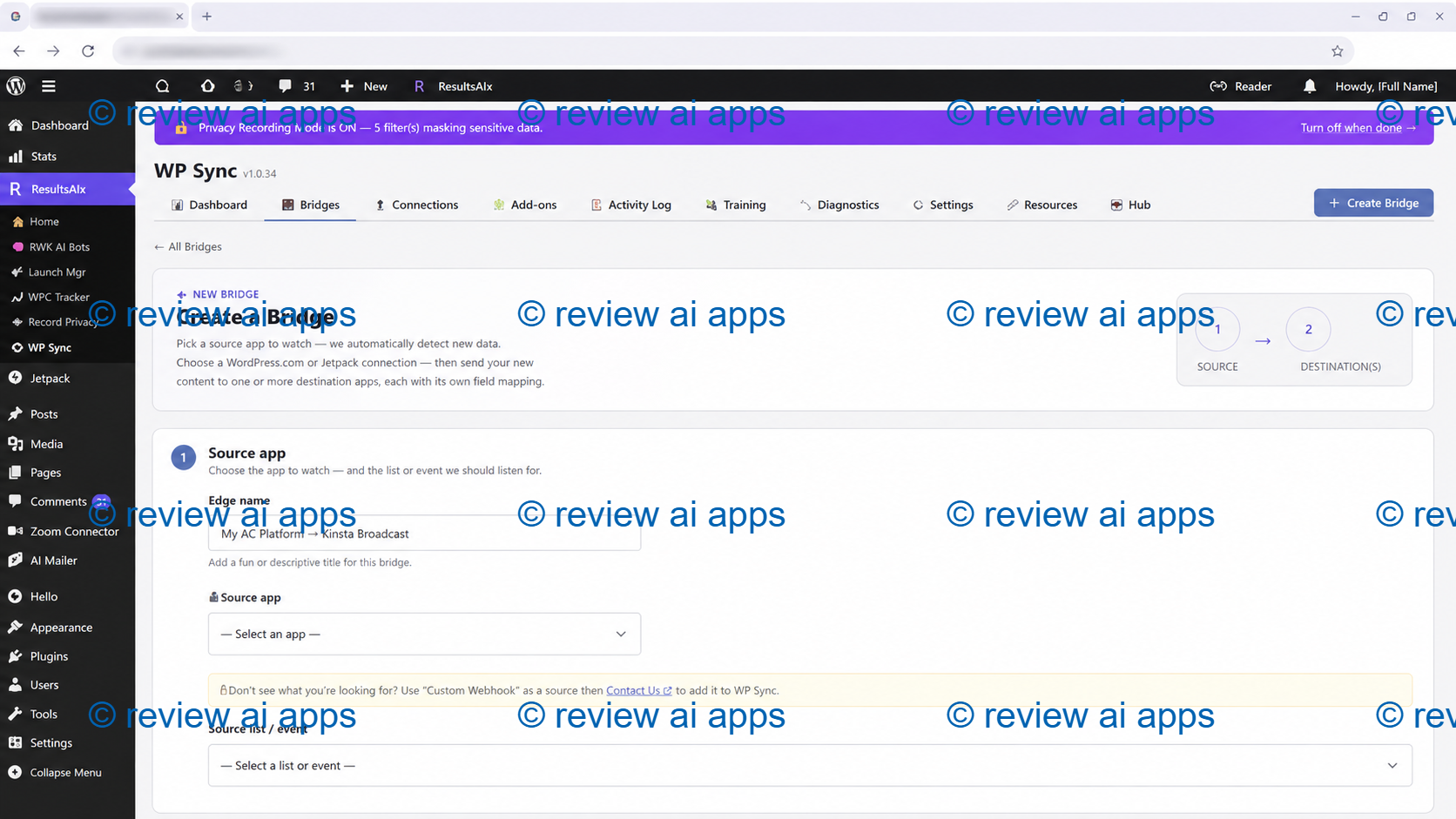
Pick a source app and a destination app or multiple destinations.
You map the fields, add any tags and set any filters you want.
You do a dry-run to see what would be sent, then you flip it live.
The plugin checks for new contacts every 5 minutes and automatically moves them.
That is the whole story. It is deliberately narrow and I think that narrowness is worth saying clearly because that is what will tell you if this tool is right for you.
WP Sync - a tool to move contacts. It's not a general workflow automation platform. There is no branching logic, no conditional paths, no data formatters, no code steps, no multi-step chains where the output of one step feeds the next. If you have been using Zapier to reformat dates, or run a five step conditional workflow, WP Sync does not do that.
What it does do is the job that most small operators actually use those platforms for. That is, getting a buyer, lead, student or registrant off of one platform and onto an email list with the right tags attached. It appears well constructed for that scope.
Setup and Interface Experience
Everything is inside your WordPress admin. There is no separate dashboard, no account to set up with the vendor, and no cloud service in the middle.
What I saw:
Clean bridge list All automations on one screen with live status, last run and lifetime totals.
Builder guided. Pick source, pick destinations, map fields. No API docs to read.
Type-to-filter search: Helpful if you have a hundred lists in your autoresponder and don't want to scroll.
Dry-run testing: a no-write simulation that reveals precisely what each destination would receive before anything touches a live list.
Searchable activity log: Each sync is recorded with email, name, time, IP and status.
Credit where credit’s due: the dry-run feature. The best design choice for a newly written plugin that manages your subscriber data is to test without writing anything.
WP Sync Review - Inside the Plugin
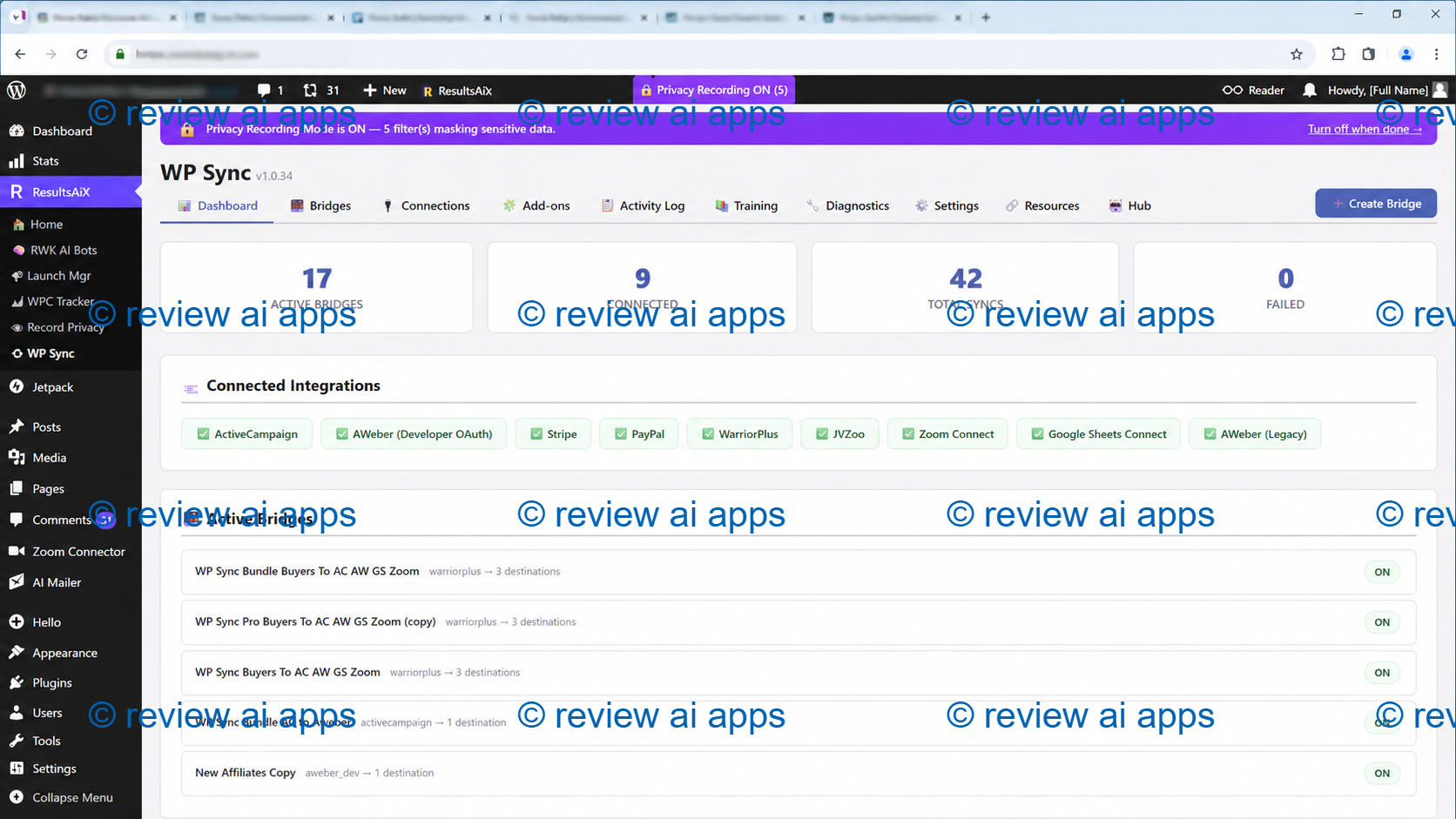
After you install the plugin on Wordpress, here's what you see. So, this is just like Zapier, it can integrate one source input into multiple programs.
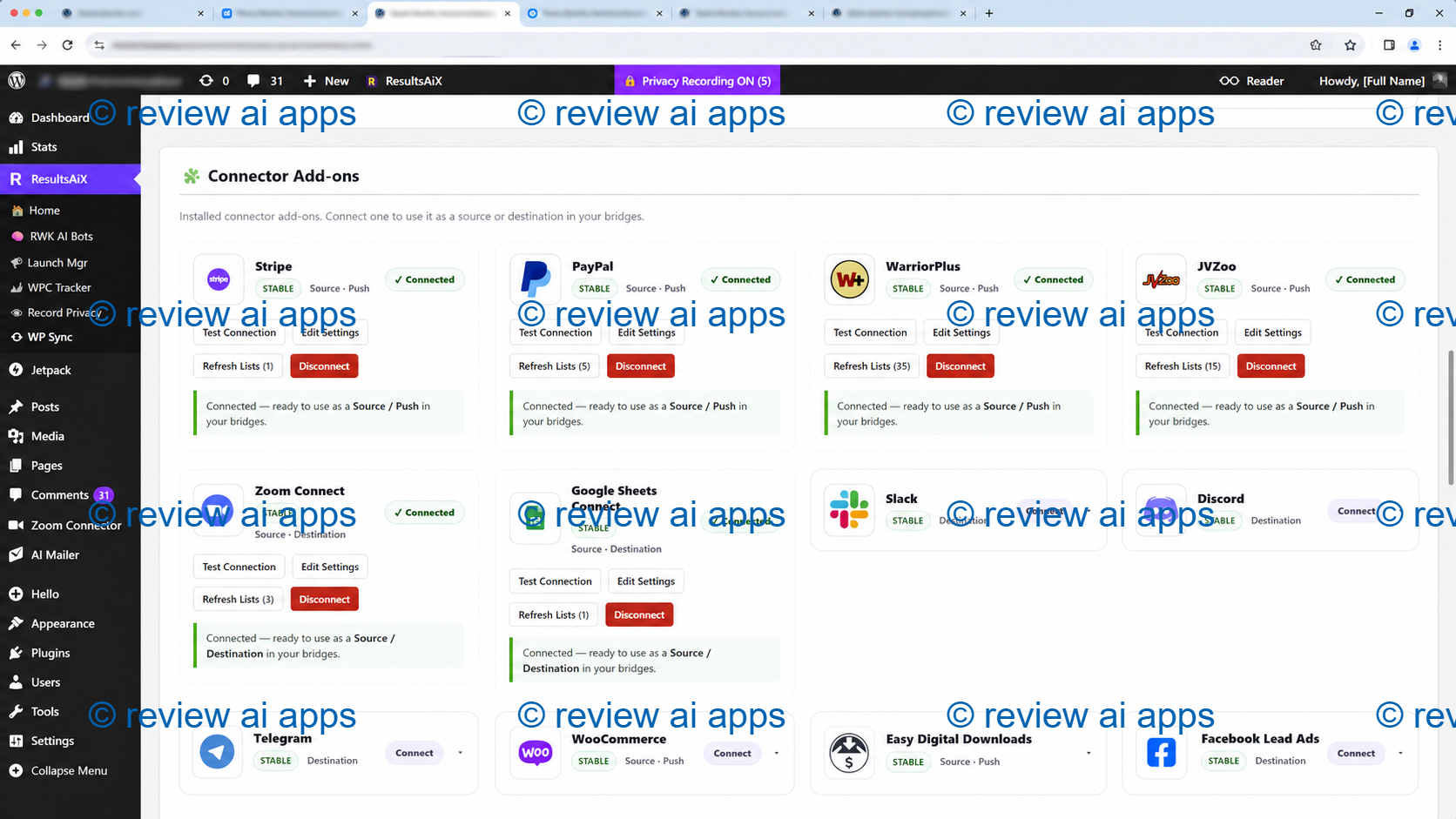
And you don't need to pay monthly fee with Zapier, it's a one-time price Wordpress plugin.
1. Create a Bridge
WP Sync Pricing and Upgrades: What You Pay and What You Get
WP Sync is offered as a front-end offer with 3 pricing tiers and 1 order bump. After purchase, there are optional upgrades. Each front end tier contains all the tiers below it.
All launch prices are a one-time payment. The vendor says they are grandfathered for life with updates, support and every future connection included at no extra cost. Every tier runs on three sites instead of the normal one as a launch bonus.
Front End Option 1 WP Sync Core ($47)
The Core is $47 to start, then $97 after that. This is the entry tier for anyone who just needs to bridge email platforms to each other.
What’s in Core:
35 autoresponders built in, working as both source and destination
Unlimited bridges with multiple destinations
Automatically sync every 5 minutes, plus a Run Now button.
Scheduling and delays on any step
One click to clone any bridge.
Squeeze page opt-ins with redirect
Complete activity log and diagnostics
Every new autoresponder, forever free
If you just need to mirror or migrate between email platforms, Core is the one to get. It really does come in handy for that, as all 35 autoresponders work both ways.
Front End Option 2: WP Sync Pro Pack ($97)
Pro Pack is $97 at launch and $197 thereafter. It adds thirteen pro plugins as a second plugin.
Plus:
Webhook Connect Incoming and Outgoing
Forms Connect, Six WordPress Form Plugins
Zoom Connect for registrants and participants
Two-way Google Sheets sync
ClickUp, GoToWebinar, Pipedrive, Trello, Airtable, Notion, monday.com
Heartbeat and Circle.so
In my opinion this is the realistic floor for most WordPress owners. The plugin is flexible because of two features: Forms Connect and Webhook Connect. Neither of these are in the base tier.
Front End Option 3: WP Sync Full Package ($147)
Whole Package: $147 at launch, $297 afterwards. This is the complete library.
What you get over Pro:
Checkouts & Marketplaces WarriorPlus, JVZoo, ClickBank, ThriveCart, SamCart, PayKickstart, Gumroad & Lemon Squeezy
Stores like WooCommerce, Shopify, Stripe, PayPal, Easy Digital Downloads
Kajabi, Teachable, Thinkific, LearnDash, and MemberPress are all course platforms
Reservations such as Amelia, Calendly and Cal.com
Facebook and Instagram Lead Ads
Slack, Discord and Telegram notifications
Selling access to private Telegram and Discord groups, with a one-time use invite link for each buyer, revoked upon refund
Each additional connection added Free
If you sell anything through a checkout, run a course, take bookings or run lead ads, this is the tier that matches what the sales page actually promises. It would be an expensive way to save a hundred dollars to buy Core and then find out your store is not connected.
That Telegram and Discord access thing is underrated. If you have a paid community automatic invite and automatic revoke on refund is a real problem solved.
Order Bump: WP Sync Reseller License ($297)
On the front end, the checkout page has one order bump for $297. This means you become a seller of WP Sync, instead of a buyer, and you get to keep the stated ninety percent of every front-end sale you make. The pages and product are provided.
I want to be frank on this one. Reseller License is NOT passive income. It’s inventory you still have to sell.” Its value is only as good as whether you already have an audience of WordPress users, marketers or agency owners. $297 is a reasonable bet if you have a list. If you don’t, you’re buying the right to sell something to nobody.
It also pops up at checkout, before you’ve even used the plugin, which is the worst possible time to decide if you would happily recommend it to your own audience.
Upsell 1: Developer’s License (\(297 / \)397 / $497)
The first offer you get after purchase is the Developer License. It is the same as the front-end tiers, and you can run your chosen tier on up to 25 sites.
Core Developer is $297, which averages out to roughly $11.88 per site.
Pro Developer is $397, or about $15.88 per site.
The whole Developer runs $497 — or about $19.88 per site.
Nothing is stripped down on the extra installations. The 25 slots are a pool you manage, so if you sell or retire a site you can deactivate it and free the slot up for the next one. That matters if you're flipping sites.
The page says that this price is available there once and will not show up in the members area or come by email later. Typical one-time offer pressure. The underlying value case is sound if you actually run client sites or multiple brands and it is simply not relevant if you run one business. There’s no in-between.
Later in the Funnel
After the Developer License, the funnel goes to WP Conversion Tracker, a separate plugin from the same vendor that tracks clicks, leads and sales by link. It has its own core and bundle pricing, its own reseller bump, an audience segmentation upgrade and its own developer tiers.
That's a different product, filling a different job. If you came for contact syncing, you can decline the whole branch without losing anything from WP Sync itself.
WP Sync Features and Benefits
Unlimited Bridges and Fan-Out
A single source can push to as many destinations as you need. One rule can add a new buyer to your email list, write to a Google Sheet, and send a Slack alert.
Each of those destinations burns a separate task on a metered connector. They don’t here. That is the most obvious practical benefit of the pricing model and it is real.
Scheduling and Delays, by Destination
This is the feature I didn't expect at this price. Each destination on a bridge is timed separately. Fire right away, wait for a certain number of minutes, hours or days, or hold until a specific date and time in your time zone.
The applications are readily apparent. Tag a buyer right away, but hold the upsell list for 2 days, until the refund window has settled. Get signups all month for pre-launch, and then dump them all at nine in the morning on launch day. Immediately ping your team on Slack, but drop the contact into the nurture sequence an hour later.
Most tools at this price shoot everything at once. This is not one of those.
Native Mapped Tags and Custom Fields Support
Most cheap sync tools just copy an email address across and stop. WP Sync transfers names, custom fields and tags that are mapped to the field structure of the destination platform (Mailchimp merge tags, the ActiveCampaign field IDs, or Systeme slugs).
If they don't already exist, tags are created automatically. Each destination has its own mapping so the same contact could come into two platforms under two different sets of rules.
Filter By Any Field
You can limit a bridge to sync only contacts matching a condition on any field the source sends. It could be product purchased, plan, country, whatever you gather. Contacts that don’t match are silently ignored. It keeps your lists nice and tidy, instead of dumping everything into one place.
Managing Your Data Without AI or Servers
The plugin makes direct API calls from your site to the different platforms. Your subscriber data never passes through the vendor’s servers. No cloud relays, no account setup with them.
That’s meaty, not slogan, for those managing client lists or operating under tighter data rules. It's the strongest structural argument the product has.
Activity Log and Diagnostics
Each optin and sync is logged and can be searched and filtered by type or status. The log includes email, name, ip, time and status. Plain-language successes and failures are evident in per-bridge run history. When something breaks you can actually know what it is.
Now For The Honest Part: What Is Overstated
I said I'd give a balanced review so here is what doesn't work.
147 is a count of names, not a measure of depth. There are about forty of those connections, which are helpdesk tools, and the page groups them under Courses and Membership. That is just wrong. Add five Airtable clones and a direct-mail long tail and a meaningful chunk of that total is padding you will never see. The page is also inconsistent with the number, showing 95, 99 and 92 in three different places.
It raises a good question, the time line to build. Kevin's letter says he started building a few weeks prior to launch. In that window, wiring up 147 external APIs is about seven a day, each with authentication, field mapping, pagination and live testing. You can’t do that by hand.” Before you trust it, make sure that your integration works for you.
Seconds and five minutes are not the same claim Both are on the same page. Push sources like webhooks, forms and store events actually do fire immediately. Sources polled can’t. Another thing the page never mentions: WordPress cron only happens when your site gets traffic. For low-traffic sites, the scheduled syncs can drift (and even stop) unless you configure a proper server cron job.
The vendor gets nothing, unlimited. It is presented as generosity over metered competitors, but it is structural. Your hosting is your compute. The real ceilings are your PHP execution limits, your memory and the rate limits of the platforms you are calling.
The testimonials are real, just not for this product. every review on that page is verified and honestly labelled and every single review is for a different Kevin Fahey product They tell you the vendor delivers and supports his customers. They don't tell you about WP Sync.
50% off the price the product has never sold at. Same for the three-site license usually called one.
WP Sync vs Other Tools
Make vs Zapier vs Pabbly: Cost Table on Sales Page Analytically Misleading, Arithmetically Correct – Five Year What you really get for a monthly fee is uptime commitments, automatic retries, error notification, complete task history, thousands of apps, multi-step workflows and a support organisation that owns the failure. WP Sync sells you code, once. The cost doesn’t disappear, it just moves to your hosting, your maintenance time and your exposure when a silent failure costs you a sale.
WP Fusion, Uncanny Automator, SureTriggers and FluentCRM. This is the comparison the sales page deftly avoids. Same self-hosted architecture, same no-task-meter pitch, mostly $99-$300 with lifetime options. WP Sync is reasonably priced but unremarkable compared to that field, and is the newest and least proven of the bunch.
Advantages and Disadvantages
Pros:
One-time price for a job you’re probably renting right now
Self hosted , so subscriber data never touches a third party server
Unusual for this price, destination based scheduling & delays
Tags and custom fields mapped to the native structure of each platform.
All 35 autoresponders work in both directions, making migration easy
> Testing before writing to a live list (dry-run)
Vendor with a long history and responsive support
30 Day Money Back Guarantee
Disadvantages
Brand new plugin with no independent reliability data yet.
The page copy is contradictory with respect to connection counts.
Claims of sync speed overstate what polling can deliver
No monitoring queue or retry queue, so failures can be silent
Not a workflow automation platform – no branching, no multi-step logic
Testimonials are for other products
Continued sales are required for long-term support on a single payment.
Tips for Better Results with WP Sync
Dry run it every single time. It takes 30 seconds and it's the difference between a clean test and a mess in your live list.
Setup a cron job on a production server. If your site is quiet, don’t use WordPress cron. Typically your host can do this in a few minutes.
One bridge at a time. Not ten. Before building a family of automations on top of the flow, prove that flow works end to end.
First, check your specific integration! Hook it up and run a real test contact through in the first week whilst you are still covered by the guarantee.
Use the delay feature on upsell lists. Holding a buyer for two days while the refund window cools is a small thing that saves awkward emails.
WP Sync Review FAQ
WP Sync is used for:
Automatically move contacts between apps. Buyers, leads, students, registrants and form submissions are pushed from a source platform onto your email list or other tools, with tags and custom fields transported across.
Do I have to be techy?
No, but you do need to have a WordPress site. Setup is copying API keys and choosing apps from dropdowns. No code. No API documentation.
Is it really a single payment?
Yes, during the launch window and the vendor says it is grandfathered for life. The offer will change to a yearly plan for new customers after 15 August.
Can it completely replace Zapier?
Only if you are using Zapier for simple contact routing. It can't if you rely on branching logic or multi-step workflows.
On how many sites can I use it?
Bonus three at launch, usually one. The Developer License bumps that up to 25.
Final Verdict: Is WP Sync Worth It?
WP Sync is a capable, targeted tool that solves an unglamorous problem for a price that beats the subscription alternatives by a wide margin. The self-hosted design is a real win for data control. The per-destination scheduling and native field mapping are better than you'd expect for the price.
It’s also brand new, marketing sync speed is overstated, page copy is contradictory and social proof is for other products. None of this makes it a bad buy. That means you should go into it with your eyes wide open.
My advice:
If you already have WordPress, your volumes are small, and your automations can be a few minutes late, this is a fair trade at $147 with a 30-day guarantee.
This is not a replacement for the need to have branching workflows, guaranteed delivery timing or high volume and no price will make it one.
If you’re currently paying monthly for nothing more than dropping buyers and leads on an email list, WP Sync does that job and you own it.
✅ Unlimited syncs, no task meter and no monthly fee
✅ Runs on your own site — your subscriber data never touches a third-party server
✅ Dry-run testing before anything writes to a live list
✅ One-time price, grandfathered with every future connection included