EZ Video Affiliate Review
What This $27 AI Video Tool Actually Does (And What It Doesn't)

Affiliate marketers have heard a version of this pitch a hundred times: paste a link, click a button, let AI do the rest, watch the commissions roll in. Video has recently become the wrapper of choice for that pitch, as a face-on-camera promo or slideshow with voiceover tends to beat a raw text review for attention and trust-building with a cold audience. The trouble is that making one takes time, editing skill or a budget that most affiliates promoting a $17 or $27 offer don’t want to spend. Brett Rutecky, a veteran JVZoo vendor, goes hard for that gap on the sales page for his latest release, EZ Video Affiliate. But under the headline promises is a tool that, when you actually open it and use it, is a pretty coherent piece of software. A scraper, an AI script and image generator, a voiceover engine, and a landing-page builder all stitched together into one workflow designed for people promoting other people’s products with video. In this review we will discuss what is EZ Video Affiliate actually, how it works mechanically, what each part of its funnel costs and adds, who it is realistically built for, who is behind it and where the marketing around it starts to outrun what the software can deliver.
✅ 9 AI voiceover options and auto-generated scene graphics
✅ Auto-built bonus page, delivery page & ready-to-paste YouTube description
✅ No filming, no editing software and no scriptwriting required
✅ $27 one-time front end with a 14-day money-back guarantee
What EZ Video Affiliate does
EZ Video Affiliate is essentially a video-funnel builder for affiliate marketers. Instead of forcing users to shoot themselves, write a script from scratch or hire an editor, it takes two pieces of input—a target sales page URL and the user’s own affiliate link—and turns them into a finished, voiced-over promotional video, plus the supporting assets an affiliate would normally have to build by hand: a bonus page, a delivery page, and a YouTube video description.
The front-end sales page sells this as a shortcut to passive income, with verbiage like earning "$500+ per day with zero effort or experience required." That claim is worth scrutinizing, and this review will return to it. But it is worth separating the marketing language from the mechanics for a moment, because the mechanics are more interesting, and more defensible, than the sales copy would have you believe.
EZ Video Affiliate Review - How It Works
1. Create Video
It all starts with a basic form workflow. A user adds a new video by inputting a Video Name, the Product URL of the sales page they want to promote, and their own Affiliate Link, toggles to add an intro and outro, and an optional Custom Copy field for anything they want to add manually.
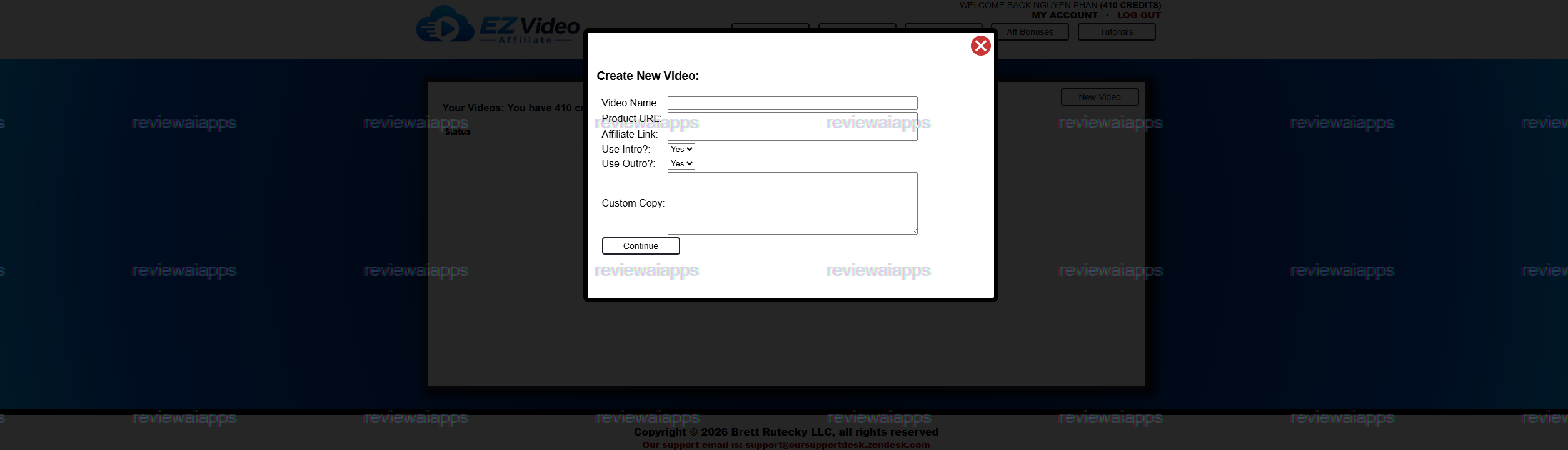
After submission, the tool crawls the target sales page (takes about a minute) and extracts the content of the page to create a script.
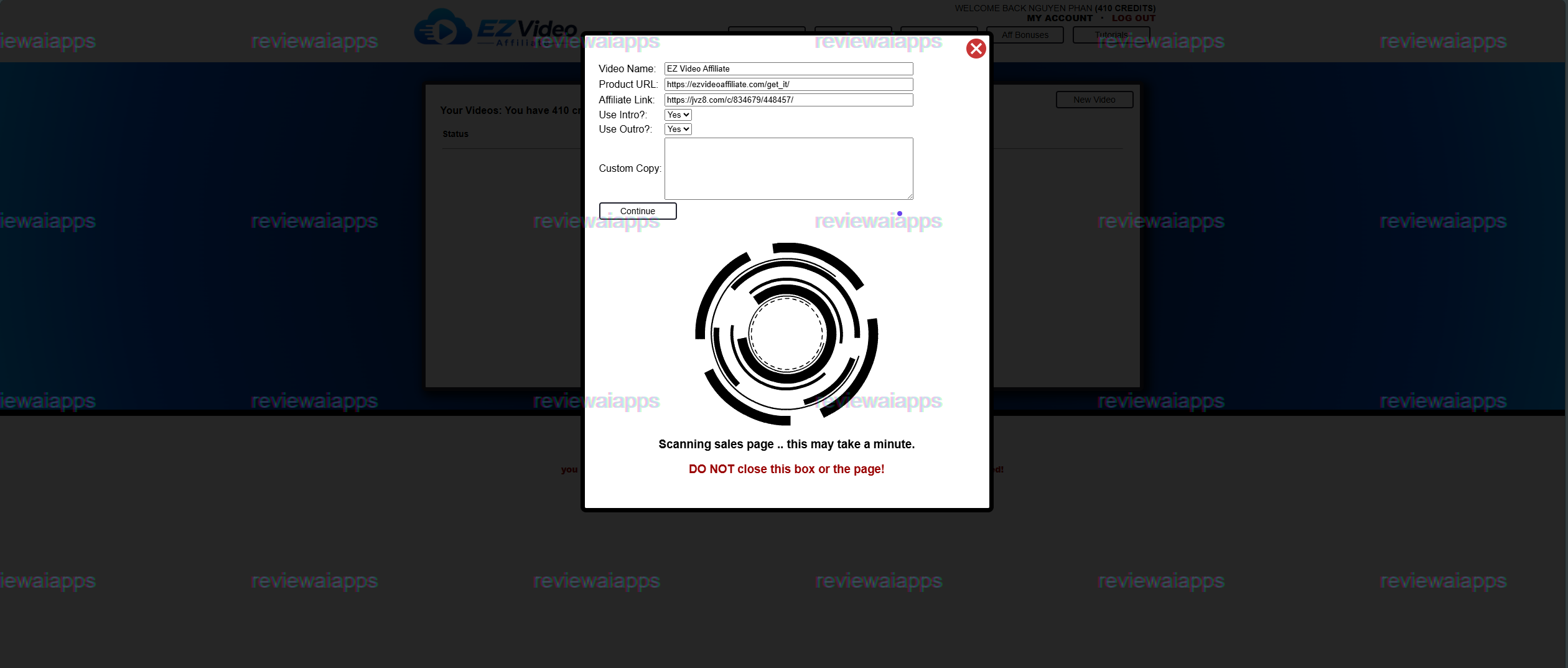
You do not produce that script as one long block of text. It's broken into scenes and each scene appears in an editor with a placeholder graphic.
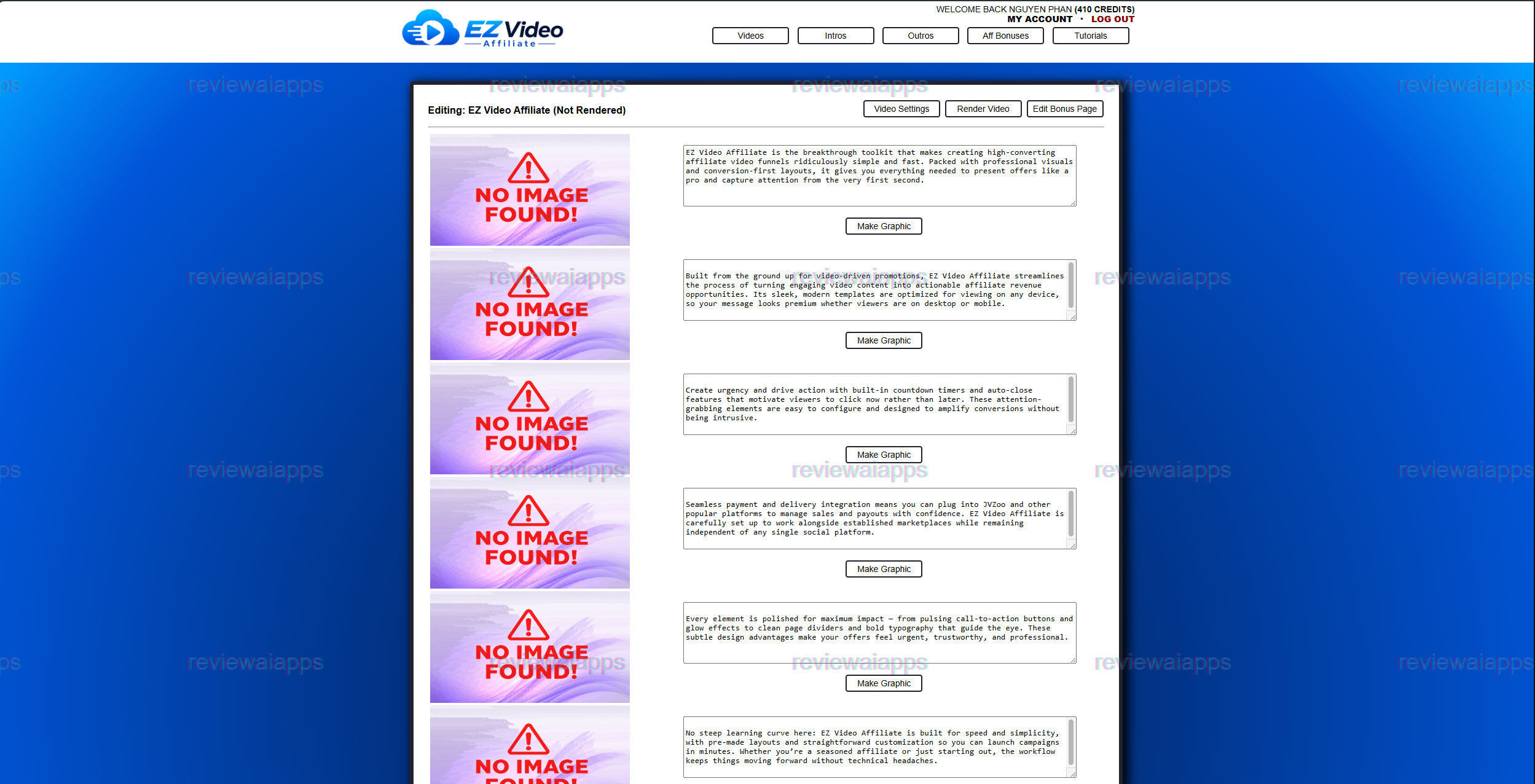
Next, the user clicks a “Make Graphic” button for each scene, and the AI is prompted to generate a matching visual. When an image is being created, that scene is locked and shows a “in progress” placeholder.
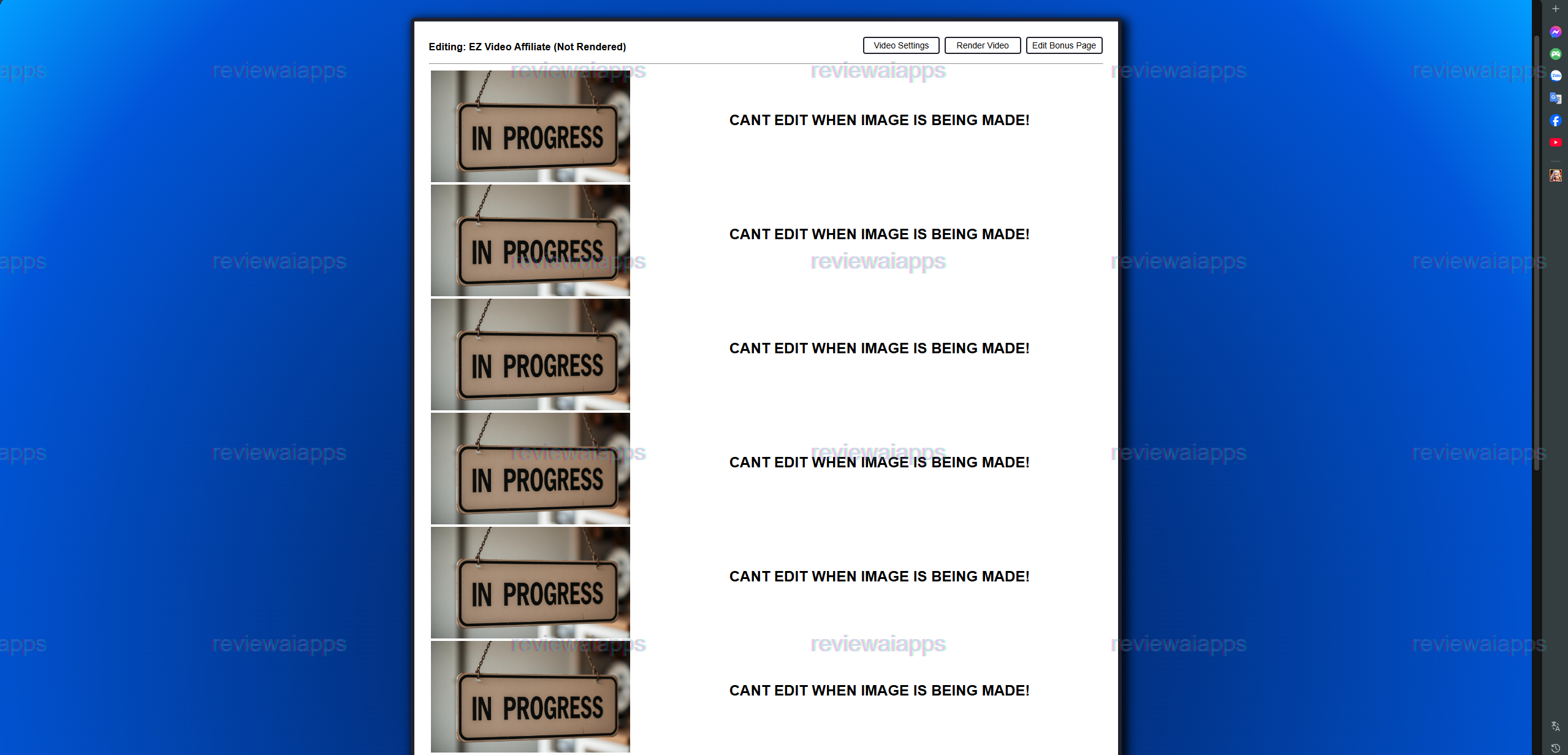
Editing is done scene by scene, rather than all at once. Once the graphic is created, it is displayed alongside the script text, and the process is repeated for the rest of the video.
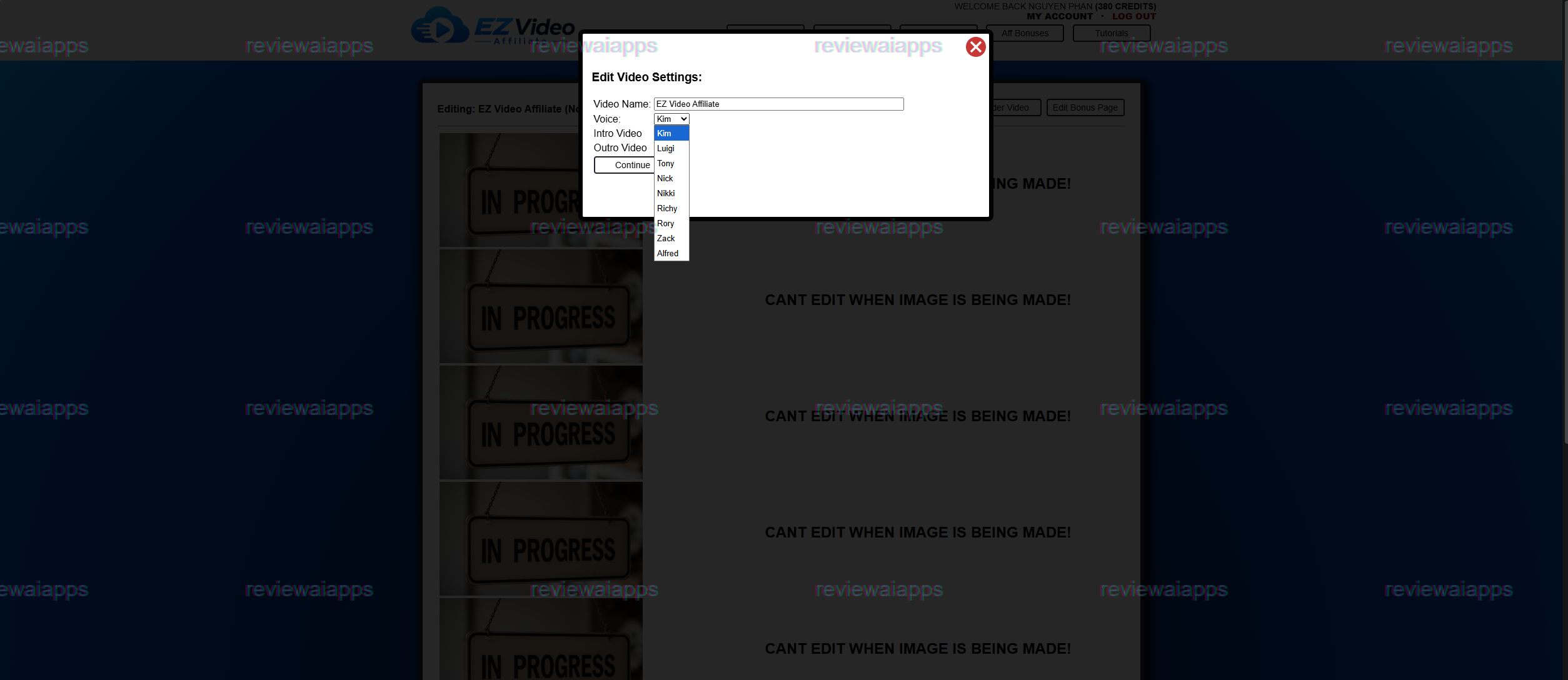
Voiceover is handled through a Video Settings panel where users can rename the project and select from nine preset AI voices — options with human-sounding names like Kim, Tony, Nick, Nikki, and Rory — plus choose separate intro and outro clips.
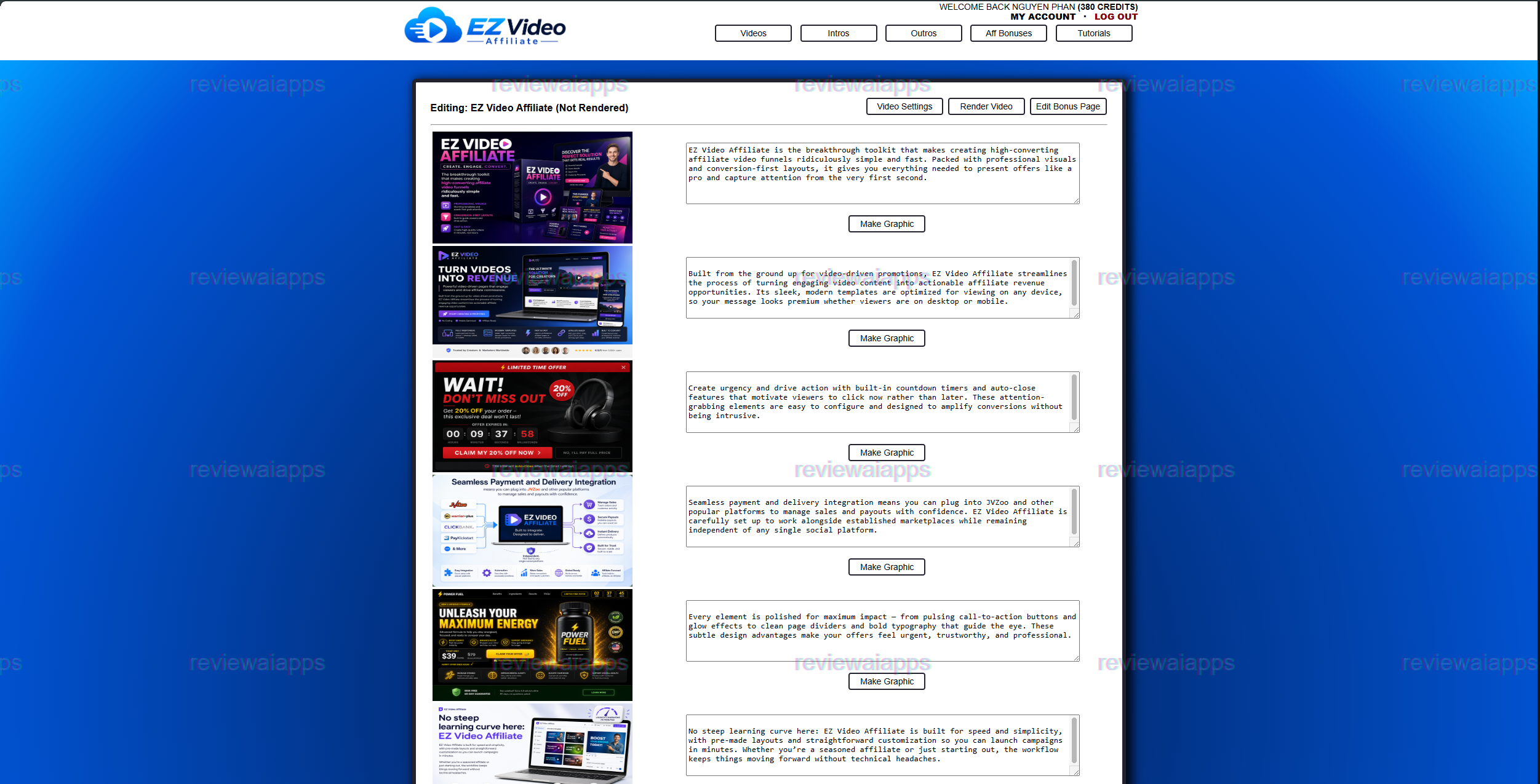
When the user has a graphic for each scene, they click Render Video and the program will assemble all the graphics into one final promo video.
This is the point where credit system is relevant and worth being specific about instead of repeating vague "AI-driven" language.
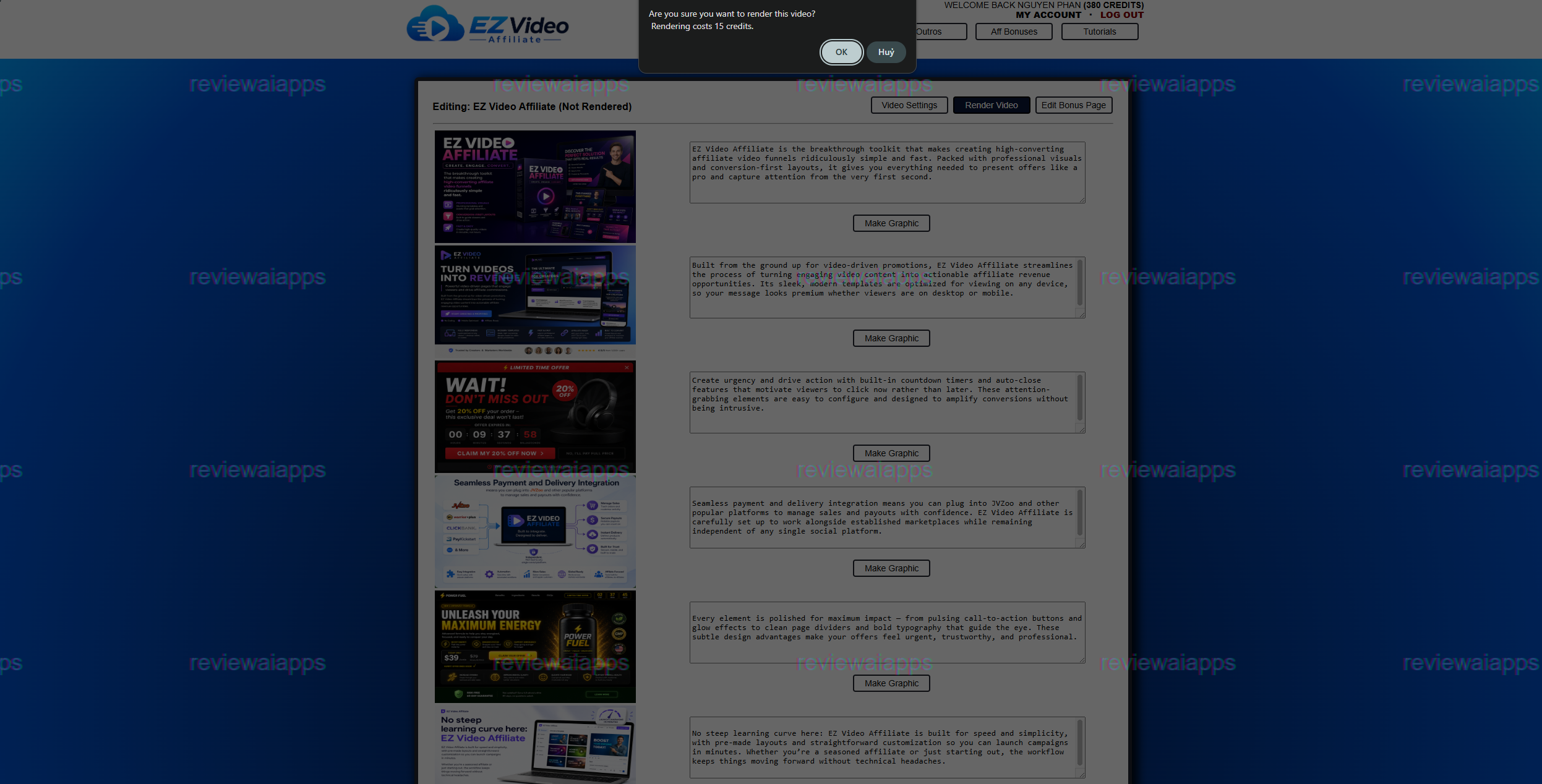
You will watch a real account’s credit balance go through this process, so you will see that every AI generated graphic costs 5 credits and rendering the finished video costs 15 credits.
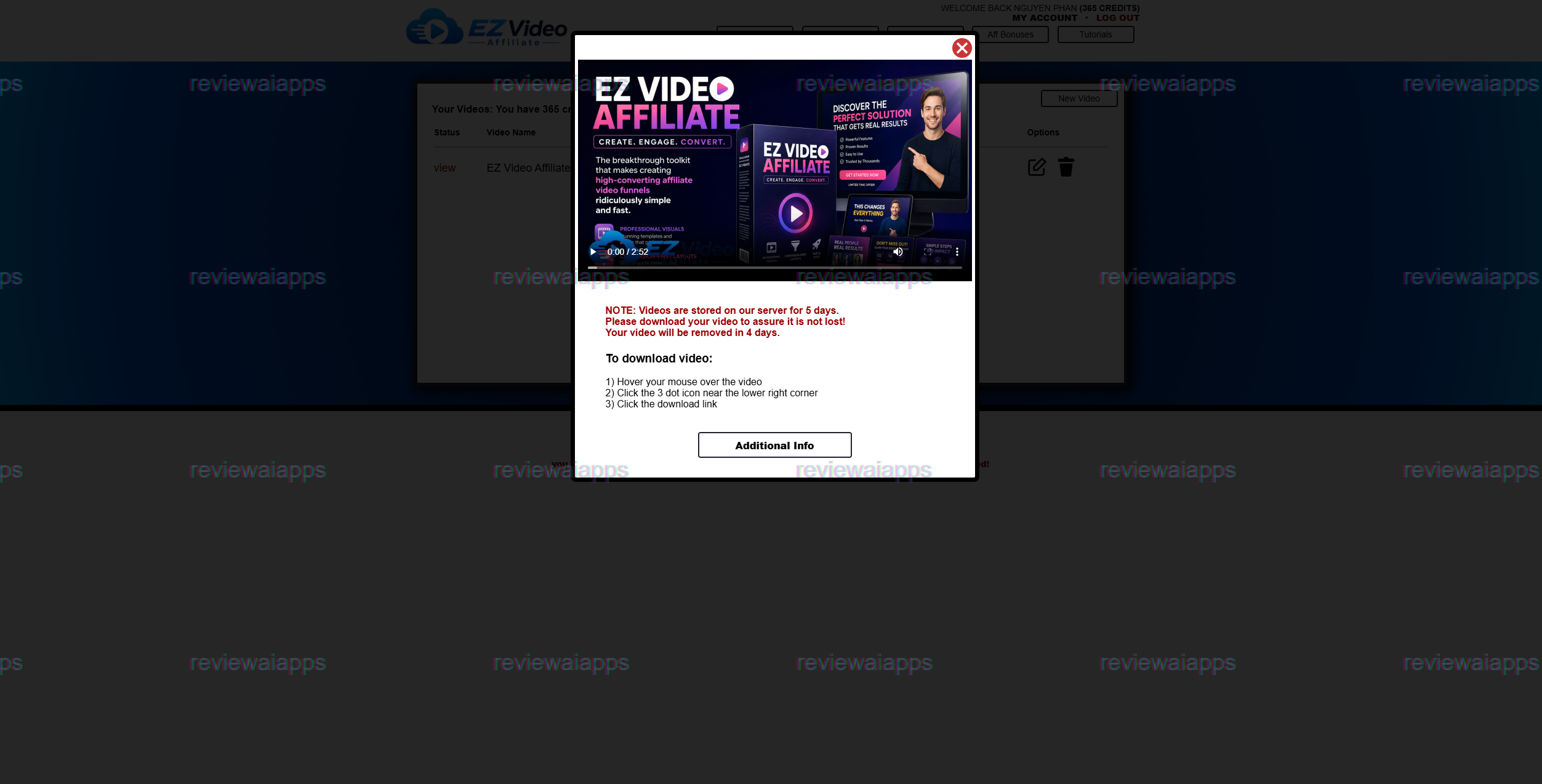
These are not numbers pulled from marketing copy, but the verified difference between the account's credit balance before and after each action, taken directly from the interface. So a typical 6 scene video will be about 30 credits for the graphics, and 15 credits to render so about 45 credits for one finished, ready to download promo video.
That level of transparency is really helpful to know before buying, as it enables a potential user to work out roughly how many videos a certain credit allocation will actually get them, rather than having to guess and find out the hard way mid-campaign. It also means the front-end account's starting allotment is worth checking carefully before assuming it will cover more than a handful of finished videos. Script edits, retries on a graphic that doesn't fit the scene, re-renders, all would draw against the same balance.
The script text itself is also not locked after it is generated. The copy for each scene is in an editable text box next to its graphic, allowing a user to rewrite a line, tighten the pacing, or substitute their own phrasing before generating the image or spending credits on a render. In practice, this matters because AI-scraped copy from someone else's sales page won't always read naturally as a third-person promotional script. And having the chance to edit it before spending credits on the graphic saves you from paying twice for the same mistake.
One practical limitation to be aware of is that the vendor retains the finished video on their server for only five days. The render screen displays a prominent warning, advising users to download their video immediately as it will be deleted following that window. This is not mentioned on the sales pages, but it is the sort of operational detail that matters to anyone who plans to batch produce videos and come back to them later.
From Video Finish to Live Promotion
As far as workflow efficiency goes, the more interesting part of EZ Video Affiliate comes after the video renders. The tool doesn’t just spit out an MP4 and leave the user to do the rest. It creates a bonus page url automatically, a separate delivery page url and a ready to go YouTube description which combines the bonus page link with a written product description – all formatted and ready to paste right under the video as soon as it's uploaded.
The bonus page itself is already packed with a little library of tools that the vendor, Brett Rutecky, is giving as exclusive bonuses to buyers who purchase through a user’s affiliate link:
• SlideVidz (an AI-powered slideshow video creation tool that is not otherwise for sale)
• Be The Winner (unreleased software for running contests on Facebook, YouTube, and other social platforms)
• Instant E-Book (an AI tool that writes complete e-books and generates their cover art)
• SellerBot (an AI sales chatbot that comes with a commercial license)
• and My Digital Shop (the vendor’s own cloud-based storefront software)
You can remove each bonus from the page, and the page headline, button text and button URL are all editable, so the layout isn’t rigid – but the starting point is clearly designed to get a new affiliate promoting quickly without having to source or build their own bonus incentives.
This end-to-end packaging is a real, tangible time-saver for someone whose biggest obstacle to running affiliate promotions is the time it takes to build a video, write a description, and assemble a bonus funnel around it. It’s the most interesting part of the real value proposition of the product, above and beyond any income claims in the sales page.
This Is Actually Built For Whom
Considering what the tool does mechanically it is worth being specific about who gets real value from it and who does not. For someone who already runs a YouTube channel or a social account or an email list, and just wants to shorten the time between “found a good affiliate offer” and “have a promo video and a bonus page live” gets a real efficiency win here: the scan-to-script-to-render pipeline, combined with the automatic bonus page and YouTube description, cuts out several hours of manual production work per promotion. But someone with no existing audience or source of traffic, well they get a finished video and nowhere obvious to put it. The tool has no built-in distribution, no traffic generation, no audience-building component, so it solves the production problem, but leaves the harder discovery problem completely untouched. That line is the difference between EZ Video Affiliate as a useful piece of an existing affiliate workflow vs being confused with a complete, standalone business-in-a-box.
Buying Path & Pricing
EZ Video Affiliate is sold through a single linear path, not a front-end plus bundle. There’s no all-in-one offer where a customer gets the front end and all the upgrades at the same time; instead, a customer purchases the front end first, and then is offered each upgrade one at a time, free to accept or decline any of them without losing access to the ones already purchased.
• The front end is titled EZ Video Affiliate and it costs $27 one-time payment, sold through JVZoo with a standard 14-day money back guaranty. This opens up the main builder above: sales-page scanning, script generation, AI graphics and voiceover, video rendering, and the bonus/delivery page generator, with an initial allotment of render credits.
• The first upgrade is EZ Video Affiliate Unlimited, priced at $37/month as a recurring subscription. The goal is simple: it removes the usage limits of the front-end version, for people who want to make videos at a real scale, not just occasionally.
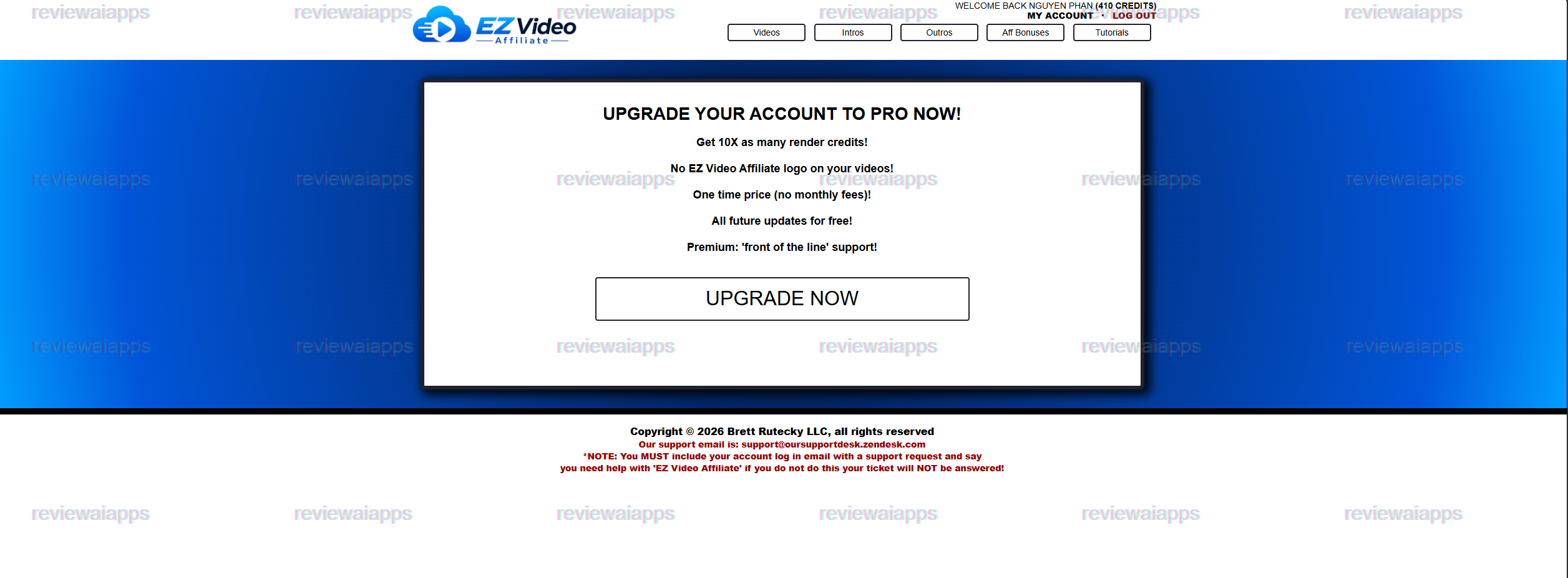
• The second upgrade EZ Video Affiliate PRO This is where the funnel gets more specific about what it’s actually selling. This is confirmed from the in-app upgrade screen rather than just the sales page. PRO adds ten times the render credits of the base account, takes away the EZ Video Affiliate watermark from finished videos, and – most importantly – it’s a one-time fee that does not recur, unlike the first upgrade. There’s also free access to all future updates and what the product calls “front of the line” priority support. The public sales page for this upgrade does not show the exact price because the pricing at checkout is generated by the payment platform, not the static page.
• The third upgrade, EZ Video Affiliate Live Training, gives you instruction on top of the software. Live step by step training on how to actually make money with the system, not more features in the software. The sales page warns that this training will not be available after the launch period ends and is presented as a limited-availability add-on rather than a permanent option. Like PRO, it has no specific price shown on the public page.
The buying decision here is easier than many similar launches because there is no bundle route to consider against the individual-upgrade route: A buyer gets the core tool at $27 and then chooses the upgrade-by-upgrade path that best fits the value they see in the individual upgrades: volume (Unlimited), production capacity + branding removal (PRO), or training (Live Training). Each of these three upgrades corresponds to a specific, non-overlapping need – volume, capacity and polish, and education – rather than being slightly repackaged versions of each other, which is a more equitable structure than appears in many low-ticket software launches.
Who’s Behind It
EZ Video Affiliate is from Brett Rutecky, a longtime vendor in the JVZoo-style digital product space, and a partner called Mike in the launch materials. The copyright footer across the product’s own dashboard lists “Brett Rutecky LLC” and support is handled via a dedicated Zendesk help desk. Account specific tickets require the user’s login email to be included.
What is interesting about the positioning here is the vendor’s own stated rationale for building this particular sort of product. The launch description materials says Rutecky had sold more traditional training courses before, and shifted toward creating automated software tools after noticing that completion and engagement rates for such courses tended to be low – that is, people bought courses but didn’t finish them, so the pivot was toward tools that do the work, not teach the work. Whether or not that's the whole story, it's a consistent and fairly straightforward reason why there is a "we'll do it for you" product instead of another instructional course, and it rings true with what EZ Video Affiliate really is: something you run, not something you learn.
Where the Marketing Blows Up the Product
It’s worth being clear on the difference between what EZ Video Affiliate’s sales pages claim and what the actual mechanics are capable of, for that’s the most important thing an interested buyer should consider before making a purchase.
The front-end sales page opens with a claim that this method “earns us up to \(500+ per day with zero effort or experience required.” Put against everything the product actually does — scan a page, generate a script, generate images, generate a voiceover, render a video, and build a bonus page — there is nothing in that mechanical process that produces income on its own. The tool automates content creation. It doesn’t automate getting a video seen, clicked, or converted to a sale, and none of the sales or upsell pages address how a buyer is supposed to drive traffic to the finished video in the first place. A video that is finished but never watched earns exactly \)0, regardless of how quickly it was made. The most egregious overreach on the sales page is the fact that it pitches a content creation tool as a way to make $500 a day with zero effort, and that’s the kind of claim you should read as a marketing hook, not a realistic expectation.
The second place where the marketing outshines the product is in the PRO upgrade pitch of "make 10X as much income". Mechanically, what PRO actually does is give you 10x the render credits - meaning you can make more videos before you run out of allowance. It is a useful and legitimate upgrade for someone looking to scale their output. But producing ten times as many videos doesn't mathematically lead to ten times as much income; it just removes a ceiling on production. The income figure attached to PRO is a red herring, and the capacity increase it offers is a red herring as well. What PRO offers is the removal of the watermark and the credit cap. Buyers should be sold on what it verifiably does, not on a guarantyd income multiplier.
Finally, the Live Training upgrade and front-end page both employ manufactured urgency: an auto-closing countdown timer on the front-end sales page and an explicit warning that the training upgrade “will not be available after the launch ends.” These are typical conversion tactics for this style of product launch, not claims about the software itself, but it’s worth recognizing them for what they are — pressure devices designed to shorten the buyer’s decision window, not evidence of genuine scarcity in the product.
The Judgment
Strip away the income promises and EZ Video Affiliate is still a pretty well built and genuinely functional tool for a certain type of user: an affiliate marketer who already has some way to get eyes on content, an existing channel, audience, or traffic source and wants to cut down the time it takes to turn a sales page into a finished promotional video, complete with a bonus page and a ready to post description. The credit system is simple enough that a buyer knows precisely how far their allowance will go, the upgrade path is logically constructed around particular needs rather than duplicated features and the automatic bonus-page-and-description creation addresses a real, boring part of affiliate promotion that most tools in this space leave entirely up to the user.
What it doesn’t have is what the sales copy would have you believe it can do. This is a content creation tool, not an income generation system, and the $500 per day and 10X income claims scattered throughout its funnel should be taken as promotional language, not as a description of what actually happens when someone buys it. If you are considering EZ Video Affiliate, keep this important distinction in mind. Judge it based on the video and funnel assets it provides, not the income claims in the sales pitch.
✅ 9 AI voiceover options and auto-generated scene graphics
✅ Auto-built bonus page, delivery page & ready-to-paste YouTube description
✅ No filming, no editing software and no scriptwriting required
✅ $27 one-time front end with a 14-day money-back guarantee