Done on Command Review

Hi, this is Hai Nguyen and welcome to my Done on Command review.
I’ve done online projects before and I know the same tired loop many of you know. An AI gives you a beautiful draft in the morning, and then the real day begins. You open the page builder and battle a template. You open a video editor and cut a clip. You upload the same logo for the hundredth time because the tool forgot your brand the moment the last session ended. That clever draft is then nearly, nearly an asset by evening.
And that gap between a draft and a delivered, live asset? That's precisely what Done On Command says it closes. So I dove in and this review is my honest take on it. What it actually is, what it does well, where the marketing gets loud and if a one-time price can really stand next to the monthly enterprise tools it keeps comparing itself to.
Let me be clear from the start. This is not a fraud. It’s an actual company, with a working dashboard, live integrations, a support desk, and a refund window. The problem is not the honesty of what exists. The issue is the size of some of the claims. So I’ll give credit where credit is due, and push back where the copy strains.
✅ Delivers finished, hosted pages, videos & campaigns, not just drafts
✅ Nothing publishes without your approval
✅ One-time price — no monthly fees
What is done by command and how it works?
Done On Command is sold as the first persistent-memory AI business operator in the world. In short, it’s one platform that attempts to build and run the marketing side of an online business. Landing pages, videos, images, lead magnets, email campaigns, social posts, and a website chatbot, all from one dashboard, or right from a Telegram chat.
Memory is the crucial idea. You point it at a domain and it scrapes a brand kit from that site, the logo, colors, fonts, voice and offers, then stores that as a self-updating memory for that business. You then pull each task from that memory, so you don’t have to re-explain the brand each session. For each business you add, your own or a client’s, you get its own memory and its own white-label dashboard, which is the whole agency angle.
Here's the basic flow:
• You give it a domain, you build a business, and it builds brand memory for you automatically.
• You connect your accounts, your autoresponder (GetResponse, GoHighLevel, Brevo or Mailchimp), your social networks and optionally your own AI key.
• You instruct it in plain words what to do, from the web or Telegram, like “launch the offer page” or “cut a thirty-second promo”.
• You sign off on the work. Nothing is sent, posted or published until you say go.
• It works. The pages are live on a real URL, the campaigns are sent out on the company's own list and the posts are scheduled and published.
That step of approval is important and I’ll come back to it, because it’s both a strength and a silent contradiction with some of the marketing.
The Texture of the Platform
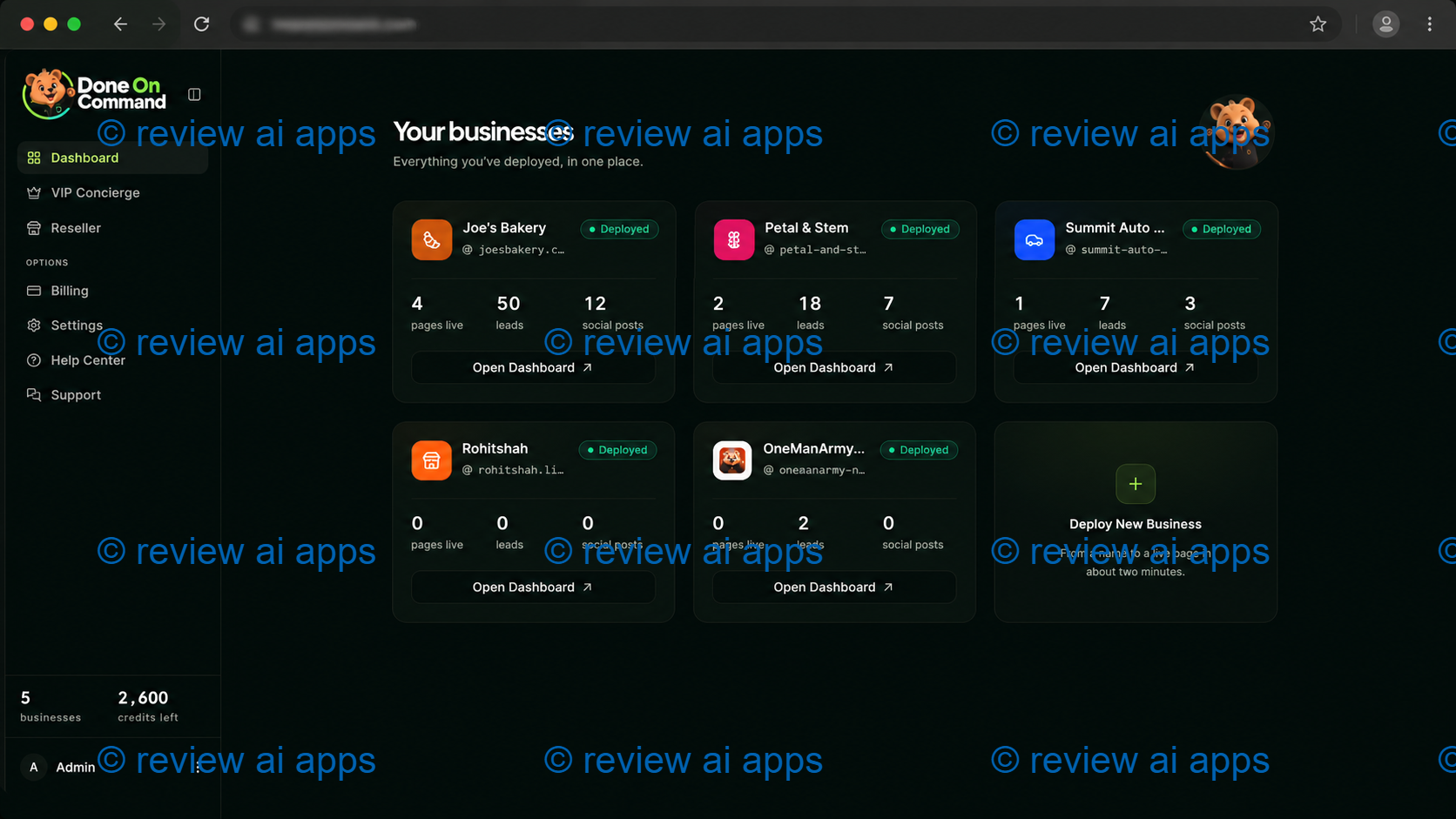
The dashboard screenshots and demo show a clean, modern looking tool. The main screen is a grid of your businesses with each tile showing live pages, captured leads, social posts and a running task-activity log. Your credit balance is also visible. The Telegram control is what stands out. You type in a request to a bot and it gives you the finished link. That mobile-first “run it from your phone” experience is super handy.
The thing I like is the low friction. Setup is not a long techy process, navigation is easy and the on-brand output means you’re not fixing fonts and colors on every asset. For someone juggling five separate subscriptions right now, pulling page building, video and images behind one memory is a real time saver.
Demo Video: Done On Command Review
This is the member's area once you login.
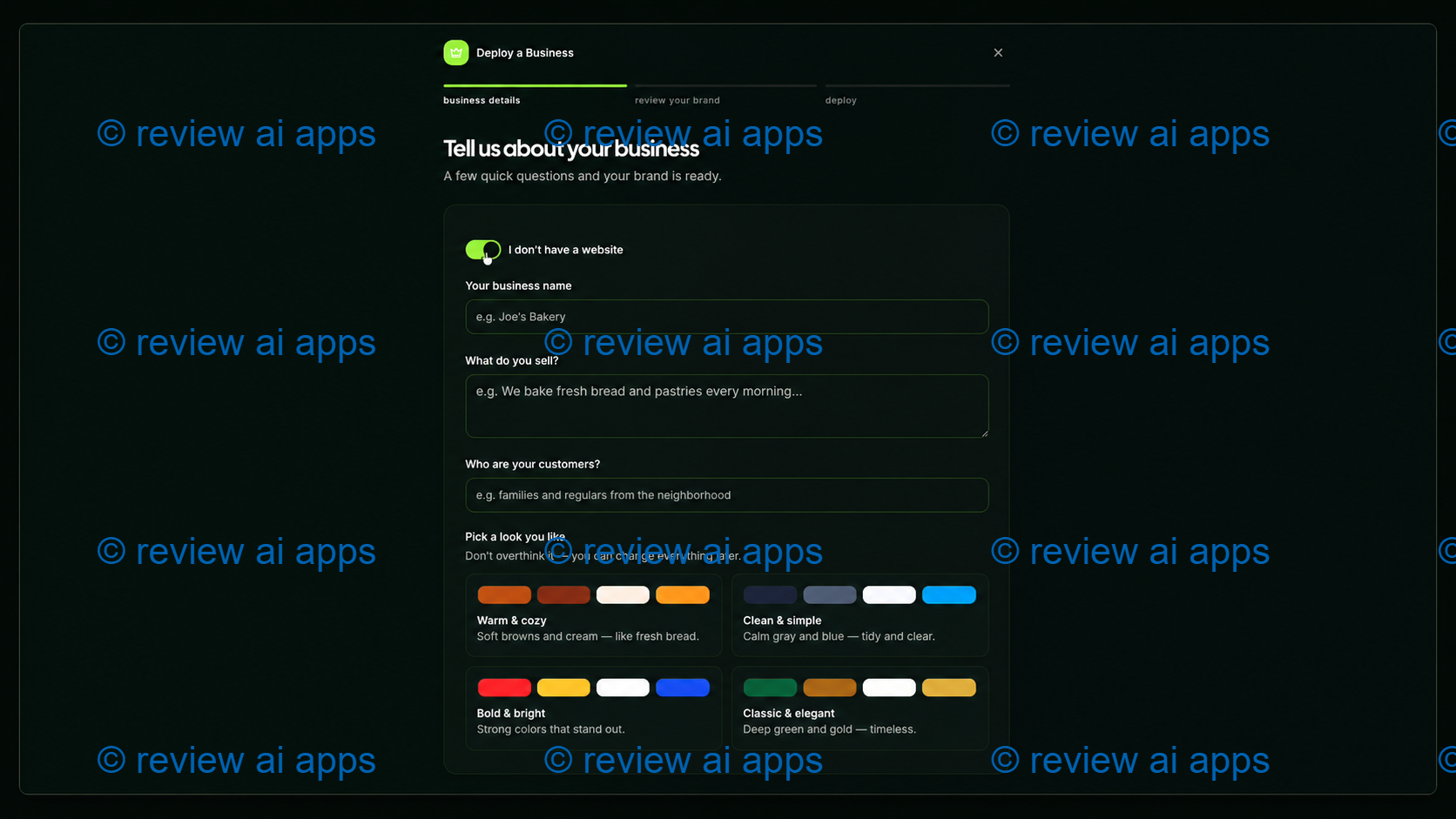
1. Create New Business
To start, you need to create your own or your client's business.
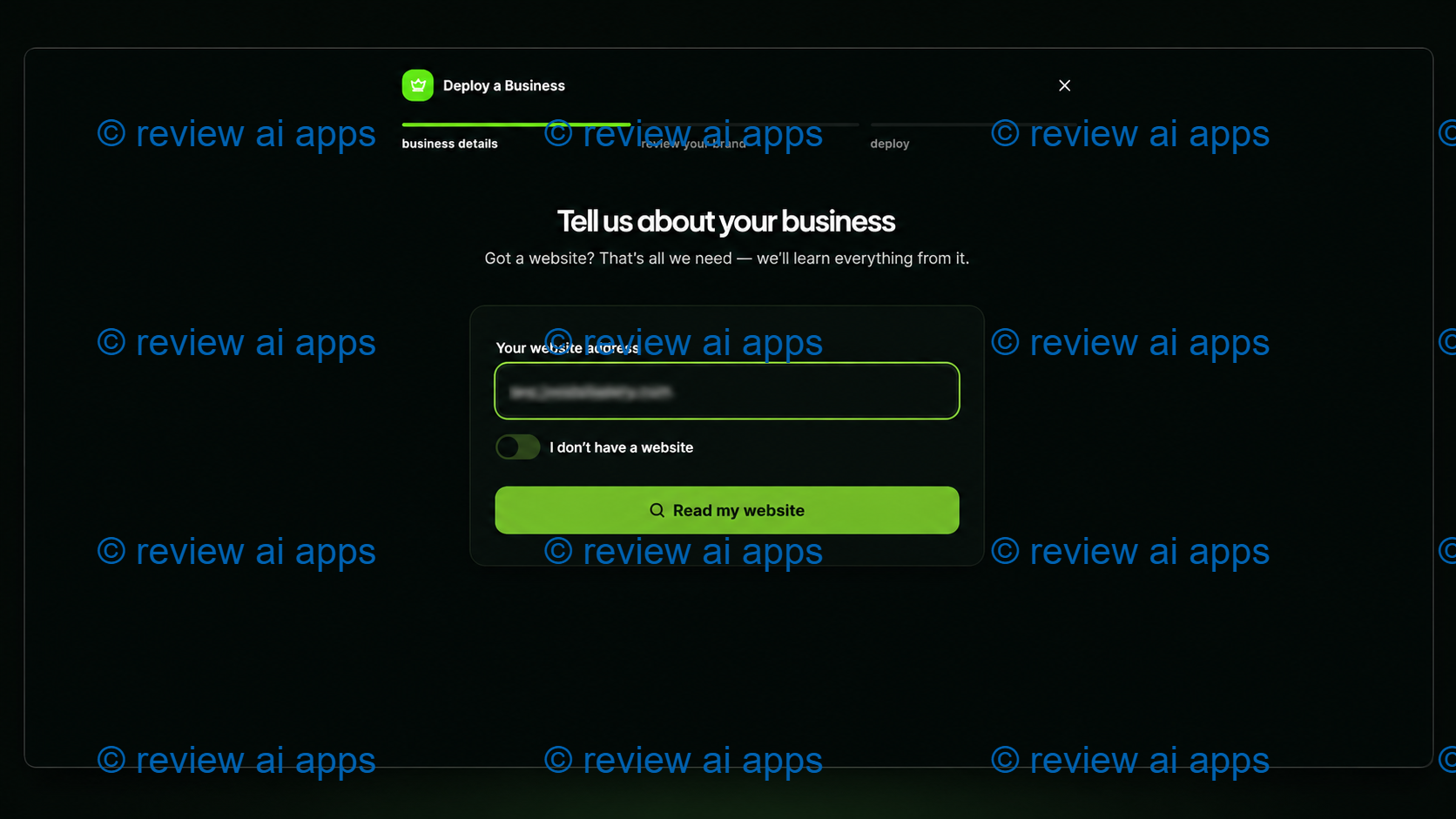
At here, just provide your business information, or choose your existing domain.
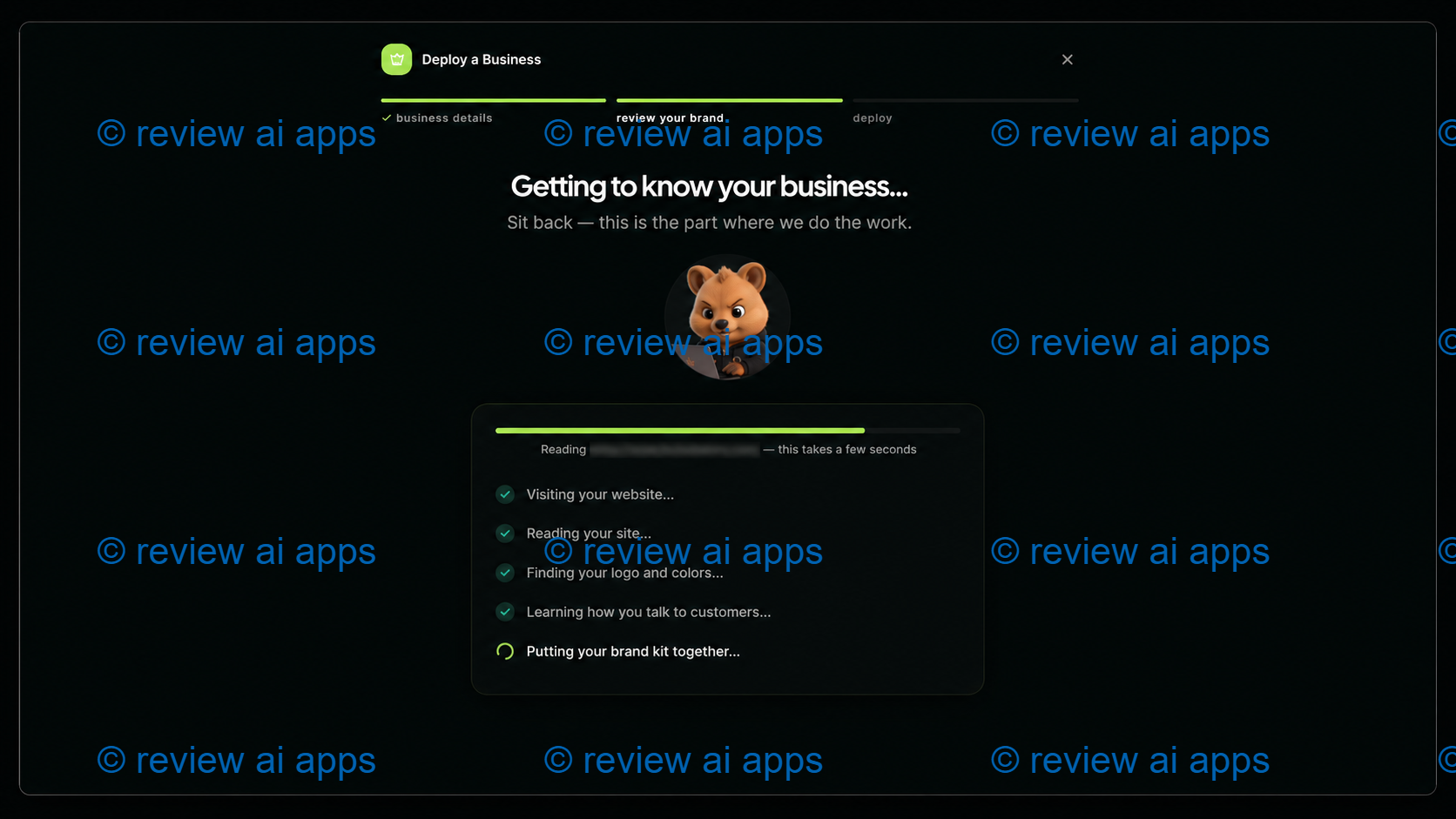
Then, the AI will explore information before it can generate business details.
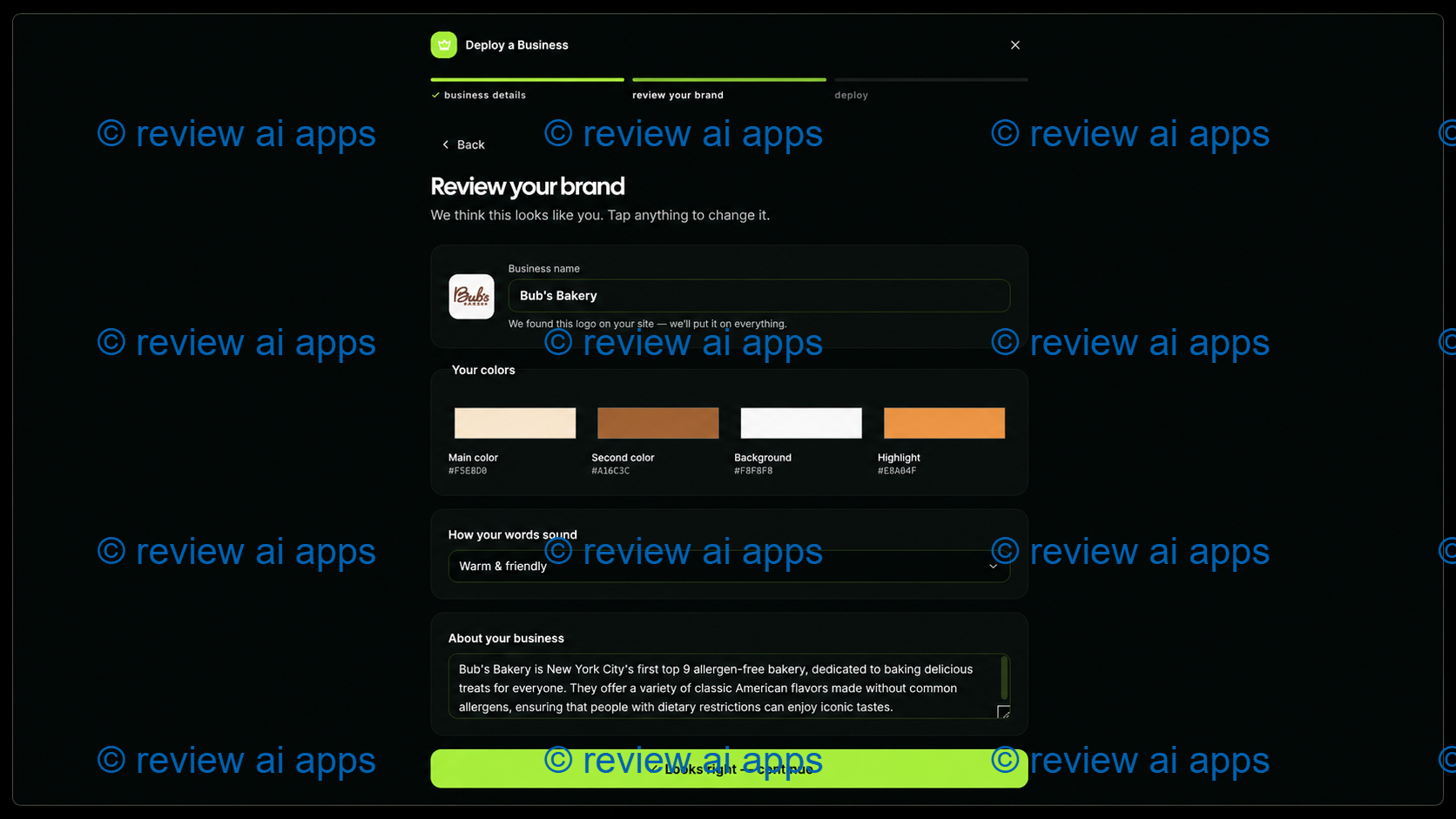
As you can see, the app can make suggestions before you proceed to next step.
Once you deploy, you've already created a new business in a hub. Then, you can switch hubs for multiple projects you tap in.
Done On Command Pricing And Upgrades - What You Get For Your Money
Know that there are two different ways to buy and they go to two different places just before the breakdown. I will keep them clearly separate.
The first is the a la carte path. You buy the front-end product first and then you either accept or decline each upsell as it is presented. There is no compulsion.
Route two is the Bundle route. You buy one Everything Bundle that includes the front end and all four upsells. You don't have to go through the individual checkout process at all. And only if you buy that Bundle do you give yourself the option of adding the Mega Bundle which is not sold elsewhere.
Each one is here.
On Command Commercial ($47) Front End
This is the entry point and the level most people will test out first. For a one time $47 you will receive:
• Build and operate up to 2 businesses
• 1,000 credits/month
• Up to 5 videos and 5 video edits a month
• 720p video off
• Up to 10 images a month
• 10 pages per month
• Watermark on generated pages
• 1 year of hosting
• • Up to 1 GB of persistent storage
• A commercial license.
This is the right option to test the concept on one real business and check if the automation works for your niche.
Upsell 1: Done On Command Pro ($67)
Pro is for people who want more quality output and more space. You can create up to 5 businesses, up to 4K video output, double the monthly limits on video, image and page generation, an extra year of hosting and priority support.
Upsell 2: Done On Command VIP Concierge ($67)
This is the hand holding, done for you level. Their team will set up 3 businesses for you, give you one-to-one training over the phone and you’ll have a direct email line that bypasses their normal support queue. Worth mentioning: the launch docs mention an older version of this offer but the live page confirms these three items so go with the live page.
Upsell 3: Done On Command Agency Platinum ($97)
That's the real agency part. You get up to 10 businesses, 5,000 credits per month, no watermark on generated pages, plus an agency website, agency assets and an agency license. This is the tier that actually matches that pitch not the front end if you are going to serve clients.
Upsell 4: On Command Reseller Pro ($197)
This is for people who want to sell the platform itself. You get 25 full accounts to sell at your price, you keep the entire sale, and the vendor does the hosting and support behind them. Worth it only if you have a real plan for selling.
Done On Command Everything Bundle ($347 or $287 with coupon code)
If you know you want the upgrades, you can bundle the front end and all four upsells into one purchase of \(347 one-time, and coupon DOCBundle takes \)60 off, making it $287. This is usually the cleaner buy than buying five separate things, especially if you’re planning on doing client work.
Mega Bundle (for Bundle Buyers Only) ($247)
This Add-On is available only after you purchase the Bundle and is not sold separately. It takes the ceilings off. Unlimited businesses, 10,000 credits per month, Unlimited Video, Page and Image Generation, Unlimited Years of Hosting and an extra gigabyte of storage. But read the word unlimited carefully, because the fine print ties it to a fair-use policy, and the promise of hosting is only as long as the platform itself continues to run.
Features and Benefits of Done On Command
Business Memory (Persistent)
That is the core and it is the most useful idea here. Once you’ve saved the brand kit, every page, video and post is on-brand from the very first draft. If you run multiple brands, not having to re-explain each one at the beginning of each session is a real time and mental load saver. It also allows a person to run more than one or two businesses without drowning.
Not Just a Drafting Machine, But an Operator
The pitch is that most AI stops at a draft, this one gets the finished asset, a hosted page on a live URL, a rendered and captioned video, a sent campaign. That is meaningful when it works as shown, because the last mile, the publishing and hosting is where most tools quietly hand the work back to you.
Approval Gate
Nothing goes live without your OK. This is a real strength and is the safe sensible design. It is, however, uncomfortable sitting next to the word autonomous on which the marketing is based. A system that requires you to click on each and every outbound action is not autonomous, it is assisted. It's the honest bet, and the safer bet. But the copy oversells it.
Video & Spokesperson Studio
You can create ad videos and convert a single photo or a raw talking clip into a captioned, voiced spokesperson video. It's a concrete, demonstrable feature and one of the more impressive parts.
Pages, Leads, Email, Social, Chatbot
You get AI landing pages you can build from a screenshot and edit by chatting, lead-magnet tools like quizzes and calculators, email campaigns, scheduled social posts, and a website chatbot on its own separate allowance. Helpful, but here’s the honest caveat that the “one tool replaces five” line overlooks. It doesn't replace anything for email, it integrates with your own paid autoresponder, so you still need and still pay for that. Social routes through Buffer et al. So for at least two of the “departments” this is an orchestration layer on top of tools that you keep paying for, not a real replacement. It replaces the page builder and video editor much more than the rest.
Where the loudest marketing is
I've promised honesty so here are the claims to take with a pinch of salt.
Not a fact. First in the world. Positioning. Other tools already have the capability to store a brand and reapply it. The phrase is new, but the skill is not.
The $47 to $3,000 a month framing mixes the price of a tool and what a human earns doing strategy and account management. Assets are created by the Tool. It does not earn a retainer in and of itself. The vendor’s own disclaimer says results are not typical.
Only in the sense that your AI actions no longer cost their credits. Zero credits with your own key. Now you pay the AI provider directly instead. The cost moves, it doesn't disappear.
And the front-end limits - 2 businesses, 10 pages, 5 videos, 1,000 credits per month - can't really run “your whole business and your clients.” That big promise is at Agency Platinum or Mega. Standard funnel design, but the entry page promises more than the entry tier delivers.
One-Time Price or Monthly Enterprise Tools: You Get What You Pay For
This is the most important question, and the answer is on the business model, not the feature list.
A monthly subscription means that the vendor only gets paid if you stay. And that gives them the revenue and incentive to keep servers up and running, improve the product and pay for support people for years. They get paid in full at checkout for a one-time $47, while every server bill and AI cost and support ticket is a cost without income to match. That structural mismatch is why many launches like this fade from view within six to eighteen months.
This changes the meaning of the most attractive promise on the page: unlimited years of hosting, which the small print defines as only for as long as Done On Command is in business. If you host a client's live pages entirely here, and the platform goes down, those pages just stop working and it's your client's site that disappears, with your name on the invoice. The real risk is putting business critical infrastructure on a one time launch.
There’s also a depth. Enterprise providers are way down one lane. A serious email platform has deliverability, IP warming and compliance. A serious host has uptime gurantees. Done On Command is broad and shallow in comparison, a little of everything behind one memory. That trade might be all right for speed and convenience, but it’s not in the same product category it’s being measured against.
SIMILAR TOOLS vs. DONE ON COMMAND
The pitch is consolidation and memory versus all-in-one platforms and separate stacks. It’s easier than a patchwork pile of page builder, video tool, design app and scheduler, and it remembers your brand. It will be lighter and less robust than a single deep specialist, which could be a dedicated email service or a dedicated video platform. A better way to think about it is as a fast, on-brand generator and coordinator, not a replacement for enterprise-grade infrastructure in any one lane.
Pros and Cons Done On Command
The advantages
• Persistent memory keeps all assets on-brand, without having to re-explain.
• When it works as advertised, delivers finished, hosted work, not just drafts
• Approval gate stops anything going live by mistake
• White label dashboards per business enable actual client work
• Telegram control makes it actually usable from a phone
• Pay once and enjoy a 14-day money-back guarantee
Cons
• Marketing oversells 'world's first' and 'autonomous'
• “Replaces 5 tools” is half false, you still pay for your own autoresponder
• Front-end limits are a trial quota, not a complete operation
• “Unlimited” is subject to a fair-use policy
• The one-off model poses real questions about long-term hosting and support
Summary of Real User Sentiment
As this is a new release, be wary of early praise. Consistent positive feedback from demos and testers includes the on-brand output, the convenience of Telegram control, and the appeal of finished assets vs drafts. The fair concerns are the same ones I raise, the gap between the entry tier and the big promises, and the durability question that looms over any one-time platform. I read it the same way. It looks capable, and it is oversold.
Tips for Making the Most of It
Keep your list in your own auto-responder. You are paying for it anyway and it is the one asset you never want to be locked into a tools life span.
Publish important pages to your own domain where possible so that if the platform ever vanishes, you're inconvenienced, not wiped out.
“Test hard in the 14-day window. Try the second and third tasks to test if the memory actually holds and the output remains usable.
Match job to the tier. Don't buy the front end expecting an agency, and don't buy the agency tier if you only run one project.
Review Done FAQ On Command
What is Done On Command used for?
Create and manage the marketing for an online business, pages, video, images, lead magnets, email and social from a single dashboard or from Telegram, remembering each brand.
Do I need to know any tech?
No. You tell it what to do in simple words and OK the results.
Is this really autonomous?
Not really. It writes and stages everything, then waits for your green light before anything goes live.
Does it replace my email?
Nope. It works with your existing autoresponder you still pay for.
Is the one time purchase safe?
The purchase is legitimate and refundable, but don't put irreplaceable, client-critical assets solely on infrastructure whose future depends on a one-time launch surviving.
Final Verdict: Is Done On Command for You?
After due consideration, my position is steady. It’s a real, capable, well designed tool that’s oversold. The features are real. The idea of memory is actually useful. The approval gate is a clever, secure touch. But the framing of a “operator that runs your business on autopilot” is aspirational, and the honest reading is more modest.
For a solo affiliate, freelancer, local marketer or creator who wants to move fast, hates juggling subscriptions and will treat this as a quick on-brand asset generator kept inside its limits, it is reasonable value at $47 especially with a refund window to test it.
Be careful if you need enterprise reliability, real email deliverability at scale, or compliance, or if you are tempted to put a client’s live, business-critical pages on infrastructure whose lifespan depends on a one-time launch.
The smart posture is easy. Use it for what it can clearly do, let it write and create, keep your list and your key assets in your own hands, and don't make anything you can't afford to lose depend on it still being online next year. Judged this way, Done On Command earns its place as a handy accelerator, not the entire business it promises to be.

✅ Delivers finished, hosted pages, videos & campaigns, not just drafts
✅ Nothing publishes without your approval
✅ One-time price — no monthly fees
🎁 VISIT MY BONUS PAGE 🎯