Hello, this is Hai Nguyen and welcome to my ClipAgent review.
So I’ve seen a lot of these “one-time payment, unlimited forever” tools come and go. And the hard truth is this. Most of them do work but not in the way the sales page tells you. They do an actual job. They just do a smaller job than the headline promises and the real cost comes later.
This is the lens I want to use here. I’m not going to tell you ClipAgent is a scam, because it is not. And I’m not going to say it’s going to replace a whole video team because it’s not. I want to give you the honest middle. What it is, what it does well, where the marketing stretches the truth and who should actually purchase it.
This review is for creators, coaches, marketers or small business owners who want to convert long video into short clips without hiring an editor. Let's get it done.
🛡️ 30-Day Money-Back Guarantee
What ClipAgent is and How It Works
ClipAgent. Cloud-based tool to turn one long video into many short clips for TikTok, Instagram Reels and YouTube Shorts. That's the core work. It's all the other stuff built around it.
The basic flow is here:
You upload a long video, or point it to a source channel.
It transcribes audio to text.
It scans the transcript and ranks the most likely moments to perform as clips.
It crops those moments and reframes them to vertical 9:16, keeping the speaker centered with face tracking.
It sparks in lively captions.
It can also optionally translate and dub the clip in other languages.
Then it schedules and auto-posts the finished clips to your connected accounts.
The term agent here means that it can monitor a channel and process the whole pipeline on new uploads automatically so you don't have to click through every step manually. That’s a real convenience. But be clear about what it is under the hood.” It's a scheduler, and a queue, and a set of AI steps. It does not think for you or make creative decisions.
I'll flag one thing right up front. Even the vendor’s own pages don’t agree on what the product is. This clipping tool is one version of described as . One describes a system for building out entire faceless YouTube channels. Even lists features for e-commerce stores. That's three different products. When pages disagree like that I take the clipping tool as the real product, that's what the demo shows you getting. Just be aware that some of the copy has been lifted from other launches and doesn't describe what's in your account.
ClipAgent Review - What it is in Reality
This is the member's area once you login.
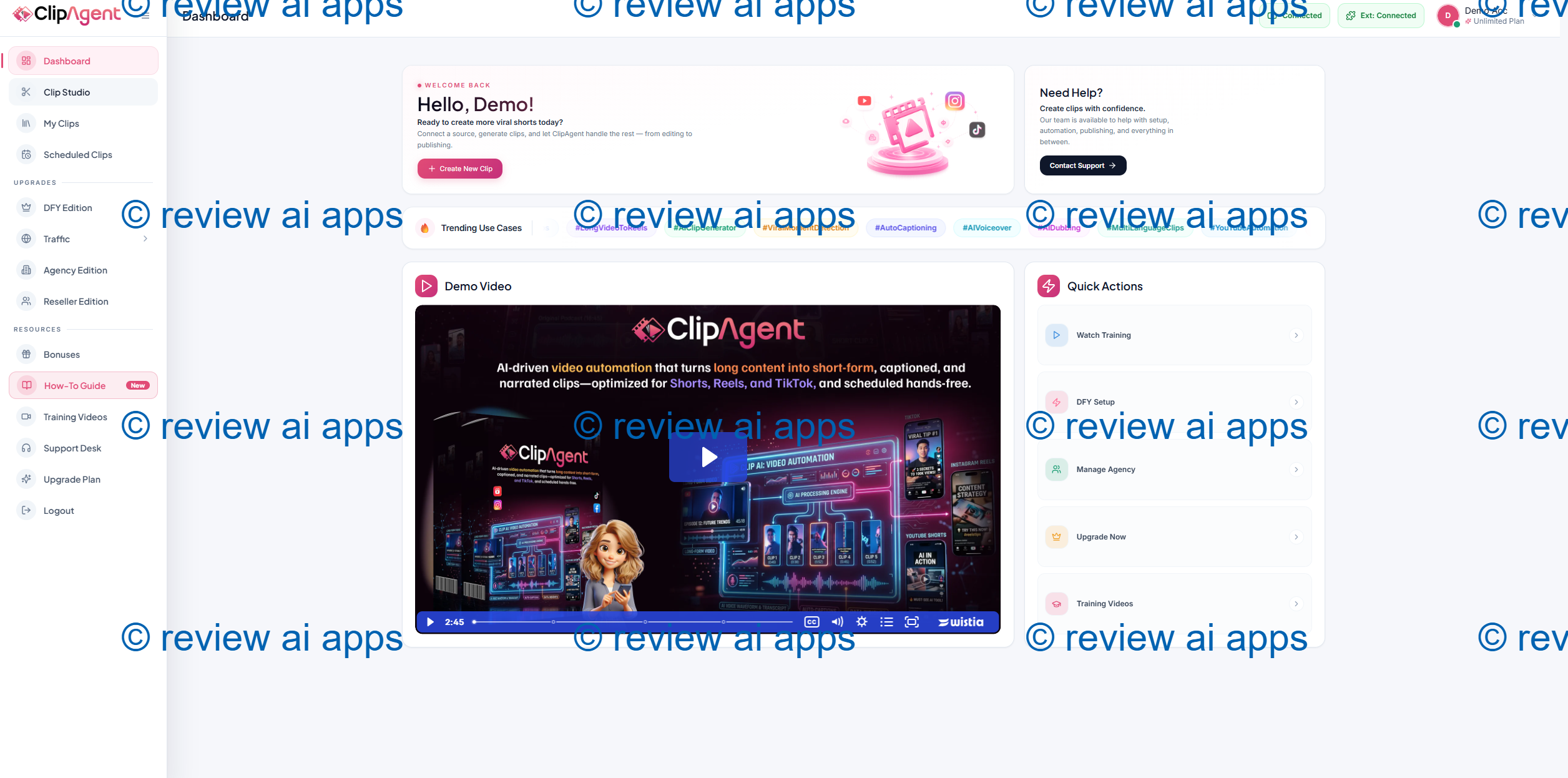
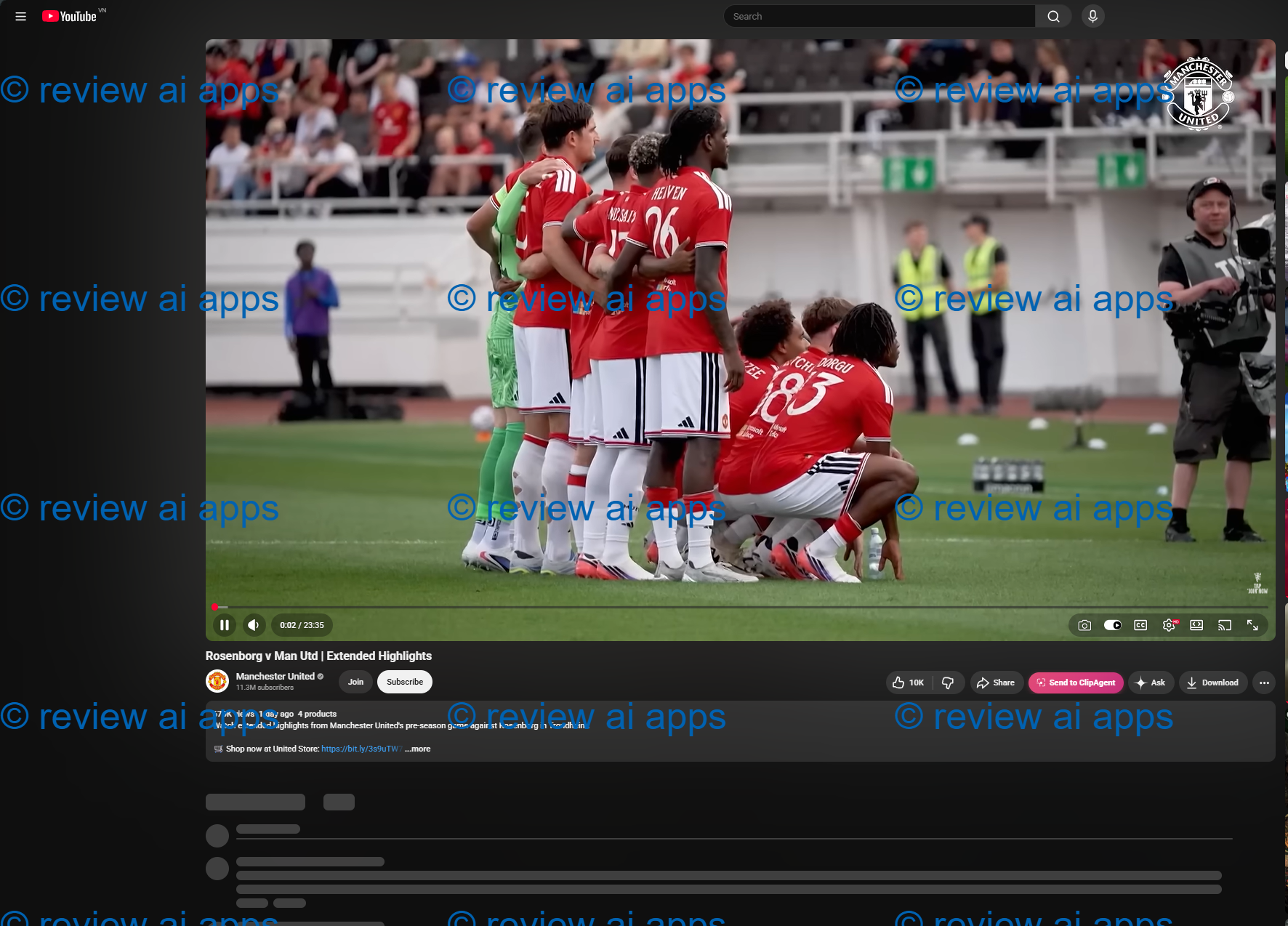
Before using, you need to integrate Chrome extension to import a Youtube video.
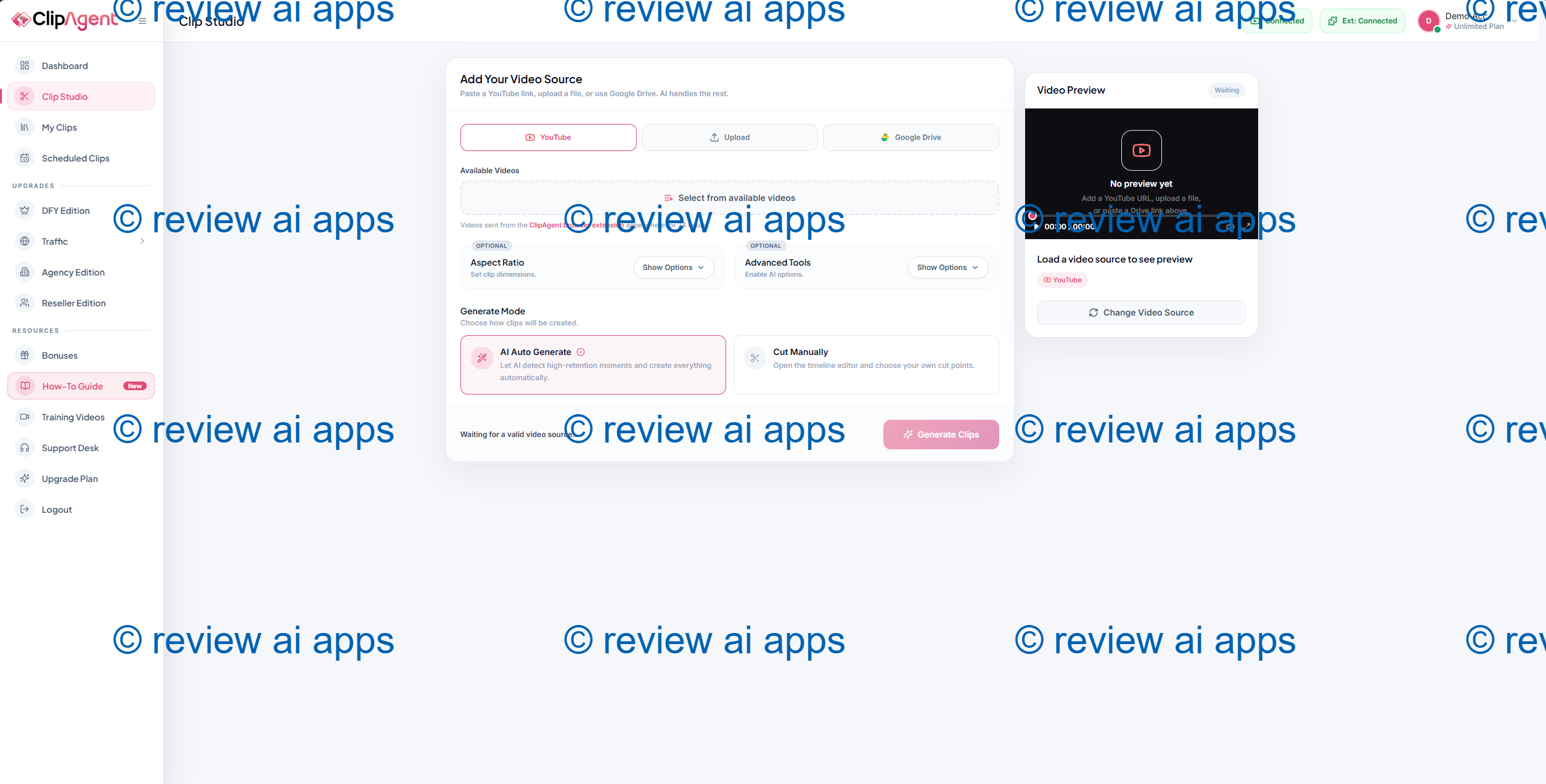
To explore Youtube, you visit Youtube watch, select any video and click on the Pink Button here.
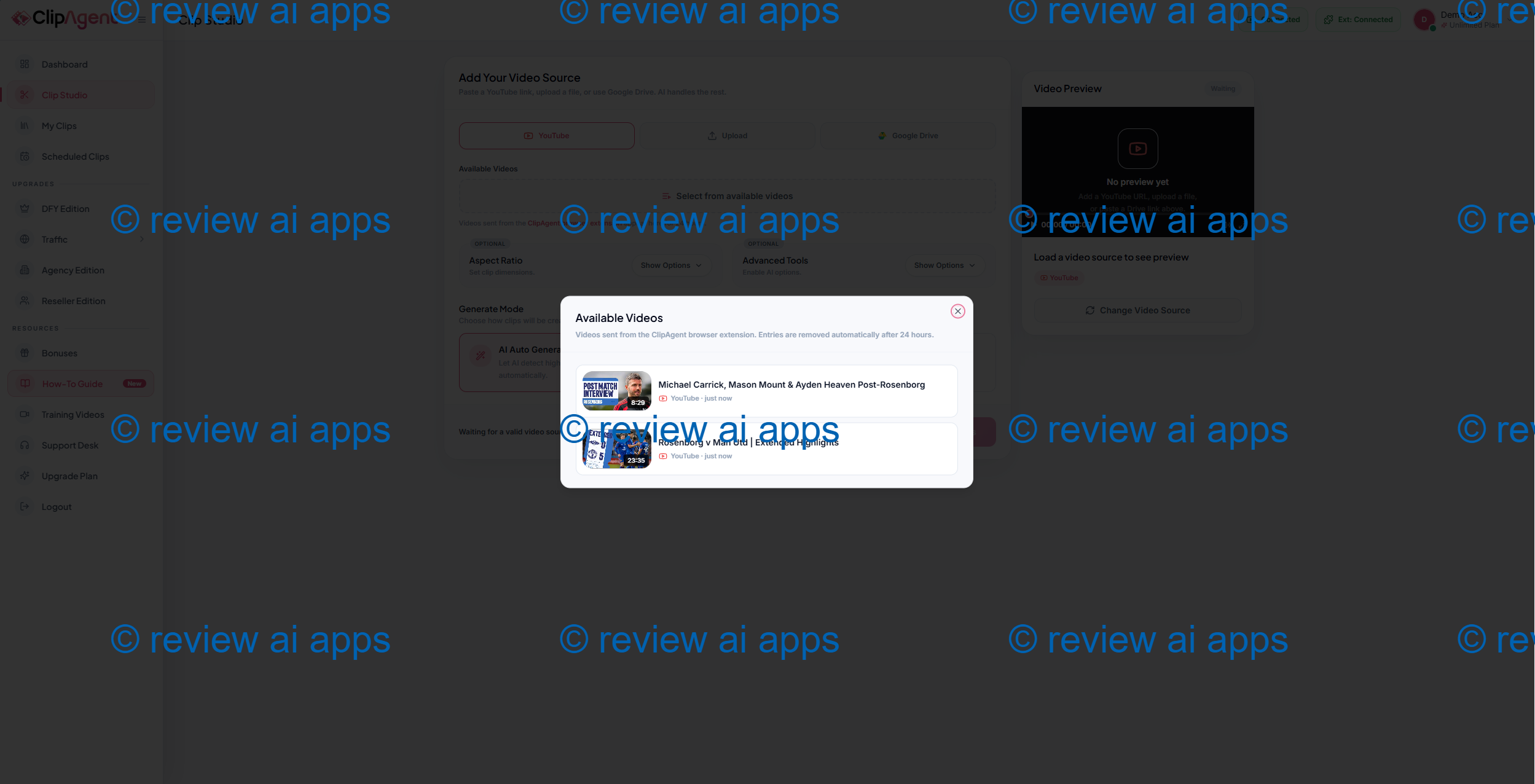
Then, on the Clip creation, just choose that video.
Then, choose some options here
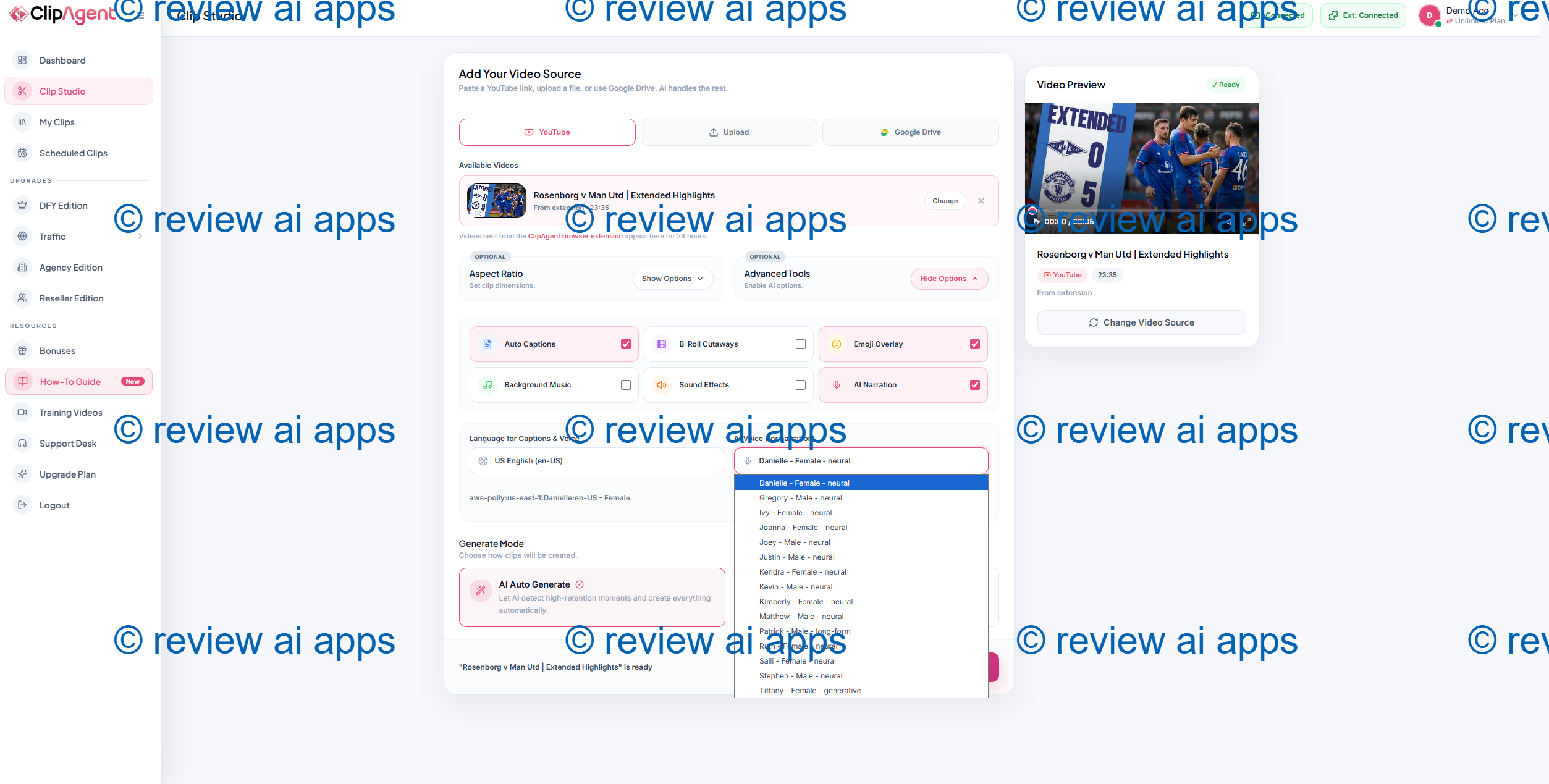
The AI will then take the key frame from original clip, trim it, and add captions, or replace with your Text-to-speech. These TTS characters are not from Eleven Labs, they are from AWS Polly. Then, just wait and the AI will automatically trim and cut your clip.
The Core Value, Integrity
The feature list isn't the real selling point of ClipAgent. All of its features already exist in other tools. The appeal is the model.
You pay once, very low entry price, and auto-posting is included at entry level. That’s the honest hook. Most of the clipping tools out there are subscription based, and some of them reserve auto-posting for a higher subscription tier. So a low one-time price with posting included is a real if narrow differentiator.
That's a good deal for a person in particular. If you're putting out one podcast, webinar or long video a week and you're looking to get a few clips out of it without paying for a subscription, ClipAgent can actually do that. The trouble is, you start to buy into the bigger promises. So we’ll start with price, then features, then the parts that need a warning label.
ClipAgent Cost and Buying Information
And ClipAgent is sold in the same way almost every launch in this space is sold. You can buy it at a low price up front, and then buy a series of optional upgrades or buy everything in a bundle that is all one purchase. There are two obvious ways to buy and they are worth spelling out.
The Cost of the Front-End
Front end is $14.95 US dollars, one time only. You’ll see the page has buttons that say $14 and others that say $14.95, and there is an exit coupon that knocks a few dollars off. You get a 30 day money back guarantee. That entry price is the one that’s quoted everywhere and that’s what the whole offer is build around.
This is the truth the page won't tell you straight. That front end is definitely limited. Transcription, video rendering, AI voice, and especially lip-sync are all real money for the vendor every time you run a job. One time low payment can not pay for unlimited use of that forever." So expect caps on video length, videos per month, dubbing minutes, connected accounts and quality of output. It doesn't print out a single number for any of those. That silence is intentional. And that’s how the funnel works. The limits are taken away in the upgrades.
Path One: The A La Carte Upsell Funnel
If you buy only the front end, you will be presented with a series of one-time upgrades before you get to your dashboard. The page text does not give the exact names and prices, and I am not going to guess at dollar figures. But this vendor does the same funnel shape on every launch so the structure is very predictable. Given their track record, expect something similar:
An Unlimited or Pro upgrade that removes the limits from the front-end.
A Done-For-You upgrade with ready-made niches, hooks & templates.
An Automation or Traffic upgrade
An Agency or client upgrade that gives you the true right to sell clips as a service.
A Reseller and a White-Label upgrade
Please consider that list to be an educated guess and not a confirmed menu. Before deciding, check the live checkout for real names and prices.
Here one detail is important . The front-end “commercial” rights are commercial-personal only. The real permission to do client work is in the agency tier up the funnel. A lot of buyers miss that and think the cheap version lets them sell to customers. It doesn't.
Path Two: Bundle Deal
The second way is a bundle. Instead of buying the front end and then adding upgrades in bits and pieces, you buy a single package that includes the whole stack at a discount over buying each upgrade individually. If you know you want the whole toolset, or you plan to use it for client work, the bundle is usually the cheaper route overall. If you are just testing the idea the bundle is overkill and you should start with the front end.
Any route you take, remember the math. “The cost of the product is not the front end. It’s the price of getting in the door. Either way, it’s a hell of a lot more than 14.95 dollars for the full stack.
ClipAgent Feature And Benefits
AI Clip Selection To Save You The Editing Time
The key is that the tool finds the moments worth clipping for you. You don’t go scrolling through a 60-minute video looking for the good 30 seconds. It transcribes the transcript, scores the moments, slices 'em
And it’s a real bonus for beginners. It eliminates the most boring part of repurposing. It gets you started quickly with a set of clips. Just keep expectations in check. The scoring is a guess. It’s not a shoo-in. You still want to look over the clips and cut out the weak ones. The tool makes the work faster. It’s not a replacement for your judgment of what’s actually good.
Auto Captions And Vertical Reframing
Every clip gets re-framed to 9:16 with the speaker in frame and captions are added automatically. This is standard for the category these days and it gets the job done. Captions are important because most short-form viewers view on mute, so having them burned in is a real plus. You should expect to have to correct the odd caption error, especially with names or accents, but the base output is usable.
Translation and Dubbing in Other Languages
Translate and dub clips in multiple languages with ClipAgent. This is the coolest thing on paper. Use it carefully in practice. Publishing auto-dubbed clips in languages you don’t speak, without review, under your own name – it’s a reputation risk. The dub can be badly done, or say something slightly wrong, and you will not notice. Use it, but have it checked, or have it checked by a native speaker. The lip-sync and voice matching are also the most expensive operations that the tool offers, which is another reason why the free front end will likely hard cap them.
Scheduling & Auto Posting
This is the feature that makes ClipAgent a cut above on price. It links to your social accounts and posts the finished clips on a schedule. Having it at the entry level is unusual and useful. Just keep in mind, the platforms themselves have daily upload limits and actively downgrades duplicate or low-effort reposts. So “post dozens of clips a week on autopilot” runs into platform rules long before it runs into the software.
The Automation tier
The agent can watch a channel and run the pipeline on new uploads. If you regularly create long content this saves real busy work. It is the nearest thing to a set and forget feature here and it is a fair reason to want the tool. The value is all about you feeding it good source video.
Where Marketing Crosses the Line
This is the part that matters most to me, because this is where an honest review earns its keep. None of this makes the product counterfeit. It makes the sales page seem not credible.
The "first ever" claim is false. Long video, short clips with captions, auto posting – this has been a mature product category for years. Several well-known tools do just this. ClipAgent is not the first but a new entrant in a crowded field.
The anchor 'real price 497 dollars a month' is fictional. The real market value for this exact feature set is closer to 29 bucks a month. So 497 is some 17 times the top paid tool. One place even contradicts itself and shows 597. On the same page a real price doesn’t go up or down by 100 dollars. The grand total of “$12,000 in value” is the same. Those numbers are assigned to make 14.95 look low. These are not real market prices.
The traffic math is wrong. The page multiplies clips times platforms times a presumed view count to get a big number. The average clip will get way more views than a new, no-face, repurposed account normally gets. The multiplication is OK. The first number is fantasy.
The hardest are “unlimited and lifetime”. No monthly card charge. True. Unlimited use is not. The caps do exist even though they never get printed as we have seen. And “lifetime” means the lifetime of the product not your lifetime.
The shortage is theater. The countdown timers and “today only” banners were still ticking long after the launch window closed. Think of them as decoration, not real deadlines.
Why a one-time price can't beat a monthly service
You asked a good question , you get what you pay for . So how can 14.95 dollars once compete with a big monthly provider ? The short answer is, it can’t. And the reason is structural, not technical.
At that price the vendor is left with only a few dollars per sale after fees. Those few dollars can’t buy unlimited cloud compute for one user forever, let alone thousands of users. So the front end isn't really a product sale. Customer acquisition The real money is in the upgrades and selling it back to the same buyers at the next launch.
That changes the incentives.” Your success and their revenue are on the same side. With a monthly provider, they only keep earning if you stay happy. In a one-off model, each minute you process is a cost against money already in the bank. So limits are not a pricing decision in there. They are a necessity for life.
In plain english $14.95 will get you an evaluation license, not a production machine. Just try short-form clipping to see if it fits your workflow. If you then need real volume you buy the stack and that stack costs about the same as two or three years of an established monthly tool.
ClipAgent vs Other Tools
ClipAgent competes with the well known clipping tools in this space.
ClipAgent sacrifices polish and reliability for a low one-time price, versus the established monthly clippers. The big tools are more consistent, better supported and constantly updated. ClipAgent costs less up front and posts earlier. You are trading low entry price for long term reliability.
In terms of volume, ClipAgent is much faster and much cheaper than doing it manually with an editor, but an editor still wins on taste and knowing which 20 seconds will actually land.
The differences are mainly branding compared to other launch style clip tools. They have the same underlying building blocks. It should be judged on caps, support and how long the vendor keeps products online, not on the feature lists that all read the same.
ClipAgent Pros And Cons
| Advantages | Downsides |
|---|---|
| 30-day guarantee, very low one-time entry price. | There are almost certainly undisclosed limits on the usage front. |
| The entry level includes auto-posting, which most rivals charge extra for. | Overhyping the sales page. Making up a bogus “first-ever” anchor price. Exaggerated traffic math. |
| Does the whole clip pipeline: cut, reframe, caption, schedule. | Real client rights are in a paid upgrade, not front end. |
| The automation of channel monitoring does away with real busy work. | Reputation risk of auto-dubbing without checking |
| It’s actually good for light volume creators who want a few clips per week. | The “autopilot” dream is capped by platform upload limits and duplicate detection. |
| Support and long-term updates are lighter than the big monthly tools. |
What Actual Use Will Be Like
This is the realistic picture, from what I can see of this vendor's past launches and this category in general. The tool will work and spit out usable clips. Before you post you will need to review the output You will reach a limit sooner than the word “unlimited” suggests, and that’s when the upgrade prompts begin to matter. People who go in using it as a cheap, useful helper are usually happy. Those who expect a traffic machine that can be driven with no hands are often disappointed. The gap is expectation, not function.
Another caution, and it is worth saying loudly. You can trim videos you or someone else has already uploaded on this page. Copyright issues come into play when you use footage from other people, and that's exactly what sets off YouTube's reused content rules that prevent monetization. The tool makes it simple to do something that can get an account de-monitized. Nobody tells you this, so I will.
Tips to Improve Your Results with ClipAgent
Begin with a good source video.
The tool can only clip what you give it. The better the length of the content in, the better the clips out.
Always check before you post.
“Consider the AI output a first draft. Trim the weak clips. Correct caption errors.
Check any dub clip.
Never submit a translation you don’t understand under your own name without a check.
Respect the limits of the platform.
Don’t spam with dozens of similar clips a day; Spread them out and mix them up so you don’t get penalized.
Test before upgrading.
Before spending on the stack, make sure the tool fits your workflow in the front end.
ClipAgent FAQs
What is ClipAgent?
It turns long videos into short vertical clips with captions, and can schedule and auto-post them to TikTok, Reels and YouTube Shorts.
For one payment, is it really unlimited?
The page does not print out any monthly fee, but expect usage caps on the front end. No monthly fee is real. With paid upgrades the caps are removed.
Do I need to be tech savvy?
Nope. It starts at a dashboard and handles the technical bits for you.
Can I use it for clients?
Not on the client side. The real client and agency rights are in a higher upgrade.
Is the 497 dollars per month price real???
Nope. That's a bloated anchor. The real market price for this set of features is a lot lower.
Who is ClipAgent owned by?
This is Loveneet Rajora working with Techies365 and generally with Deepanker Rajora. They are Proven Launch vendors with a history of frequent low-cost releases. They do a better job than the category average of keeping older products available which is a point in their favor as this is sold as lifetime access.
Final Verdict: Is ClipAgent a Buy?
Bottom line: ClipAgent is a truly humble, entry-level clipping tool wrapped in copy that over-promises and under-delivers. The problem is not the software. The sales page is. Ignore the fake anchor price. Ignore the undisclosed limits. Ignore the inflated traffic math.
My suggestion is quite simple.
If you are a light volume creator, coach, or small business owner looking for a cheap way to test out turning long videos into clips and go in with your eyes wide open, the 14.95 front end with a guarantee is a fair gamble.
If you’re looking for a replace-your-whole-team machine with hands-free unlimited, this is not it and you will be disappointed when you hit the caps and the upgrade prompts.
If you are already doing serious volume and are dependent on clipping for your business, a proven monthly tool will serve you better despite the ongoing cost.
Buy it for what it is, not what the page says it is. Think of it as a cheap assistant. Keep your hand on the wheel and it is worth its modest price. You won’t if you take the headline at face value.
🛡️ 30-Day Money-Back Guarantee